The 9 Best CRMs for startups in 2026
Lightfield
Quick summary
The CRM you pick in your first year sets the pace for everything that follows. Most options fall somewhere between lightweight and relationship-first on one end, and full-platform on the other. The problem is that almost all of them still depend on your team remembering to log what happened. Lightfield is the exception.
Shortlist
Here are our top three picks:
| # | Tool | Best for |
|---|---|---|
1 | Lightfield | Founder-led teams. Automates CRM updates, captures calls, meetings, and emails, and manages follow-ups without manual input. |
2 | HubSpot CRM | Scaling GTM teams. Free CRM core with modular hubs for marketing, sales, and service. Strong ecosystem, but costs compound fast past Starter. |
3 | Pipedrive | Pipeline-focused sales teams that want to be productive on day one. |
Every startup needs a CRM — but most still have the same problem
Early-stage teams need speed and simplicity. Every hour spent updating a CRM is an hour not spent with a customer.
But whether you're using a spreadsheet replacement or a full platform, the core issue remains: your CRM only knows what someone chose to log. Miss a meeting note, forget to move a deal, skip a follow-up — and your pipeline is already lying to you.
The gap between what actually happened and what the CRM shows widens every week. Lightfield is built around a different assumption: the system should observe your sales activity and update itself.
Why listen to us
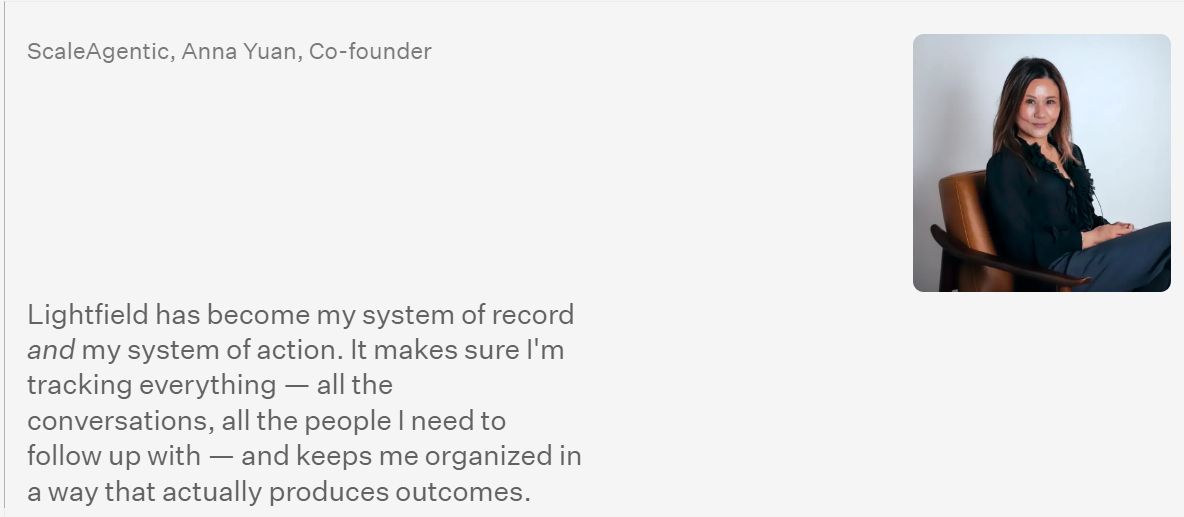
Lightfield sits at the intersection of CRM and AI — we built a product that automatically captures and structures customer interactions, so we've thought harder than most about where these tools break down. We've also talked to hundreds of founders about what they actually use, what they've abandoned, and what they wish existed. That's the lens we're applying here.
The 9 Best CRMs for Startups
| # | Tool | Pricing | Best for |
|---|---|---|---|
1 | Lightfield | $79/month | Founder-led teams doing 10+ meetings/week |
2 | HubSpot CRM | $20/seat/mont | Scaling GTM teams needing marketing + sales in one platform |
3 | Pipedrive | $14/user/month | Pipeline-focused sales teams that want to be productive on day one |
4 | Attio | $29/user/month | Technical founders wanting a flexible data model |
1 | Close | $35/seat/month | Startups with high outbound volume |
6 | Salesforce Starter Suite | $25/user/month | Teams planning for enterprise scale |
7 | Zoho CRM | $14/user/month | Budget-conscious teams wanting depth |
8 | Folk | $24/user/month | Relationship-first teams and networkers |
9 | monday CRM | $12/seat/month | Teams already using monday for project management |
1. Lightfield — Best for: Founder-led teams
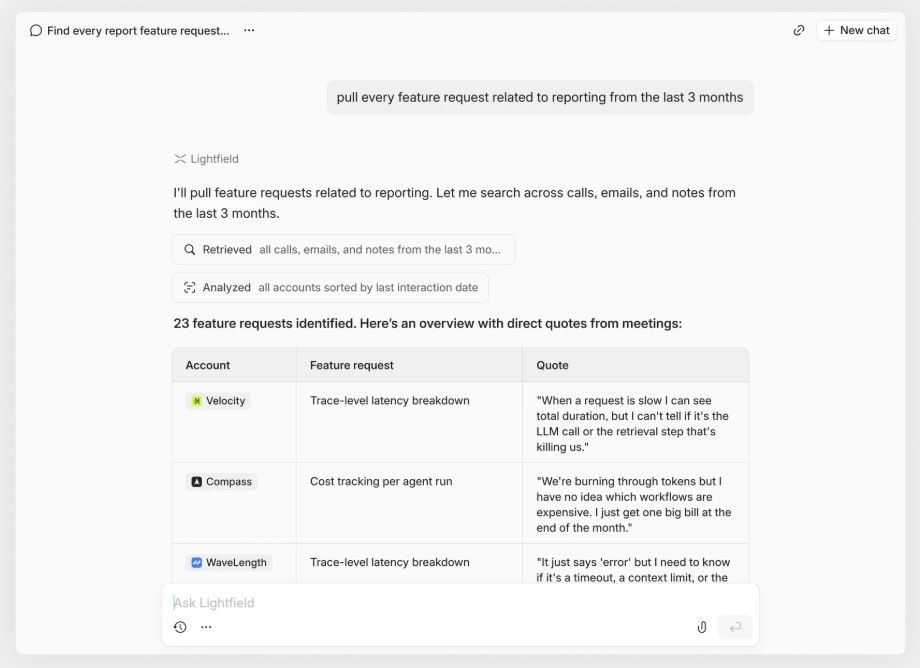
What it is: Lightfield is an AI-native CRM that auto-captures emails, meetings, and calls into structured records — no manual entry required. It turns every conversation into clean pipeline data and keeps records current as deals progress.
Key features
- Auto-capture CRM: email, calendar, meetings → contacts, accounts, opportunities
- Built-in video call recording + searchable transcripts
- Phone call capture + transcription
- Natural language queries with cited answers across full conversation history
- Custom fields with AI auto-population (forward + retroactive)
- Multi-account email drafting using prospects' own words
- Auto task generation from meetings
- Up to two years of historical data ingested at signup
Tradeoffs
- Not for teams that want deep manual control over custom objects, schemas, or workflow logic
- Newer platform with limited public reviews
Pricing
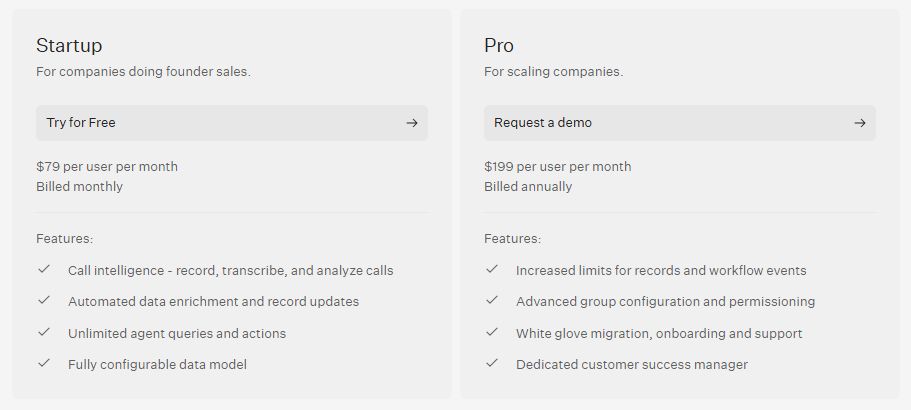
14-day free trial. Startup plan at $79/user/month (billed monthly). Pro plan at $199/user/month (billed annually).
Best for
Founder-led startup teams running high meeting volume who need a CRM that keeps itself up to date — not one that adds to the to-do list.
Bottom line
Lightfield replaces the manual CRM cycle with a system that observes your sales activity and keeps records current on its own. If your team is doing more than ten meetings a week and nobody has time for admin, it's the obvious starting point.
2. HubSpot CRM — Best for: Scaling GTM teams that need marketing, sales, and service in one platform
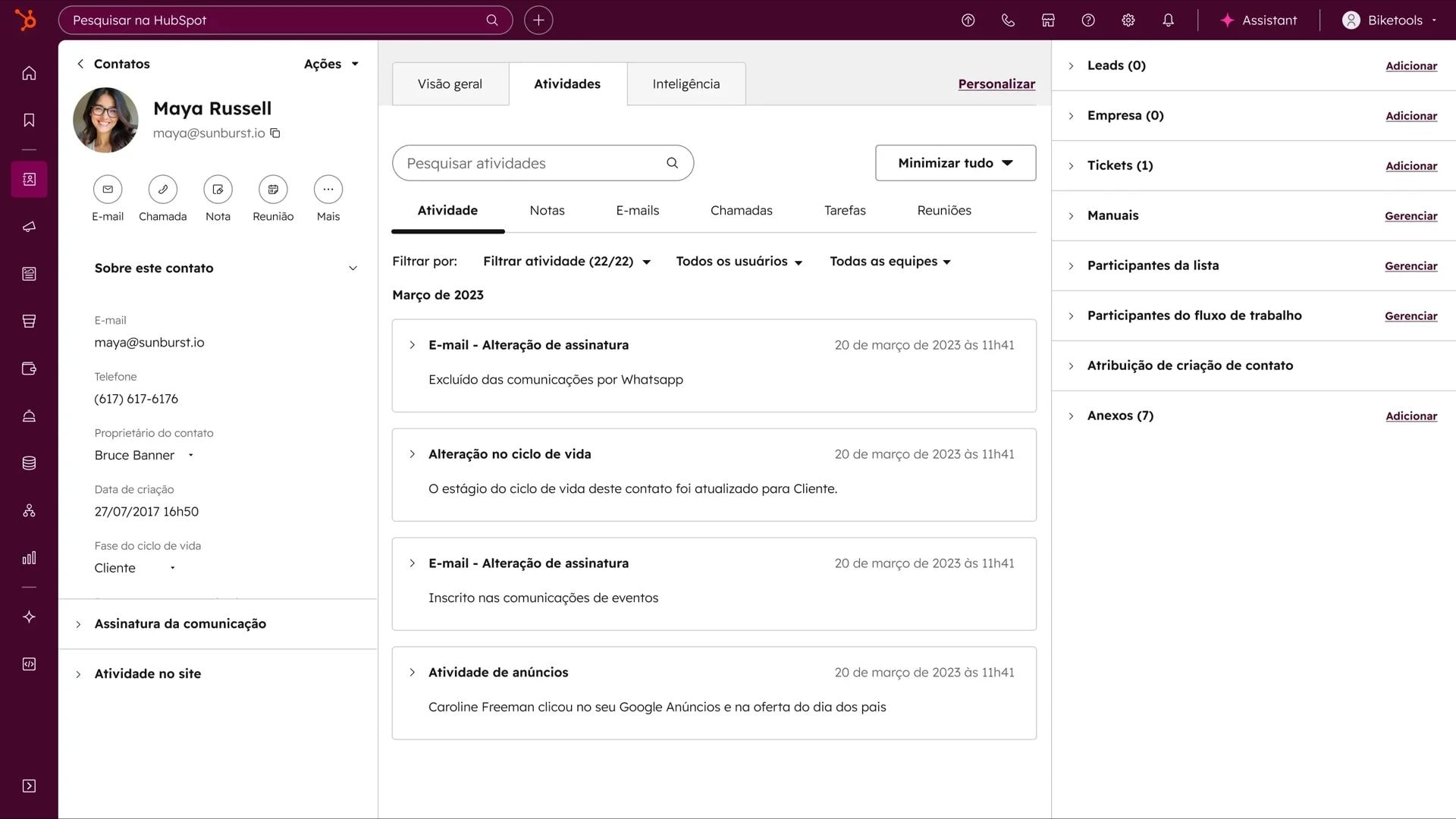
What it is: HubSpot is a full-platform CRM with five modular hubs sharing a unified customer record. The free tier is genuinely useful — contact management, deal tracking, and email sync included — but costs scale quickly once you move past Starter.
Key features
- Free CRM with contact management, deal tracking, email sync, live chat (up to 2 users)
- Modular hubs: Marketing, Sales, Service, Content, Commerce
- Breeze AI suite: Assistant, Agents (Customer, Prospecting, Data), Intelligence (enrichment, buyer intent)
- Marketing automation: lead scoring, journey builder, A/B testing
- 1,800+ app integrations
- HubSpot Academy for free onboarding and certification
Tradeoffs
- Free plan limited to 2 seats with HubSpot branding on all outbound
- Starter-to-Professional jump is steep: Sales Hub goes from $20/seat to $100/seat + $1,500 onboarding fee
- Breeze AI features run on HubSpot Credits ($10/1,000 credits) — usage-based billing on top of subscription
- Custom objects only available on Enterprise tiers
Pricing
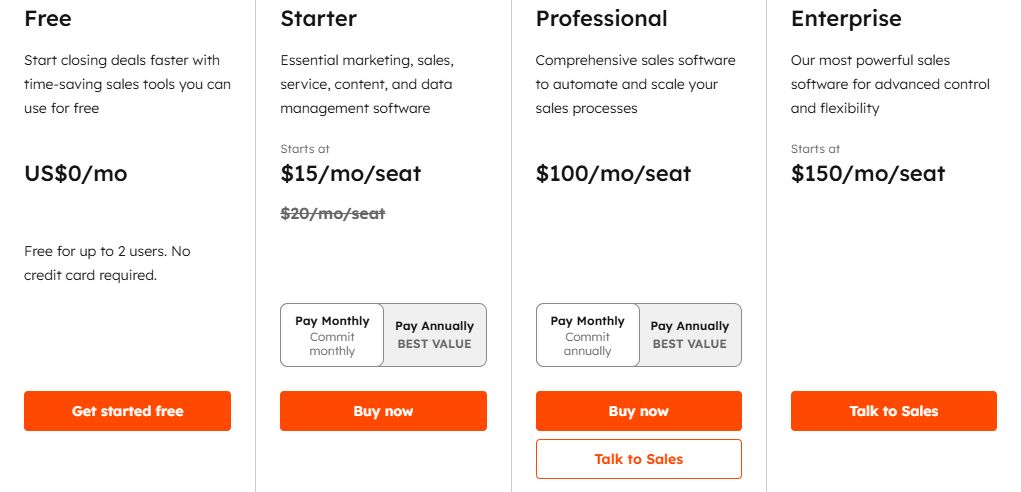
Free CRM (2 users). Sales Hub Starter $20/seat/month. Professional $100/seat/month + $1,500 onboarding. Enterprise $150/seat/month + $3,500 onboarding.
Best for
Startups that want a free entry point and plan to run marketing, sales, and service from a single platform as they scale — and have the budget headroom when the pricing steps up.
Bottom line
HubSpot is the most complete platform on this list, but the cost jumps are real and the AI features still depend on your team keeping records current. It earns its place when you need the full stack; it's overkill before you do.
3. Pipedrive — Best for: Pipeline-focused sales teams that want to be productive on day one
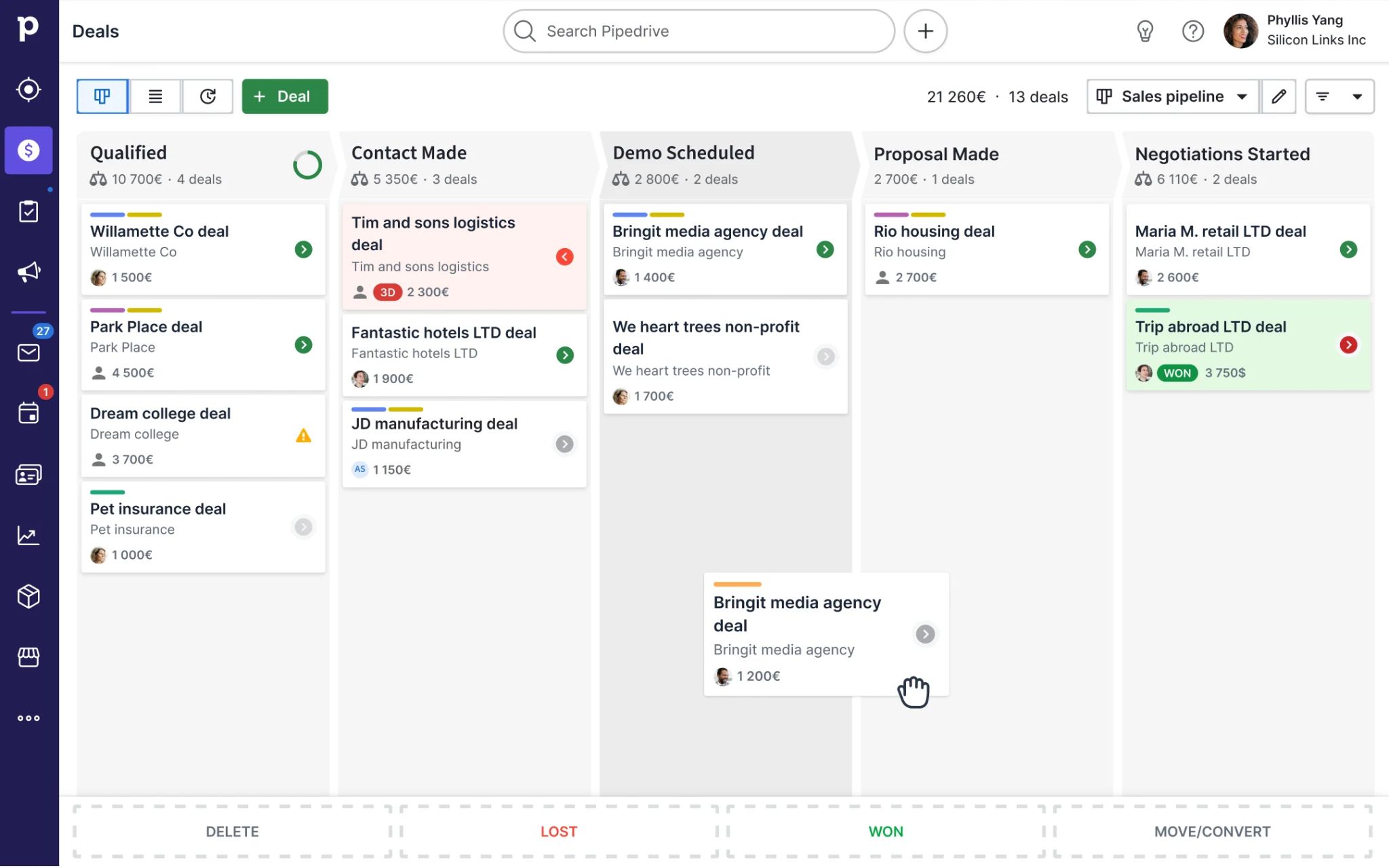
What it is: Pipedrive is a sales-first CRM built around visual Kanban pipelines and activity-based selling. Plans were rebranded in late 2025 as Lite, Growth, Premium, and Ultimate — and it remains one of the fastest tools to get running without configuration overhead.
Key features
- Visual drag-and-drop Kanban pipeline with deal rotting alerts
- AI Sales Assistant: win probability, next actions, email writing (Premium+)
- LeadBooster add-on: chatbot, live chat, web forms, prospector
- Two-way email sync with open/click tracking (Growth+)
- Meeting scheduler with Google Meet, Zoom, Teams
- 500+ app integrations
Tradeoffs
- No free plan; 14-day trial only
- Add-on pricing stacks: LeadBooster ($32.50/mo), Campaigns ($13.33/mo), Web Visitors ($41/mo), Smart Docs ($32.50/mo)
- AI features gated behind Premium ($49/user/month annual)
- Sales-only; no native marketing, service, or post-sale functionality
- Automation caps: 50 on Growth, 150 on Premium, 250 on Ultimate
Pricing
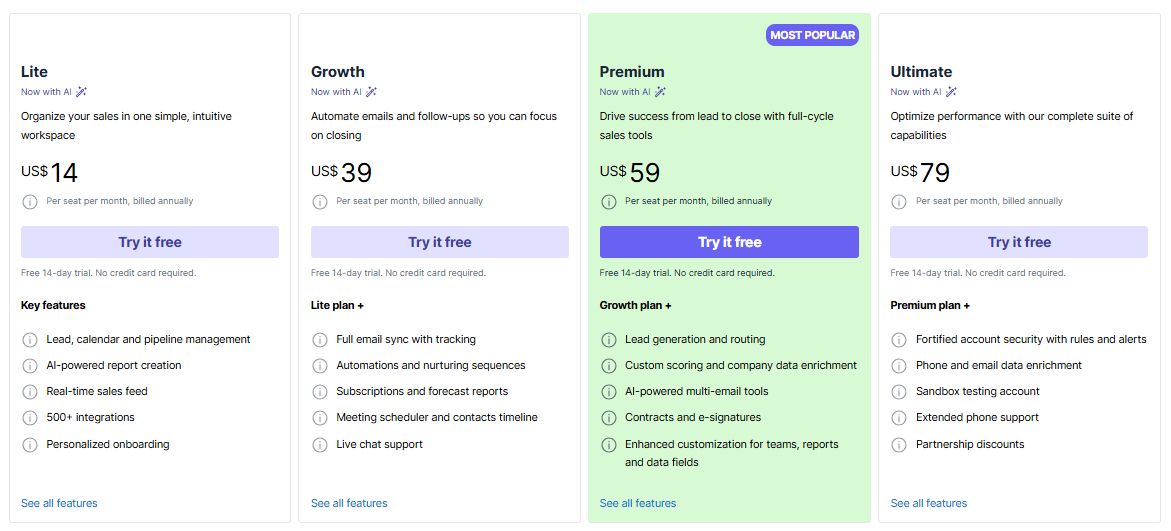
Lite $14/user/month (annual). Growth $39. Premium $59. Ultimate $79. No free plan.
Best for
Teams that want a clean pipeline view and fast onboarding without spending a week on configuration — and whose primary motion is outbound sales rather than inbound or marketing.
Bottom line
Pipedrive does one thing well: it keeps your pipeline moving. If you need marketing automation, service tooling, or AI that goes beyond suggestions, you'll hit its ceiling fast — but for pure sales execution it's hard to beat at this price point.
4. Attio — Best for: Technical founders who want full control over their data model
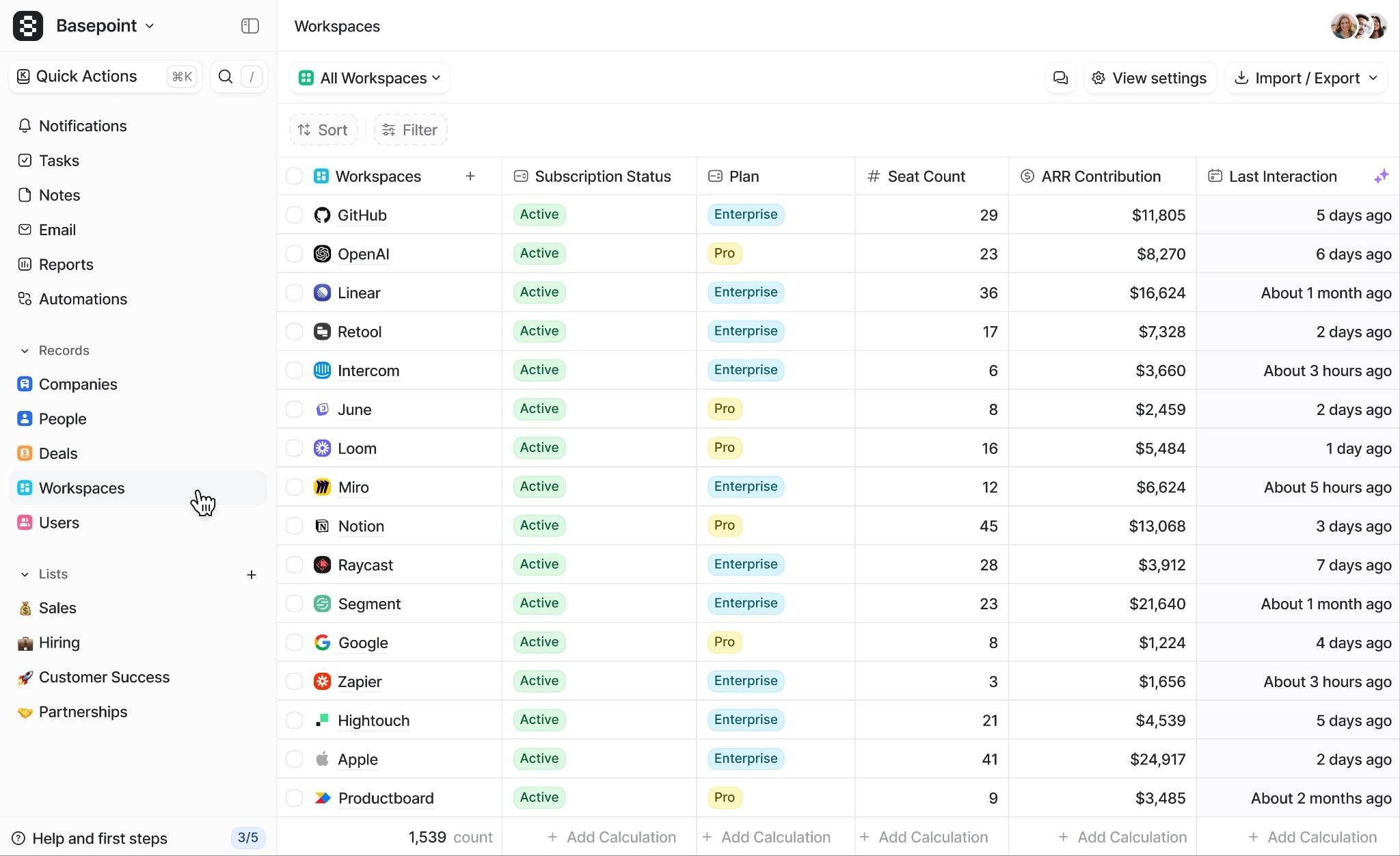
What it is: Attio is an object-based CRM where you define every entity, attribute, and relationship from scratch. Powerful AI features — Ask Attio, agents, workflow automations — sit on top of that foundation, metered through a credit system.
Key features
- Custom objects with bi-directional relationships
- Ask Attio: natural language queries across CRM data
- AI agents for prospecting, lead scoring, and company research
- Branching workflow automations with AI-powered triggers
- Built-in data enrichment (ARR, funding, employee count, social profiles)
- Call Intelligence with meeting recording and AI summaries (Pro only)
- API, webhook, and MCP server support
Tradeoffs
- Blank-slate setup means weeks of configuration before productive use
- Custom objects require Pro ($69/user/month annual)
- Dual-credit system (seat credits + workspace credits) makes costs unpredictable; add-on packs $70–$475/month
- Reporting requires significant effort for rep-level or multi-variable views
- Mobile experience lags behind desktop
Pricing
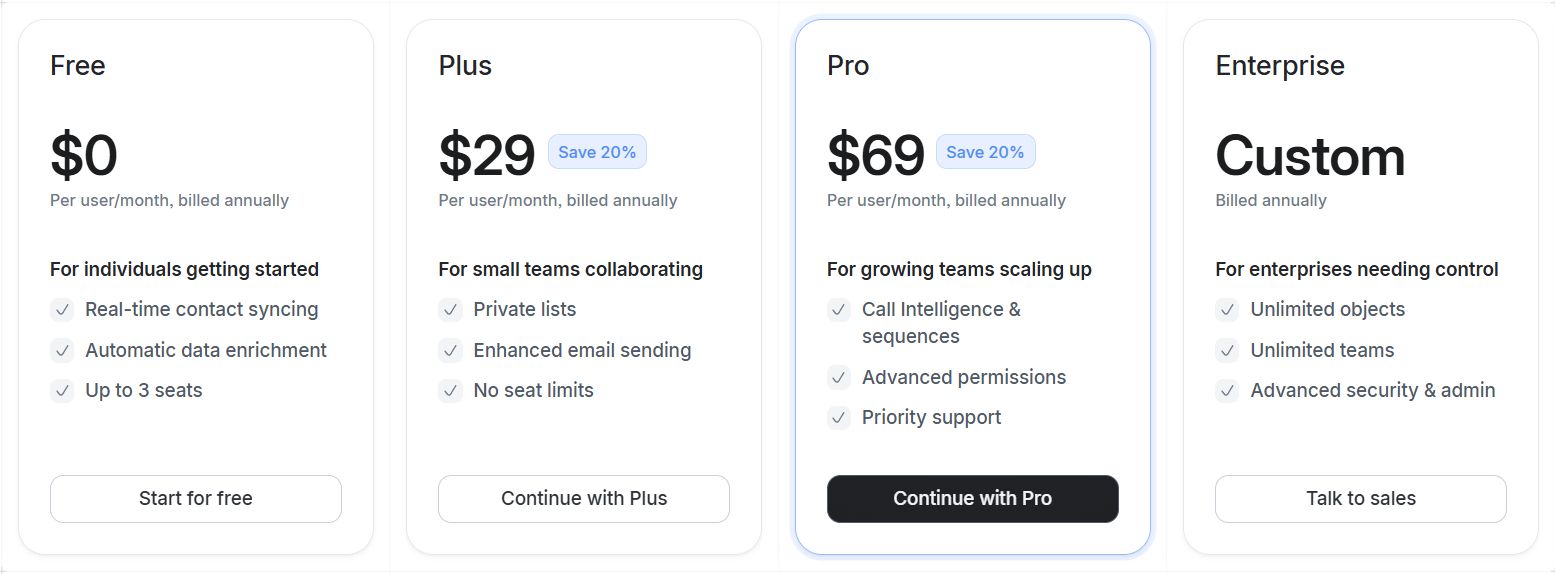
Free (up to 3 users). Plus $29/user/month (annual). Pro $69. Enterprise is custom.
Best for
Technical founders who want a CRM that mirrors their exact business logic precisely — and are willing to invest the setup time to get there.
Bottom line
Attio is the most flexible CRM on this list, but flexibility has a cost. You'll get exactly the system you design — which means you need to know what you're designing before you start.
5. Close — Best for: Startups with high outbound volume that need calling, email, and SMS in one tool
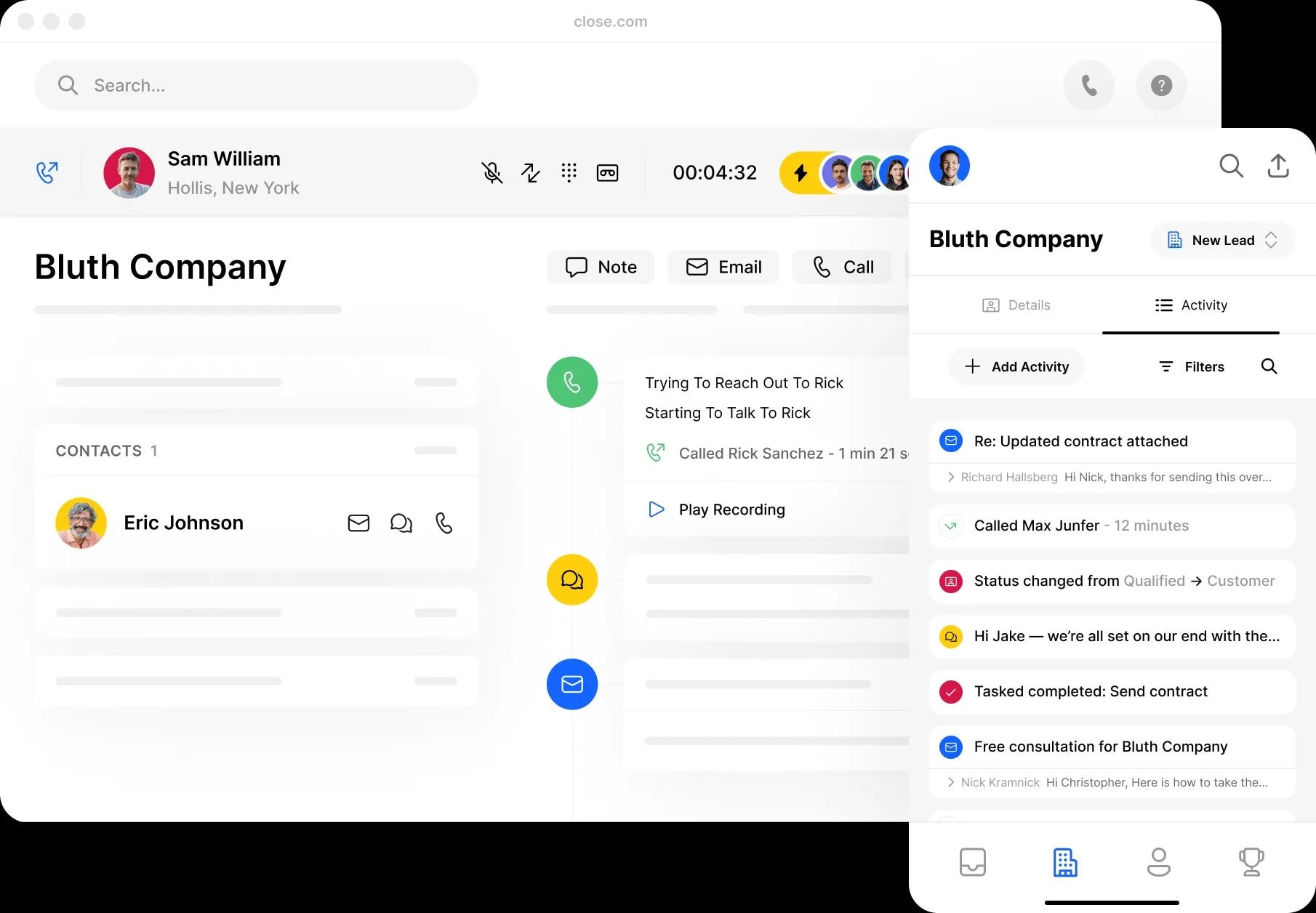
What it is: Close is a sales CRM with built-in calling (including Power Dialer), email sequences, and SMS — designed for inside sales teams that live on the phone rather than in meetings.
Key features
- Built-in calling with Power Dialer, Predictive Dialer, and call recording
- Email sequences with automated follow-ups
- Native SMS messaging inside the CRM
- Custom fields, activities, and pipeline views
- Workflow automations for task creation and deal progression
- Reporting on call volume, email performance, and pipeline velocity
Tradeoffs
- No free plan; starts at $35/user/month
- Less suited for teams that sell primarily through meetings rather than cold outreach
- Marketing automation and service features are limited
- Smaller integration ecosystem compared to HubSpot or Salesforce
Pricing
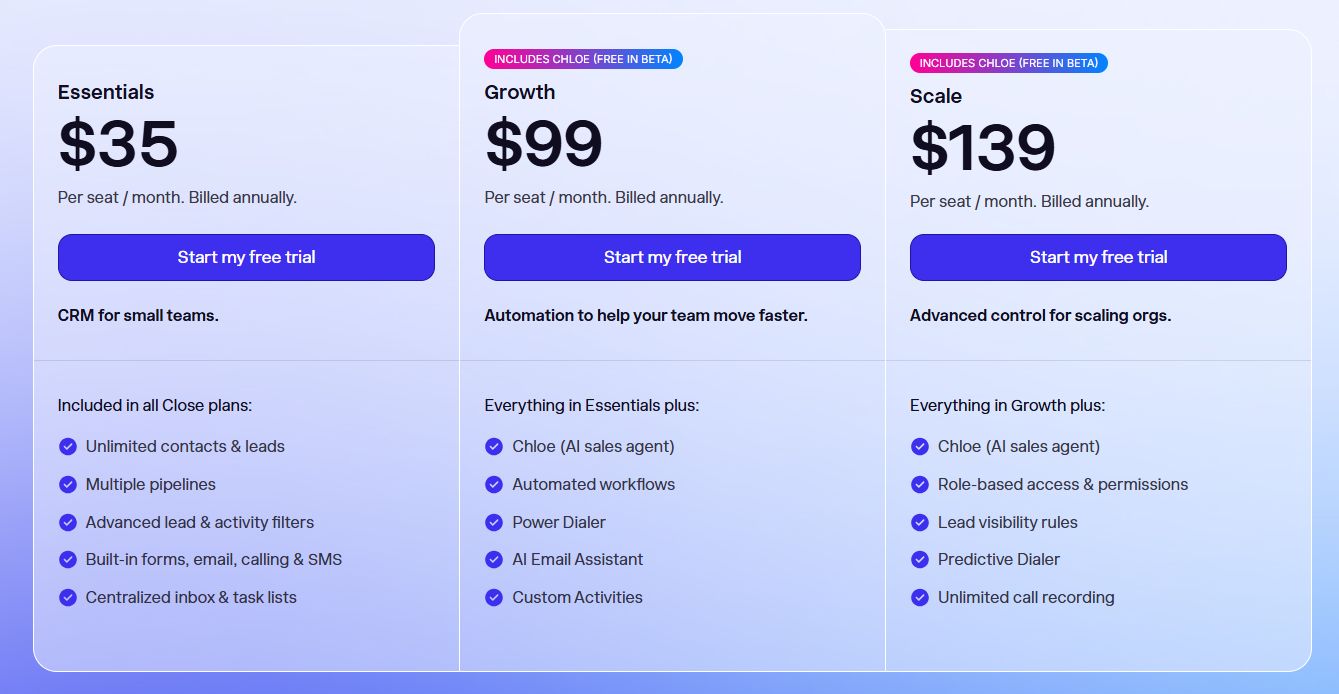
Startup $35/seat/month (annual). Professional $99. Enterprise $139. No free plan; 14-day trial.
Best for
SDR-heavy startups and founder-led teams running high-volume outbound via phone and email — where dialing volume and sequence management matter more than relationship depth.
Bottom line
Close is purpose-built for outbound-heavy sales motions and it shows. If your primary channel is cold calling and email sequences, it's among the best tools available. If you're selling through longer discovery cycles and complex meetings, its feature set won't stretch far enough.
6. Salesforce Starter Suite — Best for: Startups that want enterprise-grade CRM at a lower entry point
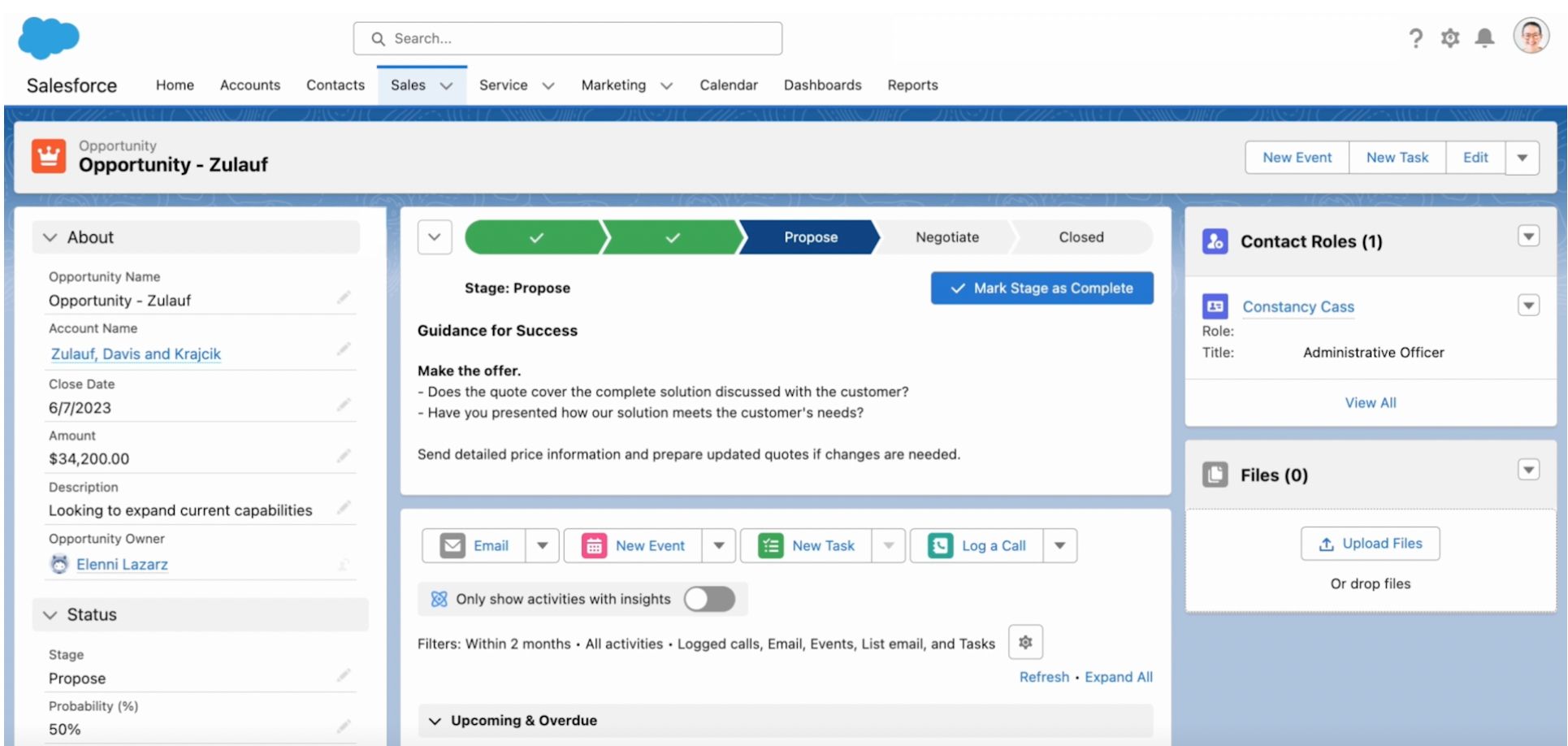
What it is: Salesforce Starter Suite is a simplified version of Salesforce for small teams — providing access to the broader Salesforce ecosystem and Agentforce AI without requiring full platform configuration.
Key features
- Contact, lead, account, and opportunity management
- Email integration with activity tracking
- Customisable sales pipeline and reporting
- Agentforce AI for lead research and task automation
- Access to Salesforce AppExchange (thousands of integrations)
- Path to upgrade into full Sales Cloud as you scale
Tradeoffs
- Still carries the Salesforce learning curve, even in simplified form
- Advanced customisation, custom objects, and workflow rules require upgrading to full Sales/Service Cloud
- Ecosystem complexity can overwhelm small teams without admin support
- Per-user pricing increases substantially on higher tiers
Pricing
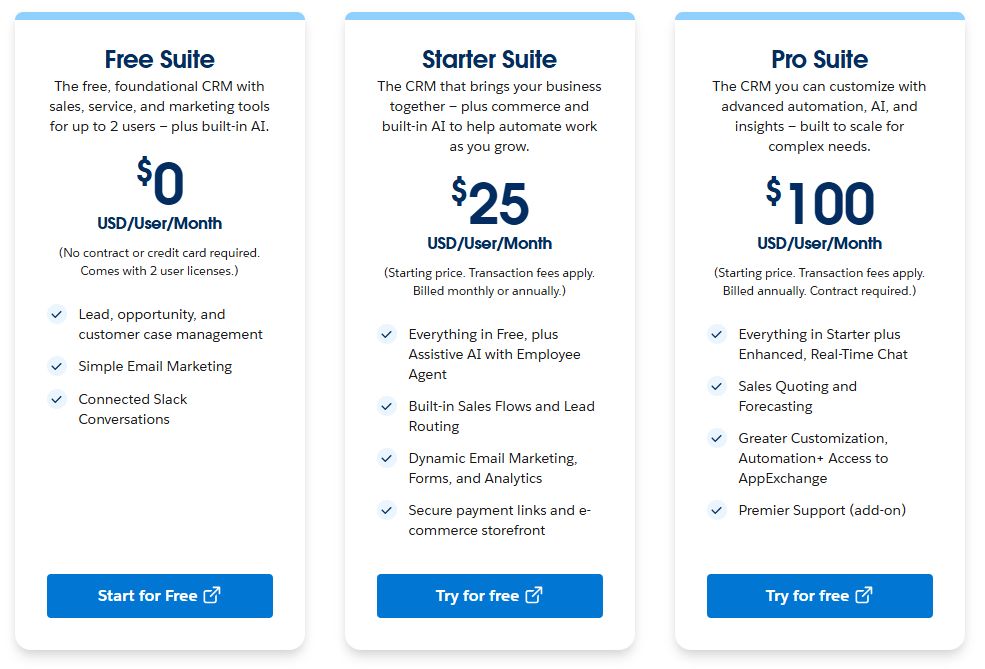
Starter Suite $25/user/month (annual). Pro Suite $100/user/month. Full Sales Cloud from $165/user/month.
Best for
Startups in regulated industries or those that know they'll need Salesforce at scale — and want to start on the platform before migration becomes painful.
Bottom line
Starter Suite is the right bet if Salesforce is inevitable for your business. For everyone else, the complexity and cost ramp up make it hard to justify at the early stage when simpler tools will outperform it for less.
7. Zoho CRM — Best for: Budget-conscious startups that want deep functionality without high per-seat costs
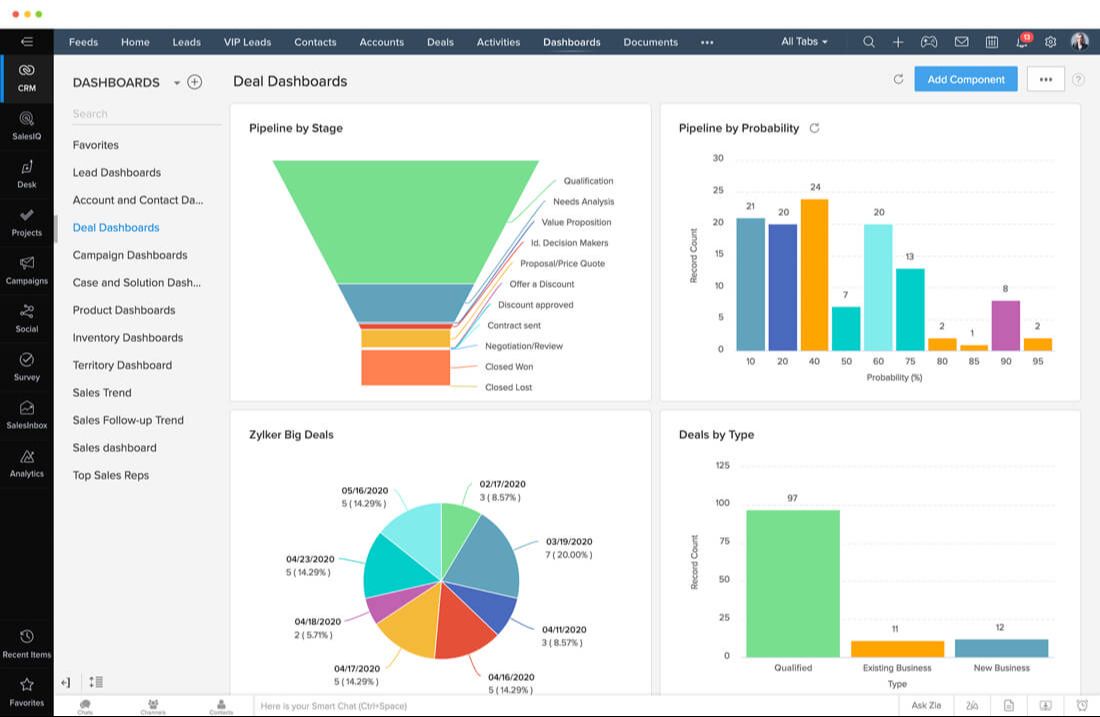
What it is: Zoho CRM is a full-featured platform with AI (Zia), workflow automation, and multi-channel communication built in — and it connects to 40+ other apps across the Zoho suite.
Key features
- AI assistant (Zia) for predictions, anomaly detection, and workflow suggestions
- Multi-channel communication: email, phone, social media, live chat
- Canvas design studio for custom CRM interface layouts
- Workflow automation with conditional logic
- Deep integrations across the Zoho suite (Books, Desk, Campaigns, etc.)
- Blueprint process management for enforcing sales processes
Tradeoffs
- Interface can feel dated compared to modern CRMs like Attio or Folk
- Depth of features creates a steeper learning curve
- Some advanced AI and automation features locked behind higher tiers
- Third-party integrations outside the Zoho ecosystem can be clunky
Pricing
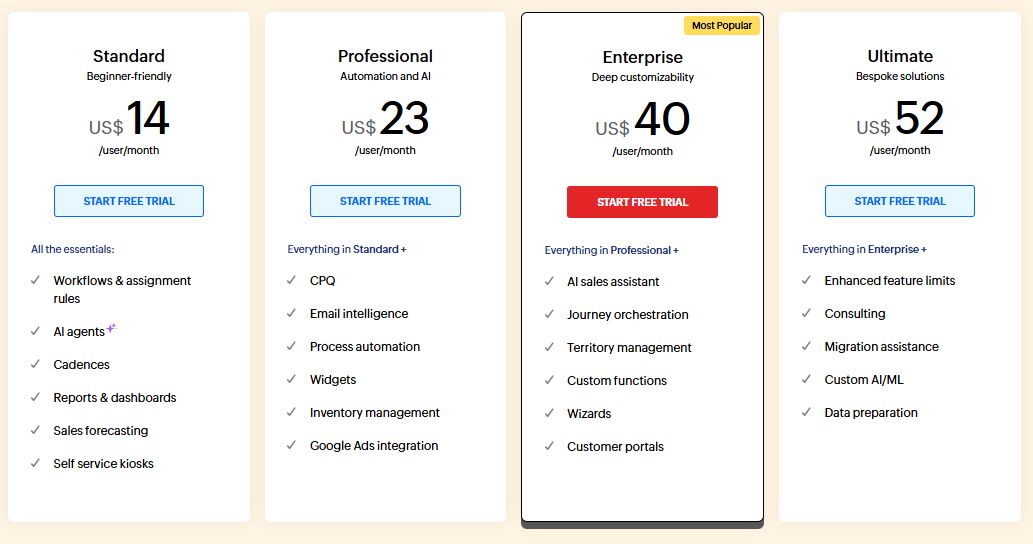
Free (up to 3 users). Standard $14/user/month (annual). Professional $23. Enterprise $40. Ultimate $52.
Best for
Startups that want maximum functionality per dollar and are comfortable investing time in configuration — particularly those that plan to consolidate other tools into the Zoho suite over time.
Bottom line
Zoho CRM offers more per dollar than almost anything else on this list. The tradeoff is a steeper setup curve and an interface that hasn't kept pace with newer entrants. Worth it if budget is the primary constraint.
8. Folk — Best for: Relationship-first teams managing investors, partners, and prospects in one place
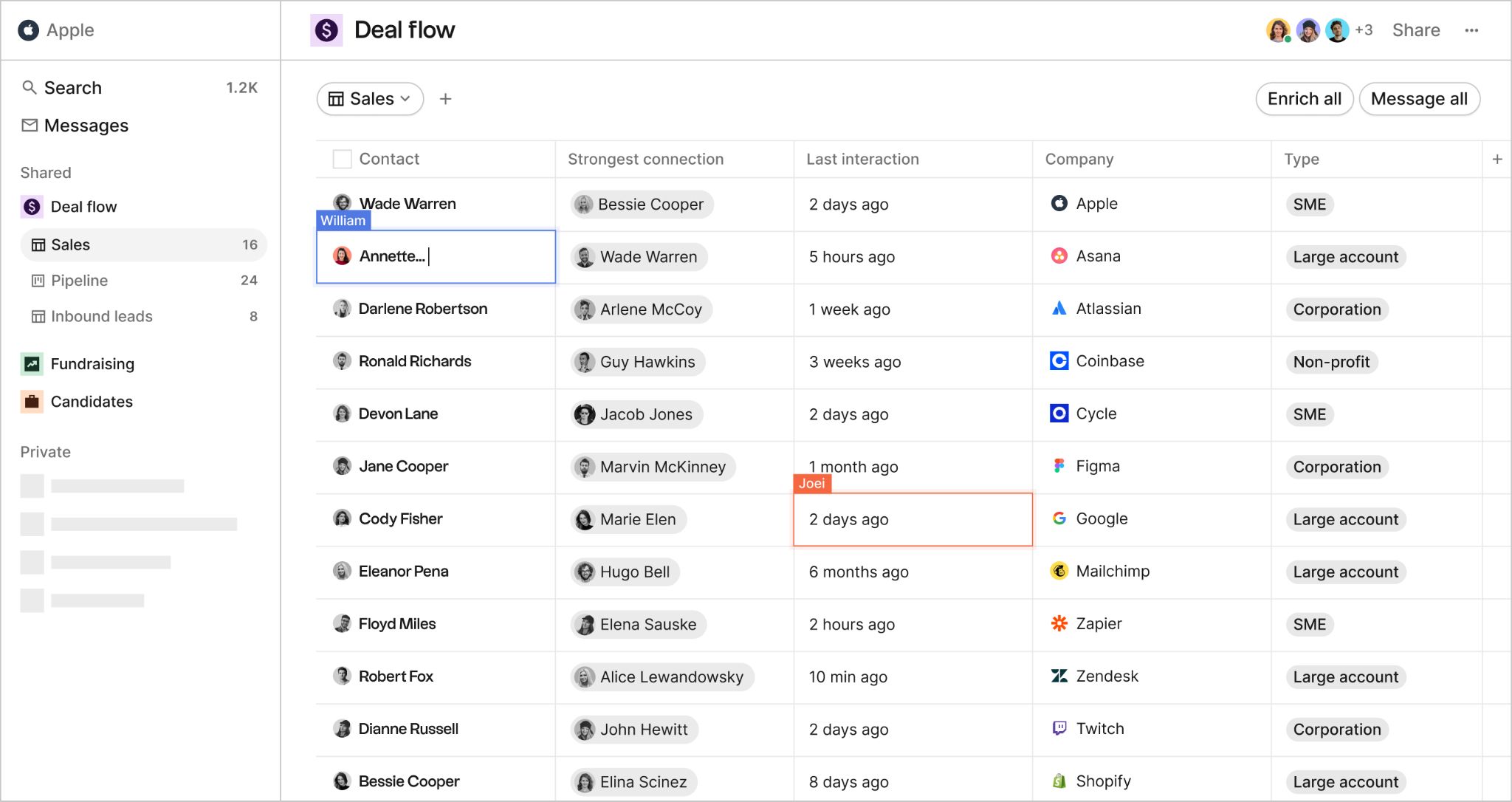
What it is: Folk is a lightweight, spreadsheet-style CRM with a Chrome extension (folkX) that captures contacts from LinkedIn, X, and websites in one click — designed for teams where relationship management matters more than pipeline rigor.
Key features
- folkX Chrome extension for one-click contact capture from LinkedIn, X, websites
- Spreadsheet-style interface with custom fields and pipeline templates
- AI-powered email sequences with persona and goal inputs (Premium)
- Magic Fields that auto-populate contact data using AI
- One-click enrichment for emails, phone numbers, job titles
- Automatic deduplication during import
Tradeoffs
- No free plan; 14-day trial only
- No native mobile app
- Email sequences and deal management locked behind Premium ($48/user/month annual)
- Enrichment credits shared workspace-wide, not per user
- Limited native integrations; relies on Zapier/Make for most connections
Pricing
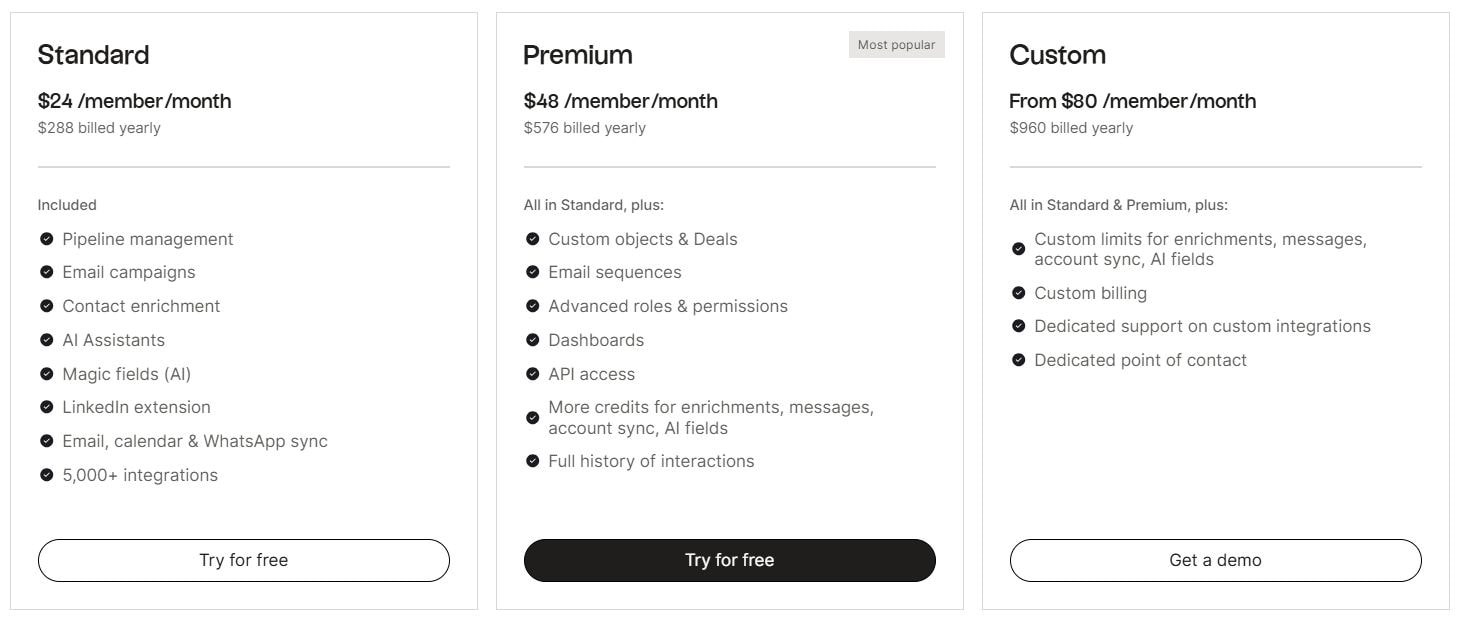
Standard $24/user/month (annual). Premium $48. Custom from $80. No free plan.
Best for
Founders and small teams managing a mix of investor, partner, and customer relationships who want speed and simplicity over structural depth.
Bottom line
Folk is the fastest way to get a relationship-first CRM off the ground. It won't scale into a complex sales operation, but for early-stage teams juggling many relationship types at once, it's a smart starting point.
9. monday CRM — Best for: Teams already using Monday.com that want CRM in the same workspace
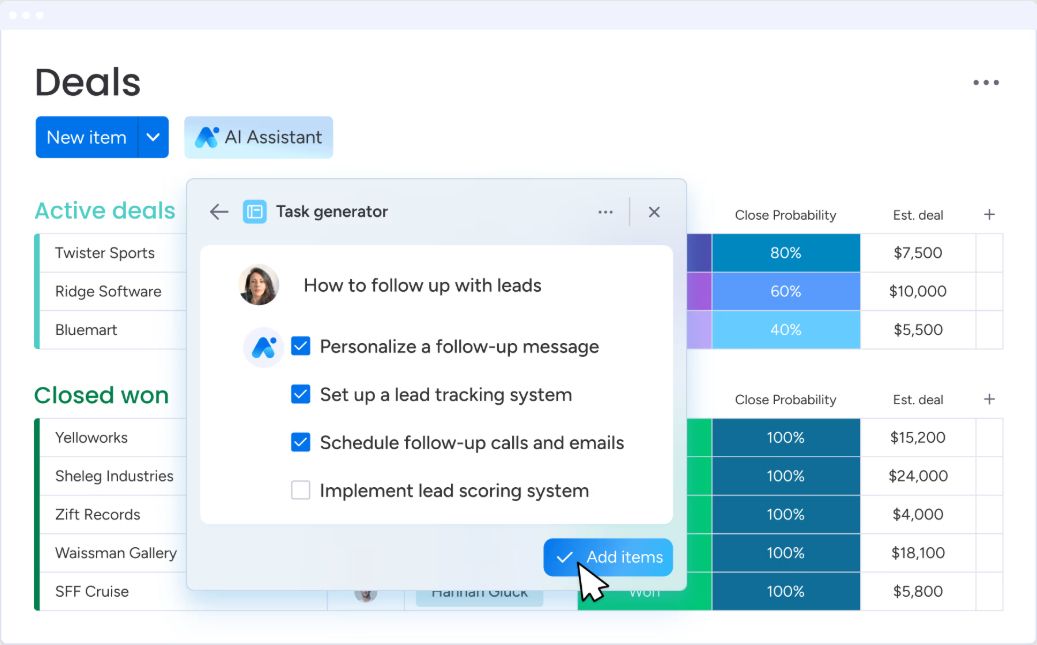
What it is: monday CRM is built on top of monday.com's work OS — keeping sales, handoffs, and delivery in one workspace through highly customisable boards and native project management.
Key features
- Visual pipeline boards with drag-and-drop deal tracking
- Customisable columns, automations, and dashboards
- Email sync and activity tracking within deal records
- Lead scoring and deal management
- Native project management alongside CRM
- Integrations with Gmail, Outlook, Slack, Zoom, and 200+ apps
Tradeoffs
- CRM functionality is less mature than dedicated sales CRMs
- AI features are basic compared to platforms like HubSpot or Attio
- Reporting depth is limited for complex sales analytics
- Per-seat pricing with minimum seat requirements on higher plans
Pricing
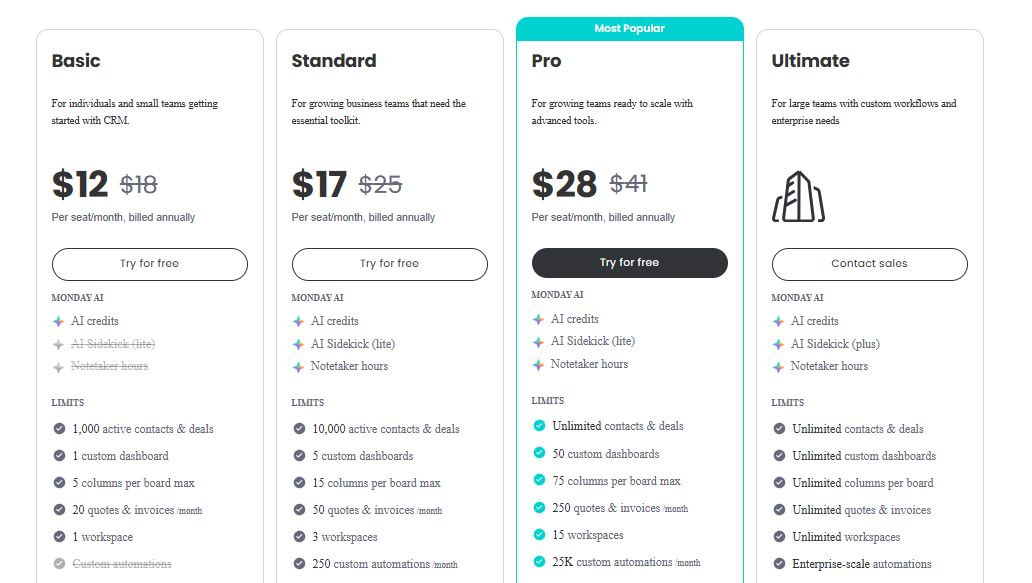
Basic $12/seat/month (annual, min 3 seats). Standard $17. Pro $28. Ultimate is custom.
Best for
Startups already running monday.com for project management that want to add CRM without introducing a new tool — and whose sales process doesn't require deep CRM functionality yet.
Bottom line
monday CRM wins on consolidation, not capability. If you're already in the Monday.com ecosystem and your sales process is relatively straightforward, it removes a platform switch. If CRM is a core part of your GTM motion, a dedicated tool will serve you better.
What to look for in a startup CRM
Not every CRM feature matters at the early stage. These are the ones that do:
- Ease of setup — You shouldn't need an admin or an agency to get started. If it takes more than a day to get value, that's a red flag.
- Pipeline management — Visual, flexible pipelines that map to how your team actually sells — not how some consultant thinks you should.
- Activity capture — This is where most tools fall short. Every CRM claims it, but most still require someone to remember to log a call. Lightfield auto-populates custom fields retroactively, pulling from conversations that happened months before you set the field up.
- AI and automation — Look for tools where AI does the work, not just suggests it. Recommendations you have to action manually are still manual work.
- Integrations — Your CRM needs to connect with email, calendar, and the rest of your stack without friction. Check whether the integrations you need are native or routed through Zapier.
Why startups can't afford to skip a CRM
The cost of not having one compounds fast:
- Deals fall through because follow-ups get forgotten
- No visibility into where prospects actually stand
- Handoffs between team members are messy and slow
- Forecasting is guesswork without clean pipeline data
- A single source of truth keeps the whole team aligned — even when it's just two people
Most of these aren't CRM problems. They're memory problems. A good CRM is the fix.