Folk vs. Pipedrive: Which CRM is best for startups in 2026?

Lightfield
Quick Summary
Folk is an anti-admin CRM built for relationship-driven teams. It features simple pipelines, one-click LinkedIn capture, and a spreadsheet-style UI. Pipedrive is a structured deal-cycle CRM with visual pipeline and activity-based selling capabilities. Both work well. But they only know what your team had time to log. Lightfield is the option that doesn't.
Which CRM is right for your team?
Folk is for relationship-driven teams that want to move fast with minimal configuration. Pipedrive is for deal-stage-driven teams that want structure and accountability baked into how they sell. The choice comes down to how your team is wired — and what you're optimizing for on day one.
But both share the same underlying weakness: your CRM only reflects what someone had time to log. Miss a call, skip a note, forget to move a deal — and your pipeline is already out of date. The context that actually drives decisions (what was said, what was promised, what the prospect is worried about) lives in email threads and call recordings, not in the CRM.
Why listen to us

Lightfield is built for teams who need their CRM to work with them, not against them. That gives us direct visibility into where platforms demo well but fall apart under daily use — Folk and Pipedrive included. We're not neutral, but we are specific.
Folk vs. Pipedrive: Key differences
1. Setup and onboarding: Minutes vs. hours
Folk's entire value prop is speed. The spreadsheet-style UI, pre-built pipeline templates, and folkX Chrome extension mean most teams are capturing contacts and managing relationships within 20 minutes of signup. There's almost no configuration required. The tradeoff: you can't model complex deal structures or custom object types at all — what you see is what you get.
Pipedrive requires more upfront setup — pipeline stages, custom fields, activity types, email sync — but rewards that investment with a more structured selling environment. Drag-and-drop Kanban boards, deal rotting alerts, and activity-based workflows keep reps accountable to a process rather than leaving it to individual judgment.
Verdict: Folk if your team needs to start selling today with zero config. Pipedrive if you're building a repeatable sales process and want structure from day one.
2. Outreach: LinkedIn-first vs. pipeline-first
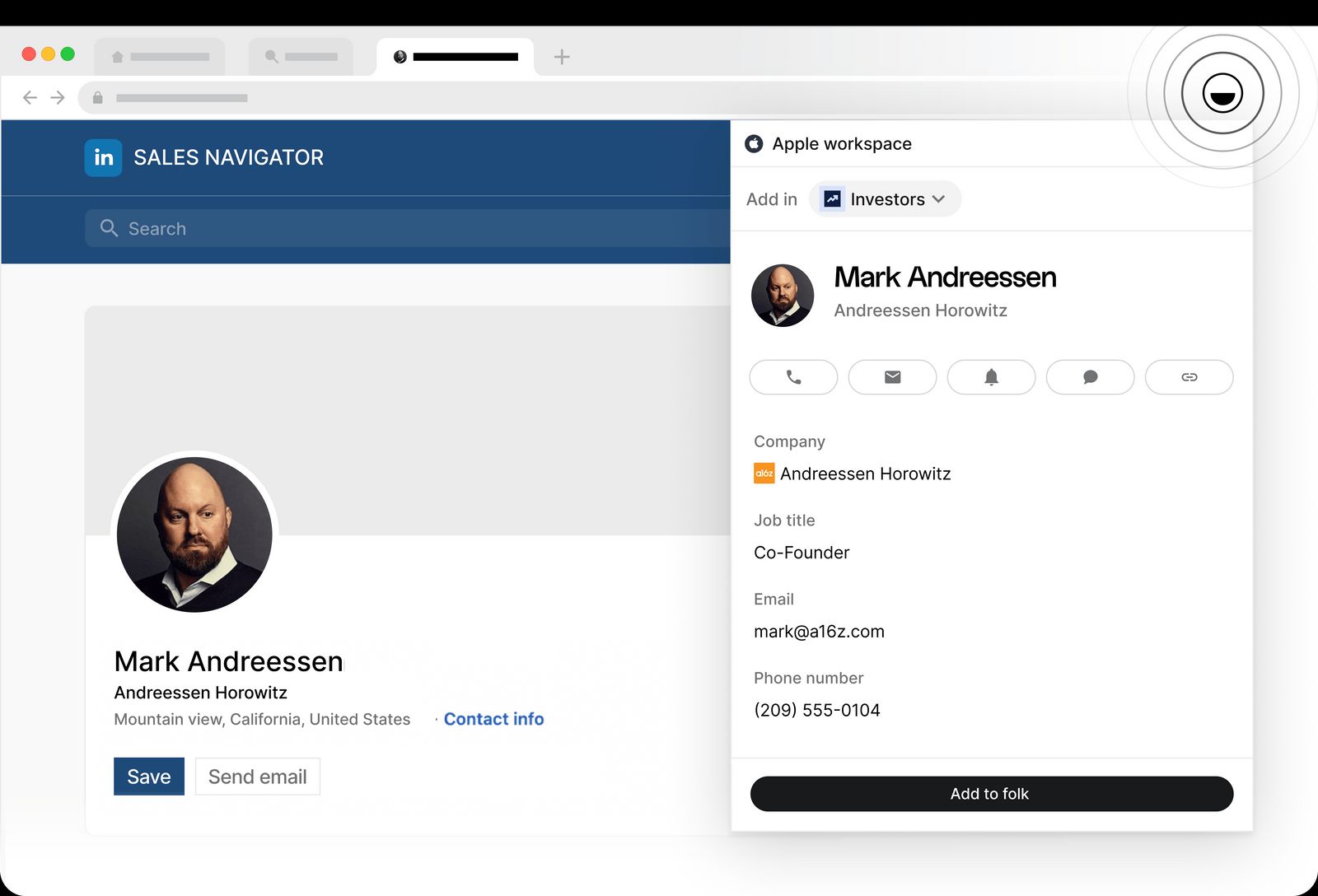
Folk is built around outbound prospecting. folkX captures contacts from LinkedIn, Sales Navigator, and websites in one click — which is genuinely fast for teams that live in those channels.
Email campaigns are available on Standard ($24/user/month annual), and AI-powered sequences with multi-step follow-ups unlock on Premium ($48/user/month annual). Native WhatsApp sync adds another channel most CRMs don't touch.
Pipedrive is built around the deal, not the contact. Email sync with open and click tracking requires Growth ($24/user/month annual). Sequences (called "nurturing sequences") are available from Growth.
There's no native LinkedIn capture or WhatsApp integration. The LeadBooster add-on ($32.50/month) adds chatbots, web forms, and a Cognism-powered prospector — but it's a paid extra on top of the seat price.
Verdict: Folk for teams whose workflow starts with LinkedIn. Pipedrive for teams whose workflow starts with inbound leads or an existing pipeline they need to manage.
3. Pricing and feature gating
Folk has three paid tiers: Standard ($24/user/month annual), Premium ($48), and Enterprise (from $80). No free plan. Deal management and email sequences are locked behind Premium — which doubles the entry price. Enrichment credits are shared workspace-wide: 500 per month on Standard, 1,000 on Premium.
Pipedrive has four tiers: Lite ($14/user/month annual), Growth ($39), Premium ($59), and Ultimate ($79). No free plan. Two-way email sync and workflow automation require Growth. AI features, lead scoring, and phone support require Premium. Add-ons like LeadBooster ($32.50/month) and Campaigns ($13.3+/month) stack on top of seat pricing on lower tiers.
Verdict: Folk is cheaper at entry but forces an expensive upgrade the moment you need deal management. Pipedrive spreads features more evenly across tiers but add-ons compound fast. A five-person team needing core sales features ends up paying more than the headline price on both tools.
What is Folk?
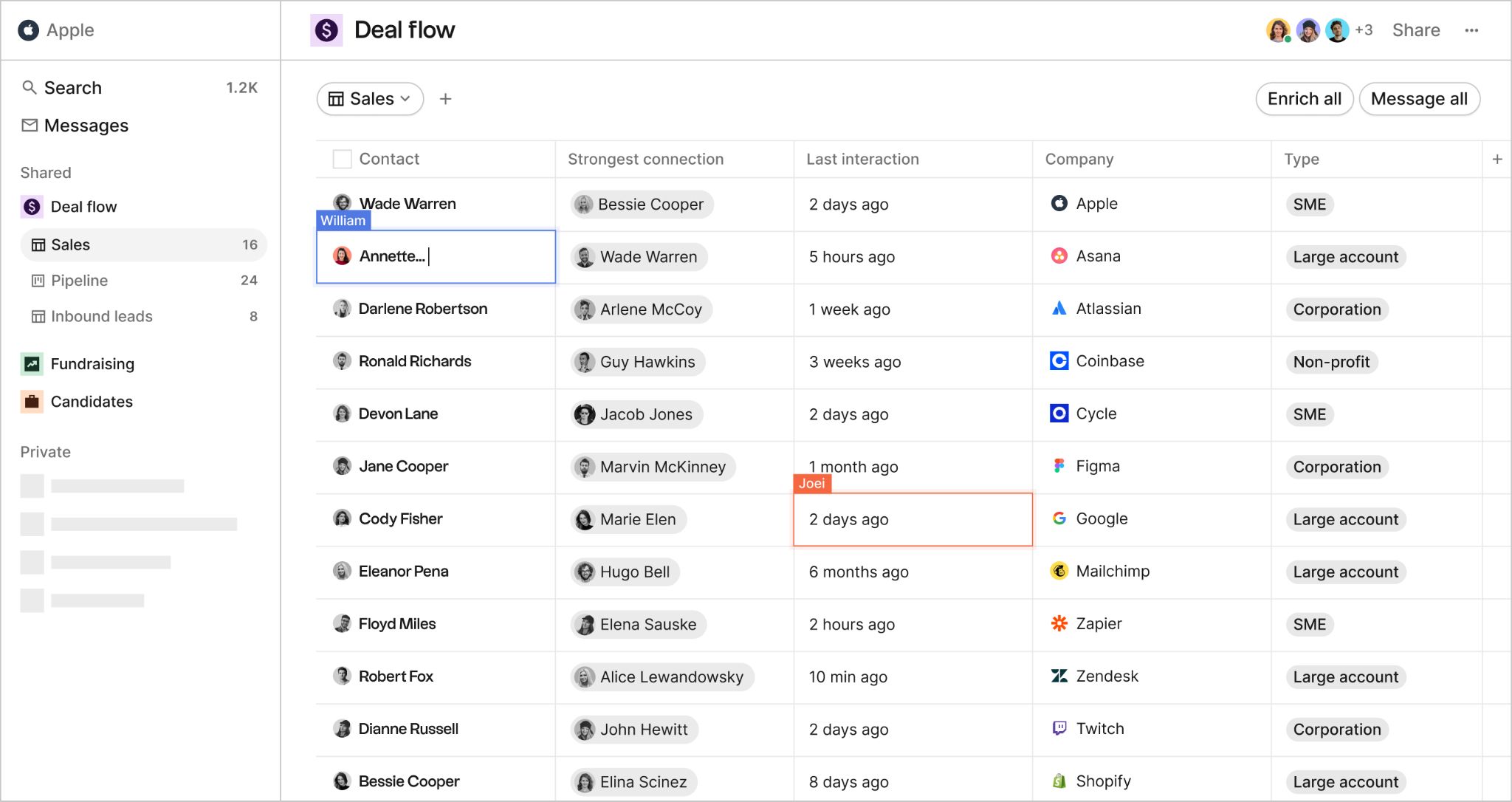
Folk is a lightweight, relationship-first CRM designed to feel as familiar as a spreadsheet and work as well as a CRM. The signature feature is folkX — a Chrome extension that captures contacts from LinkedIn, Sales Navigator, and any website in one click, with no copy-pasting.
Setup takes about 20 minutes. Most teams coming from spreadsheets, Notion, or Airtable find Folk the most natural transition available.
Key features
- folkX Chrome extension: one-click capture from LinkedIn, Sales Navigator, any website
- AI email sequences from persona and goal inputs (Premium only)
- AI follow-up assistant: detects stalled conversations, suggests re-engagement
- Native WhatsApp integration
- Auto deduplication and enrichment (Clearbit, Apollo, People Data Labs)
- Shared views and collaborative pipelines
- Magic Fields (AI auto-populate) and Smart Fields (real-time data updates)
Pros
- ~20-minute setup, near-zero learning curve
- Flexible custom fields with no technical configuration required
- folkX works across LinkedIn, Sales Navigator, and the general web
- Follow-up assistant proactively flags stalled deals before they go cold
Cons
- No native mobile app on any plan
- Deal management locked behind Premium ($48/user/month annual)
- Limited workflow automation compared to dedicated sales CRMs
- Contact capture is strongest on LinkedIn; other channels still require manual logging
- API is still early-stage
Folk pricing
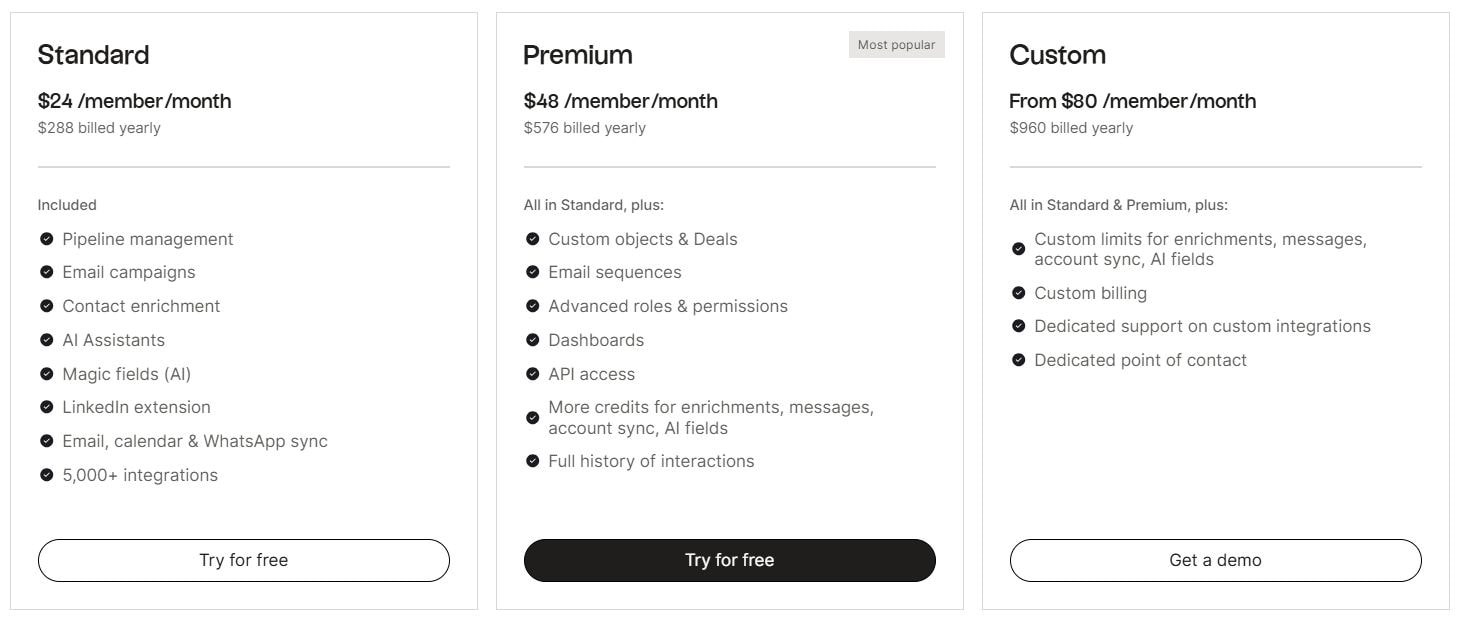
| Plan | Monthly Price | Annual Price | Best For |
|---|---|---|---|
Standard | $30/user/mo | $24/user/mo | Solo users or small teams doing basic contact management and email campaigns |
Premium | $60/user/mo | $48/user/mo | Teams needing deal pipelines, email sequences, dashboards, and API access |
Custom | From $100/user/mo | From $80/user/mo | High-volume teams needing custom credit limits and dedicated support |
Key cost detail: No free plan. The two-week trial defaults to Premium features; the account is blocked after the trial ends until you upgrade. Enrichment credits are workspace-wide — not per user — so a three-person team on Standard shares 500 enrichment credits per month.
What is Pipedrive?
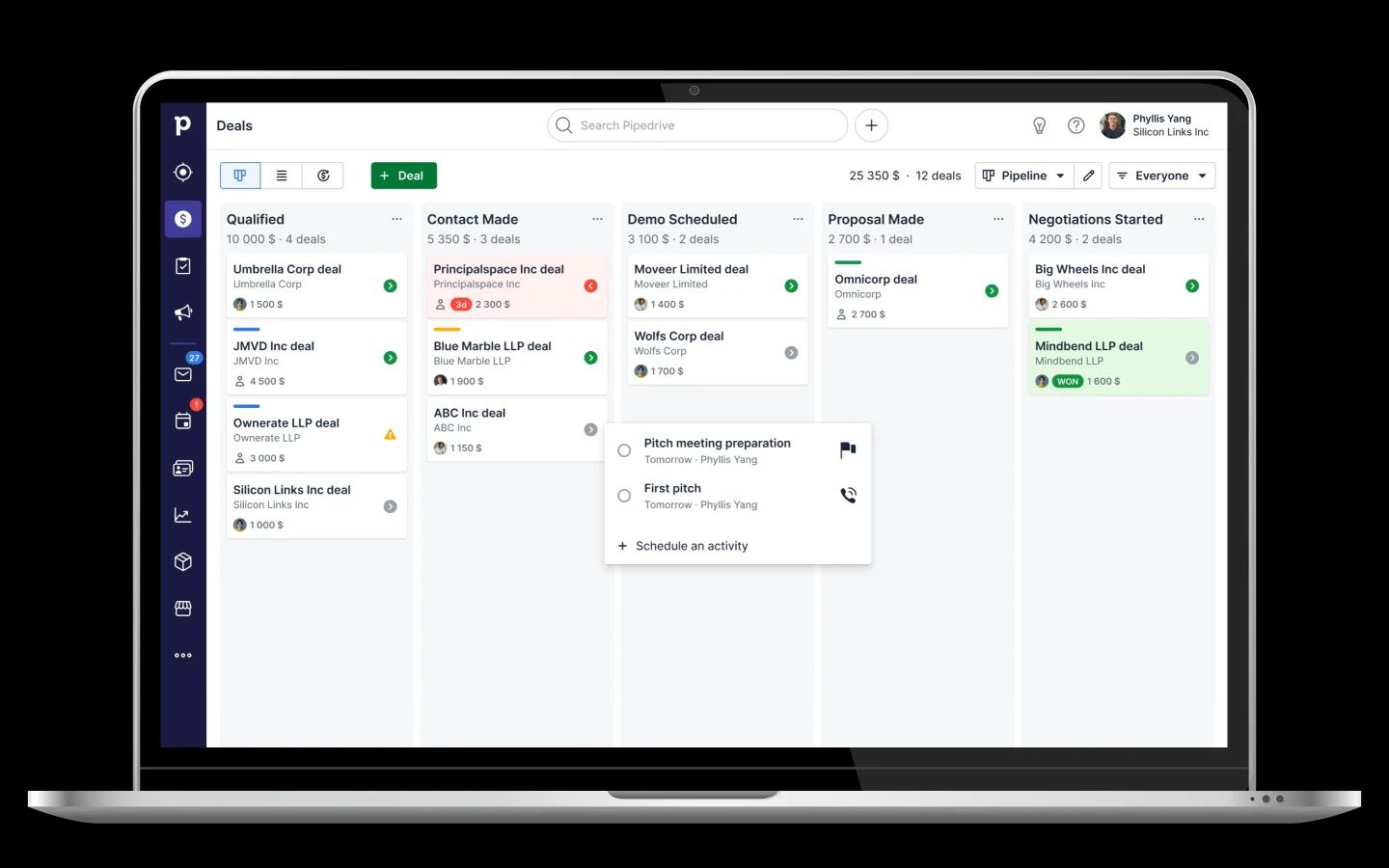
Pipedrive is a pipeline-centric sales CRM built around the idea that sales is a process, and reps should focus on actions rather than outcomes. Visual Kanban deal tracking, activity-based selling, and deal rotting alerts keep teams moving.
It scales from solo founders to mid-market teams, but the cost adds up once you factor in add-ons — LeadBooster, Campaigns, and Projects are all extras on lower tiers.
Key features
- Visual Kanban pipeline with drag-and-drop deal cards and deal rotting alerts
- Workflow automation: triggered actions on deal movement, auto follow-ups, sequences (Growth+)
- AI sales assistant: flags neglected deals, recommends next actions, generates emails
- LeadBooster add-on: chatbot, live chat, web forms, Cognism-powered prospector
- Two-way email sync with open and click tracking (Growth+)
- Meeting scheduler with Google Meet, Zoom, and Teams links
- Campaigns add-on for email marketing ($13.33+/month)
Pros
- Strong iOS and Android apps for pipeline updates on the go
- Activity-based methodology keeps reps focused on actions, not data entry
- Customizable revenue forecasting and deal velocity reporting (Premium+)
- Clean UI that's easy to learn without training
Cons
- Add-on pricing stacks fast: LeadBooster ($32.50/month), Campaigns ($13.33+/month), Web Visitors ($49+/month) all extra on Lite and Growth
- Advanced reporting and lead routing gated behind Premium ($59/user/month annual)
- Two-way email sync not available on Lite
- AI features are still early — more suggestions than automation
- Sales-only by design; limited marketing or service functionality
Pipedrive pricing
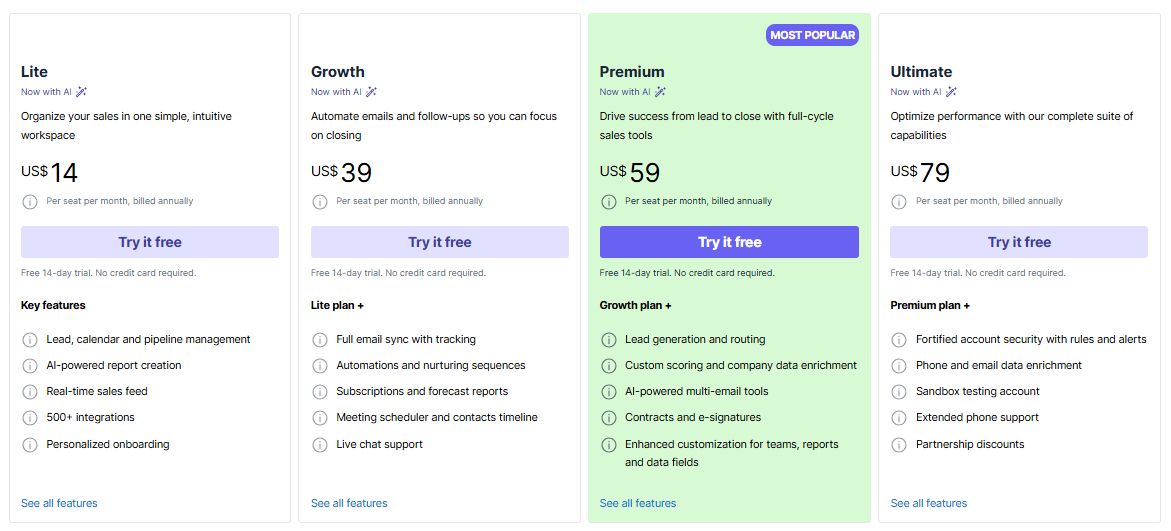
| Plan | Monthly Price | Annual Price | Best For |
|---|---|---|---|
Lite | $24/seat/mo | $14/seat/mo | Solopreneurs or tiny teams needing basic pipeline management |
Growth | $49/seat/mo | $39/seat/mo | Small teams needing email sync, automations, sequences, and forecasting |
Premium | $79/seat/mo | $59/seat/mo | Scaling teams needing lead scoring, AI tools, e-signatures, and phone support |
Ultimate | $99/seat/mo | $79/seat/mo | Larger teams needing the full feature set, advanced security, and priority support |
Key cost detail: No free plan. 14-day trial. Add-ons stack on top of seat pricing: LeadBooster ($32.50/month), Campaigns (from $13.33/month), Web Visitors (from $41/month). Premium and Ultimate bundle LeadBooster, Projects, and Smart Docs at no extra cost.
Plans were renamed in November 2025: Essential → Lite, Advanced → Growth, Professional → Premium, Enterprise → Ultimate.
Lightfield: The best Folk and Pipedrive alternative
Folk gives you speed. Pipedrive gives you deal structure. What neither gives you is a CRM that updates itself from the conversations your team is already having.
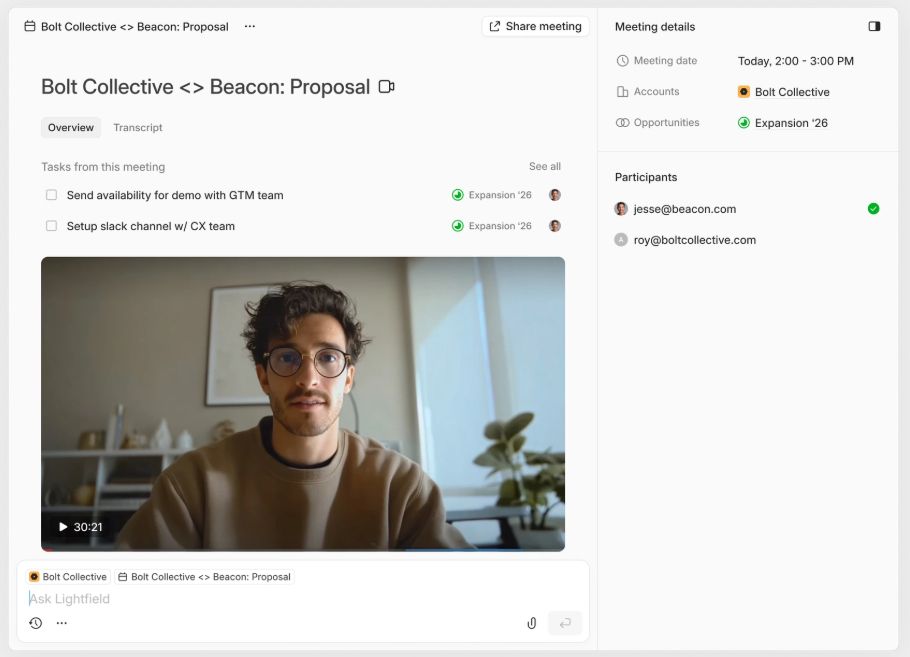
Lightfield auto-captures every email, meeting, and call and matches it to the right contacts and accounts — no Chrome extensions, no BCC forwarding, no separate transcription tools. The CRM reflects reality, not what someone had time to log after the call.
You get Folk's simplicity and Pipedrive's deal depth, without asking anyone to do the admin work that makes both tools fall behind.
Key features
- Auto-capture CRM: email, calendar, meetings → contacts, accounts, opportunities
- Built-in video call recording and searchable transcripts
- Phone call capture and transcription
- Natural language queries with cited answers across full conversation history
- Custom fields with AI auto-population (forward and retroactive)
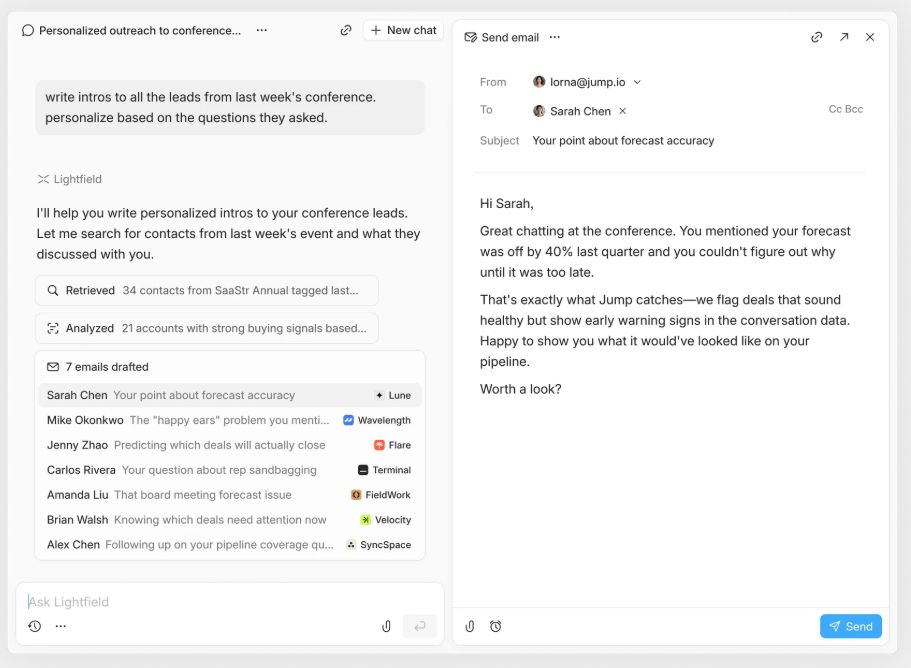
- Multi-account email drafting using prospects' own words
- Auto task generation from meetings
Lightfield pricing
Starter
$89/user/month, up to 3 users. 14-day free trial.
Larger teams doing more complex agentic work can move to a team plan with unlimited viewer seats.
Pro
Visit lightfield.app/pricing for details.
Growth
Visit lightfield.app/pricing for details.
Why people choose Lightfield
1. Conversations become CRM records automatically
Folk captures contacts fast but not what was said on the call. Pipedrive tracks deal stages but not the context behind them — what the prospect raised as a concern, what your rep committed to, what the agreed next step was.
Lightfield records every email, call, and meeting and turns it into structured data without anyone logging anything after the conversation ends.
2. No credit system, no add-on stacking
Folk meters enrichment through workspace-wide credit caps that small teams burn through quickly. Pipedrive gates core features like email sync, automations, and lead scoring behind higher tiers and paid add-ons that can double your monthly bill.
Lightfield includes the full feature set on every plan with no consumption tracking, no credit limits, and no add-ons to buy.
3. Call intelligence on every plan
Folk doesn't offer call recording at all. Pipedrive's built-in Caller is basic and doesn't include transcription or AI summaries.
Lightfield includes full call recording, transcription, and AI-generated summaries on the Startup plan — so the context from your most important conversations is captured and searchable from day one.
4. Retroactive custom fields
Neither Folk nor Pipedrive can populate a new field from historical conversation data without manual entry or a purpose-built workflow.
Add a field to Lightfield today and it backfills from months of past conversations automatically — so refining your data model as you learn doesn't mean losing the context you've already captured.
5. Built for teams that sell through meetings
Folk is optimized for LinkedIn prospecting. Pipedrive is optimized for structured deal cycles. Lightfield is built for teams doing ten or more meetings a week where conversation context — what was said, what was promised, what's at risk — is the most valuable data in the system.
The best of both tools without the trade-offs
Folk's simplicity makes it easy to start. Pipedrive's structure makes it easy to scale a process. But the moment your team starts running more meetings than anyone can manually log, both tools drift from reality.
Lightfield gives you Folk's zero-config speed and Pipedrive's deal-tracking depth — without asking anyone to maintain the CRM between conversations. Every interaction is captured automatically, every record stays current, and every follow-up surfaces before it gets missed.