Folk CRM review 2026: Simplicity, social selling, and sales limits
Lightfield
Quick Summary
folk is a lightweight relationship CRM built around shared lists, LinkedIn capture, and AI-assisted outreach. Lightfield is a CRM that updates itself by capturing emails and meetings automatically. Both help teams manage relationships — the difference is how well pipeline structure and forecasting hold up as sales activity grows and revenue accountability becomes more important.
When Design Simplicity Meets Sales Structure
folk positions itself as a lightweight, collaborative CRM focused on relationships rather than heavy database architecture. Shared lists, LinkedIn sourcing, and AI-assisted outreach make it fast to adopt for founders and small teams managing multiple relationship channels — sales, partnerships, fundraising, and recruiting all fit naturally into the same workspace.
However, simplicity introduces tradeoffs as sales activity grows. Forecasting depth, structured reporting, and pipeline controls remain lighter than traditional sales CRMs. Teams that start on folk for contact management often find themselves reaching its limits when they need revenue visibility or want to track what actually happened in a deal.
This review examines where folk's relationship-first design improves collaboration and where structured pipeline management becomes harder as teams scale.
Why Listen to Us?
Lightfield is an AI-native CRM built for founder-led sales. We work closely with early-stage teams moving away from design-forward platforms like folk and Attio, which gives us a practical view of where relationship-focused CRMs excel and where structured forecasting and long-term data architecture become more important as sales operations mature. We're not neutral, but we are specific.
What is folk CRM?
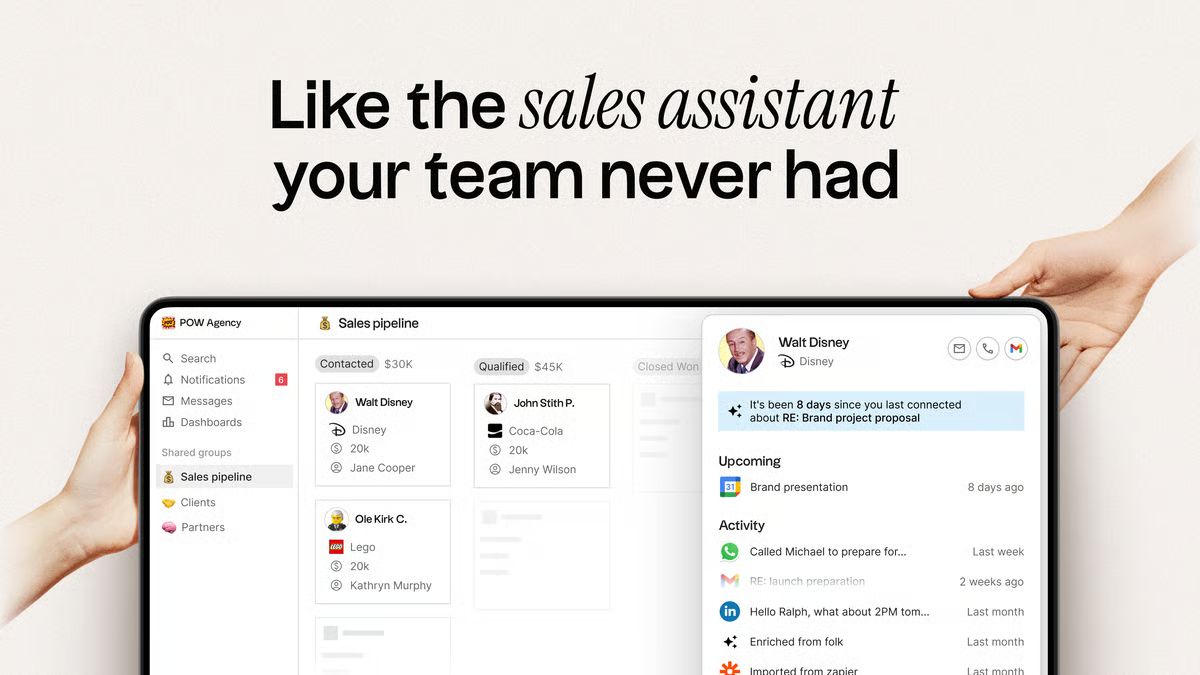
folk is a collaborative CRM designed for startups, agencies, and small teams that prioritize speed and simplicity over structural depth. The workspace feels closer to Notion than a traditional sales database — contacts live in flexible lists, pipelines are visual and drag-and-drop, and the whole system is built to be shared across a team without setup friction.
The core appeal is breadth without complexity. A single folk workspace can hold a sales pipeline, an investor pipeline, a recruiting tracker, and a partnership list — all managed with the same familiar interface. For early-stage teams wearing multiple hats, that flexibility is genuinely useful.
The folkX Chrome extension is folk's signature feature: one-click contact capture from LinkedIn, Sales Navigator, X, Instagram, Google Meet, and other platforms. Combined with one-click enrichment (email addresses, phone numbers, company data, social profiles), it makes prospecting from social channels faster than most CRMs on the market.
Key Features
- folkX Chrome extension: One-click contact capture from LinkedIn, Sales Navigator, X, Instagram, Google Meet, and other sources.
- List-based pipelines: Drag-and-drop pipelines to track deals, candidates, or partnerships.
- One-click enrichment: Waterfall enrichment for emails, phone numbers, company data, and social profiles.
- Messages and sequences: Multi-step email campaigns with Gmail or Outlook sync.
AI assistants and Magic Fields: AI extracts structured data, suggests categories, drafts outreach, and summarizes interactions.
folk CRM Pricing
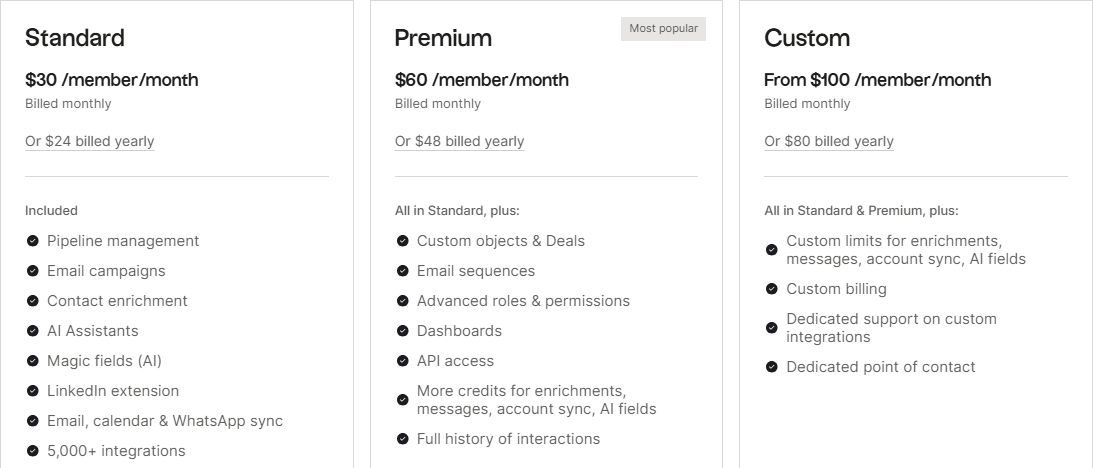
folk's plans are billed per member monthly or annually and include a 14-day free trial. There is no permanent free tier — when the trial ends, the account is blocked until you upgrade.
| # | Plan | Price | What's Included |
|---|---|---|---|
1 | Standard | $30/member/month ($24 billed annually) | Pipeline management, folkX LinkedIn extension, email campaigns, contact enrichment, AI Magic Fields |
2 | Premium | $60/member/month ($48 billed annually) | Custom objects and deals, email sequences, dashboards, advanced permissions, API access |
3 | Custom | From $100/member/month ($80 billed annually) | Custom AI enrichment limits, custom billing options, dedicated support |
The pricing structure has a meaningful gap between Standard and Premium. Deal management (custom objects), email sequences, and dashboards are all gated behind Premium — which doubles the monthly cost. Most sales teams will find Standard insufficient within weeks and end up on Premium before they've fully evaluated the product.
Enrichment credits are shared workspace-wide, not per user. Standard gets 500 enrichment credits per month for the entire team. Premium gets 1,000. For any team doing active outbound prospecting, these limits can become a constraint faster than expected.
What We Like About folk CRM
- Fast contact capture: folkX is genuinely one of the best LinkedIn-to-CRM capture tools available. One click imports a contact with name, title, company, and social profile populated automatically. For teams whose prospecting workflow starts on LinkedIn or Sales Navigator, it eliminates a meaningful amount of copy-paste admin.
- Clean interface: folk's design is intentionally minimal. The spreadsheet-style layout, color-coded tags, and drag-and-drop pipelines encourage adoption across a team without training. New members can be productive within an hour — which matters for early-stage teams that can't afford a week of onboarding.
- Flexible lists and pipelines: The same list-based structure works for sales, partnerships, fundraising, and recruiting. Teams managing multiple relationship channels can run them all in one workspace without switching tools or duplicating contacts. For a three-person founding team tracking investors and customers simultaneously, this is a real quality-of-life improvement.
Built-in campaigns: Native email campaigns and multi-step sequences integrate directly with Gmail and Outlook, with replies syncing back into contact records automatically. The AI sequence builder — available on Premium — generates outreach from persona and goal inputs, which reduces the time spent drafting cold messages from scratch.
What We Don't Like About folk CRM
- Limited forecasting depth: folk provides visual pipelines and dashboards, but structured revenue forecasting tools are minimal. There are no built-in probability percentages, weighted pipeline views, or automated forecasting models. Teams that need to report on expected revenue — even informally — typically have to export data to a spreadsheet and build their own calculations. As deal volume grows, this becomes a meaningful gap.
- Lighter reporting: Analytics in folk are simpler than what dedicated sales CRMs offer. Rep-level performance tracking, multi-variable deal analysis, and velocity reporting all require significant manual work or external tools. Teams that need to understand why deals are moving or stalling will hit the ceiling of what folk's dashboards can show them.
- No native dialer: folk has no built-in calling capability. Teams doing outbound phone outreach need to connect an external dialer — which means another tool to manage, another integration to maintain, and call context that doesn't automatically flow back into the CRM. For teams where phone calls are a primary sales channel, this is a structural gap.
Usage limits on AI and enrichment: Magic Fields, AI assistants, and contact enrichment all operate within monthly credit limits that are shared workspace-wide. Standard's 500 enrichment credits and 2,000 Magic Field credits are consumed quickly by a team doing any volume of outbound. Hitting these limits mid-month disrupts workflows and pushes teams toward the Custom tier before they're ready for that commitment.
Lightfield: A folk CRM Alternative Built for Structured Sales Data
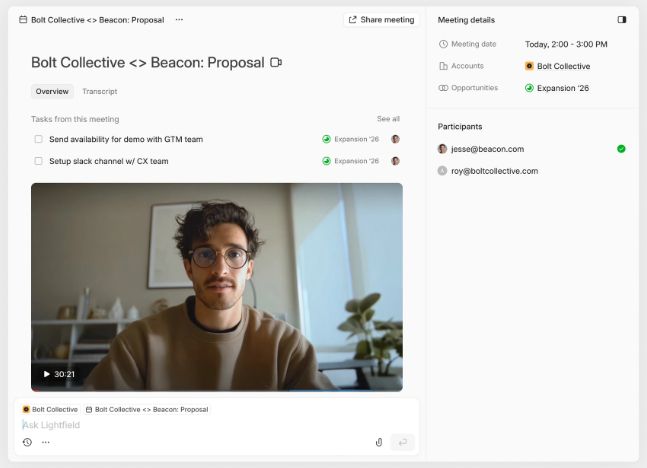
Lightfield is an AI-native CRM designed for founder-led sales teams that need structured pipeline data as activity scales. Instead of organizing contacts into lists and manually maintaining deal stages, Lightfield converts emails, meetings, and calls into structured CRM records that update accounts, opportunities, tasks, and fields automatically.
The difference in approach is meaningful in practice. folk requires someone to capture a contact, add them to the right list, create a deal, move it through stages, and log what happened after each interaction. Lightfield does all of that from the conversation itself. An email thread creates a contact and account. A call recording populates the opportunity record. A meeting note generates the follow-up task.
For teams doing ten or more meetings a week, the gap between what folk can track and what Lightfield captures automatically widens quickly.
Key Features
- Forecast-ready data: Opportunity records built from conversations to support reliable revenue tracking.
- Integrated call recording: Calls recorded, transcribed, summarized, and linked to the correct account automatically.
- Retroactive field population: Create a new field today and Lightfield populates it from past emails and meetings.
- Automatic task extraction: Action items generated from conversations and surfaced in a task panel without manual entry.
Schema-less architecture: Start immediately and evolve your CRM structure without losing historical data.
Lightfield Pricing
| # | Plan | Price | What's Included |
|---|---|---|---|
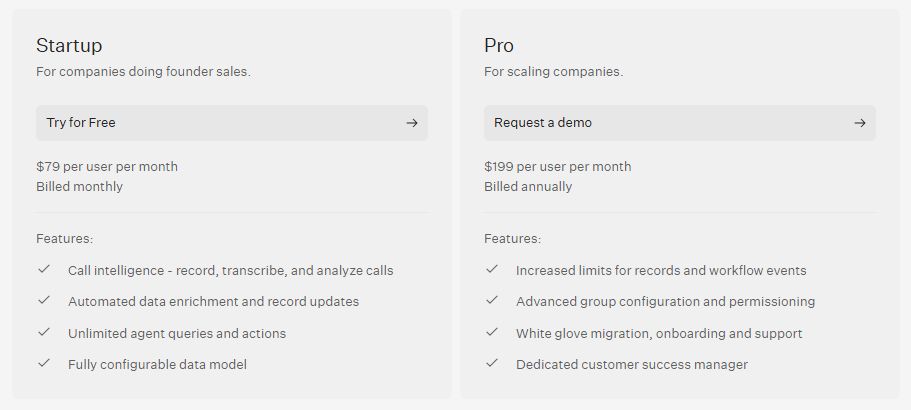
1 | Startup | $79/user/month (billed monthly) | Call intelligence, automated record updates, unlimited agent queries, configurable data model |
2 | Pro | $199/user/month (billed annually) | Higher record limits, advanced permissions, white-glove migration, onboarding support, dedicated customer success manager |
(Writer note: Verify pricing at lightfield.app/pricing before publishing.)
Why People Choose Lightfield Over folk CRM
1. Reduced Manual Coordination
In folk, reminders, tagging, and stage movement typically require user input — someone has to remember to update the deal, log the note, and create the task. Lightfield extracts tasks, updates records, and populates fields directly from conversations as they happen. The result is a CRM that reflects reality without requiring anyone to maintain it between calls.
2. Forecast Structure at Scale
folk provides visual pipelines and dashboards, but revenue projections depend on how accurately team members have updated their deal fields — which in practice means projections are only as reliable as the last time someone logged in. Lightfield structures opportunity data directly from conversations: close dates, deal context, next steps, and stage signals are derived from what was actually said, not from what someone remembered to type.
3. Structured Data Durability
folk focuses on flexible relationship lists, which work well for early-stage teams managing a broad mix of contacts. As sales operations mature and teams need to report on pipeline health, conversion rates, and deal velocity, the lack of structured data architecture becomes a constraint. Lightfield prioritizes structured accounts, opportunities, and reporting clarity from the start — so the foundation doesn't need to be rebuilt when the team scales.
FAQs About folk CRM
1. Does folk Offer a Free Plan?
No. folk offers a 14-day free trial but does not include a permanent free tier. The trial defaults to Premium features regardless of which plan you select — and when it ends, the account is blocked until you upgrade or manually request a one-week extension. Paid plans start at $30 per member per month (billed monthly) or $24 per member per month (billed annually).
2. Can folk Handle Email Campaigns?
Yes. Email campaigns and multi-step sequences are sent through connected Gmail or Outlook accounts, with replies syncing back into contact records automatically. Campaigns are available on Standard; AI-powered sequences with persona and goal inputs require Premium. Enrichment credits used to build contact lists are shared workspace-wide and subject to monthly limits based on your plan.
3. Does folk CRM Include Weighted Revenue Forecasting?
No. folk provides visual pipelines and basic dashboards but does not include built-in deal probability percentages or automated weighted forecasting. Teams that need revenue projections typically have to export pipeline data and build forecasts in a spreadsheet. This is one of the more significant gaps for teams moving from folk to a dedicated sales CRM as they scale.
4. Can folk be Used Outside of Sales?
Yes — and this is one of folk's genuine strengths. Teams commonly use folk for fundraising (tracking investor conversations), recruiting (managing candidate pipelines), partnerships (monitoring partner relationships), and community management (keeping shared contact lists organized). The same list-based interface works across all of these use cases without requiring a separate tool or workspace.
5. Are There Limits on Contact Enrichment?
Yes. Contact enrichment operates within monthly credit limits that are shared across the entire workspace — not allocated per user. Standard includes 500 enrichment credits per month for the team. Premium includes 1,000. Higher limits require either upgrading to Custom or supplementing with a standalone enrichment tool. For teams doing any volume of outbound prospecting, these limits can constrain workflow mid-month and require planning around the reset date.