Pipedrive review 2026: Is it the right CRM for founders?
Lightfield
Quick Summary
Pipedrive is an activity-based CRM built around visual pipelines and structured sales processes. Lightfield is a CRM that updates itself by capturing emails and meetings automatically. Both manage pipeline visibility. The difference is how the data gets there.
Pipeline Visibility Requires Consistent Logging
Pipedrive helps teams organize deals with a visual pipeline and activity-based selling. The system works best when reps consistently log calls, emails, and follow-ups. That structure makes pipeline stages easy to read and reporting easy to trust—when the underlying data is current.
But that creates a common friction point. The CRM reflects what someone recorded, not always what actually happened. Conversation details, commitments made on a call, or follow-up context can remain in inboxes or meeting notes instead of appearing directly in the pipeline. For founder-led sales teams moving fast across many simultaneous conversations, the gap between what happened and what was logged can widen quickly.
This review examines how Pipedrive's activity-based model performs in daily sales workflows and where manual logging can create gaps in pipeline visibility as conversations move quickly.
Why Listen to Us?

Lightfield is an AI-native CRM built for founder-led sales teams. We work closely with teams evaluating tools like Pipedrive and other pipeline CRMs as their sales process grows. That vantage point gives us direct insight into where these systems help organize deals and where manual activity updates still create friction in daily sales workflows—especially at the pace founders actually sell.
What is Pipedrive?
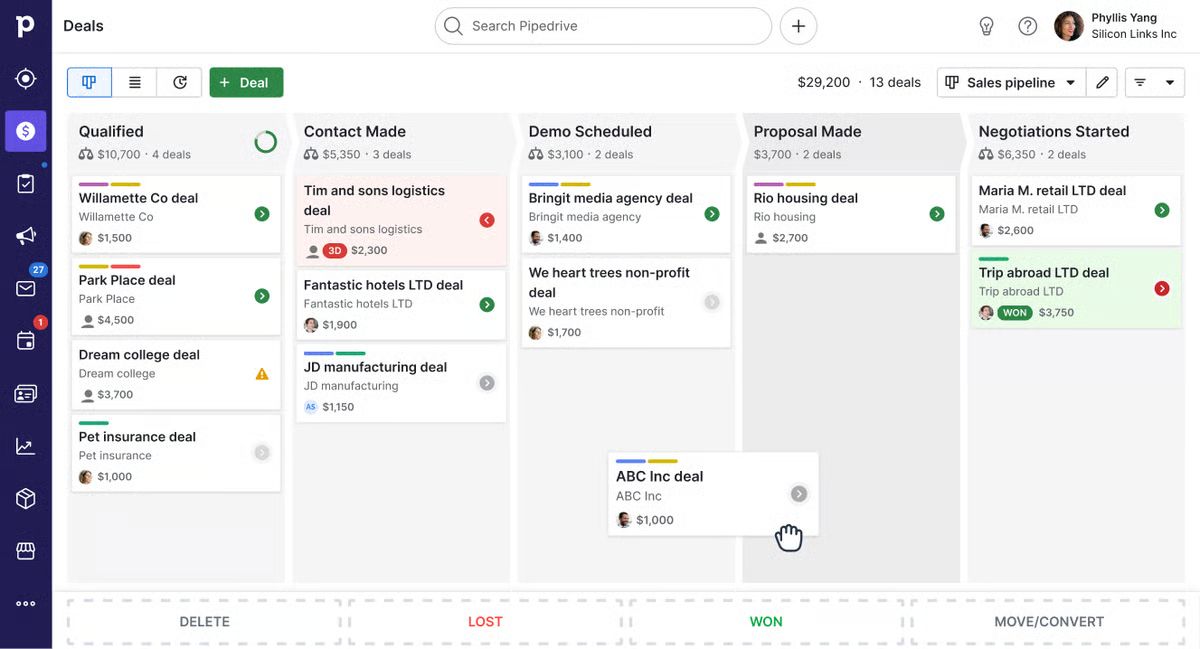
Pipedrive is a sales-focused CRM built around activity-based selling and visual pipelines. Founded in 2010 by salespeople who were frustrated with existing CRM tools, it's deliberately narrow in scope: help reps visualize where deals stand, remind them what needs doing next, and reduce the cognitive load of managing an active pipeline.
Over 100,000 companies use Pipedrive. It's a common upgrade path from spreadsheets or lightweight contact managers, and its shallow learning curve means most teams can be live within an hour. The drag-and-drop pipeline interface is one of the most intuitive in the category.
Pipedrive restructured its plans in July 2025, replacing the old Essential, Advanced, Professional, Power, and Enterprise tier names with four new ones: Lite, Growth, Premium, and Ultimate. It has also added AI features—deal summaries, email drafting, and lead prioritization through its Pulse toolkit—across plans.
Key Features
- Visual sales pipeline: Drag-and-drop Kanban board with customizable deal stages, deal rotting indicators to flag stalled opportunities, and multiple pipeline support across all plans.
- Lead and activity management: Leads Inbox separates early prospects from active deals, with task scheduling, reminders, and calendar sync for follow-up management.
- Workflow automation and AI assistant: Rule-based automations on Growth and above, plus an AI assistant for next-action suggestions, deal risk flags, and email drafting. The Pulse toolkit adds lead prioritization and enrichment.
- Email and communication tools: Two-way Gmail and Outlook sync, email templates, open and click tracking, a meeting scheduler, and Smart Docs for quotes and e-signatures.
- Reporting and forecasting: Dashboards, goal tracking, and revenue forecasts based on pipeline performance. Report limits vary by plan (50 per user on Growth, 250 on Premium, 500 on Ultimate).
Pipedrive Pricing
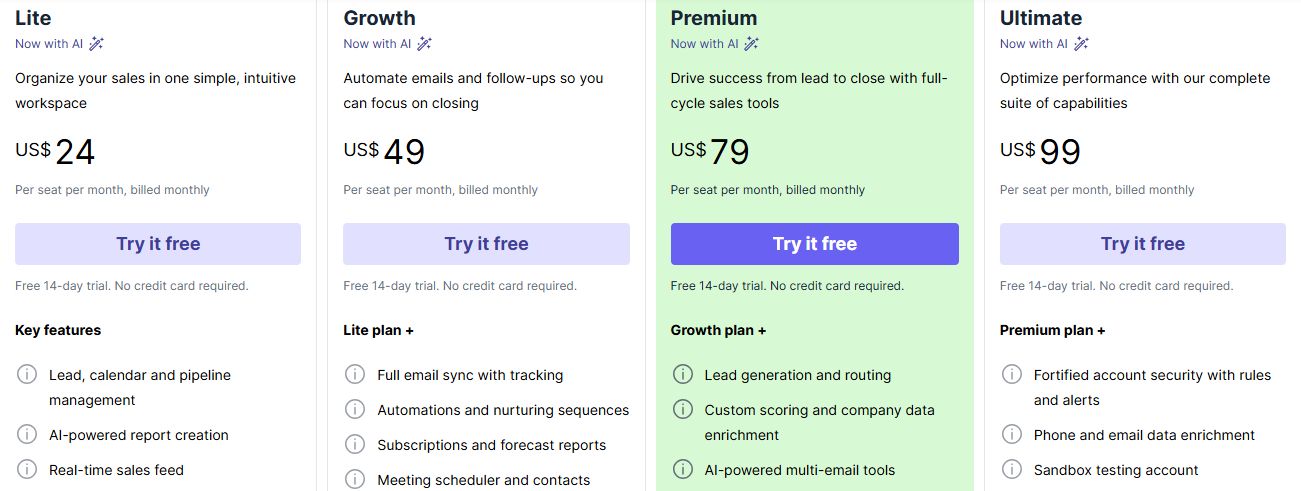
Pipedrive uses per-seat pricing with no free plan. A 14-day free trial is available on every tier with no credit card required. Annual billing saves approximately 30–50% versus monthly rates. Prices below reflect annual billing.
A few things to know before choosing a plan. Email sync is a Growth feature—Lite users get basic email tracking but not two-way sync, which means full activity logging requires the second tier at minimum. Workflow automation limits are per company (not per user), capping at 50 active automations on Growth before upgrading. LeadBooster (chatbot, prospector, web forms) and Campaigns (email marketing) are either included from Premium or available as paid add-ons on lower tiers—check which you need before anchoring to a plan price.
Note to editor: Verify pricing at pipedrive.com/pricing before publishing. Plans were restructured in July 2025 and names on some third-party sites may still reflect the old tier names.
What We Like About Pipedrive
Pipedrive is well-designed for what it sets out to do. These strengths are genuine and hold up in daily use:
- Intuitive visual pipelines: The drag-and-drop Kanban board makes deal stages easy to understand and manage at a glance. Deal rotting indicators surface stalled opportunities without anyone having to run a report.
- Clear lead separation: The Leads Inbox keeps early prospects outside the main pipeline until they're qualified, reducing clutter in the active deal view.
- Automation builder: Rule-based workflows on Growth and above reduce repetitive actions—stage changes, task assignments, internal notifications—once processes are defined and configured.
- Strong reporting basics: Dashboards and forecasting provide meaningful pipeline visibility for sales managers, with plan-tiered report limits that scale with team needs.
What We Don't Like About Pipedrive
These limitations show up in practice, particularly for early-stage teams running high-volume, fast-moving conversations:
- Process dependency: Pipeline accuracy relies on consistent activity logging or up-front automation setup. When reps miss updates—common in high-velocity selling—the CRM stops reflecting reality, and forecasting degrades.
- Activity-driven model: Founder-led sales move faster than structured logging often allows. A quick call that changes deal scope, an email thread with a new stakeholder, an informal commitment—none of these show up in the pipeline unless someone manually records them or an automation is already in place to capture them.
- Context loss risk: Conversation insights from emails and meetings can remain in inboxes or external transcripts unless actively moved into Pipedrive. The CRM captures activities, but not the full context of what was discussed—objections raised, decisions made, next steps agreed.
- Add-on complexity: The Lite plan's baseline is functional but limited. Email sync requires Growth. AI features and revenue forecasting require Premium. LeadBooster and Campaigns add further cost. Teams that need the full toolkit often discover they're well above the entry-level price before the system does what they actually need it to do.
Lightfield: A Pipedrive Alternative Built for Founder-Led Sales
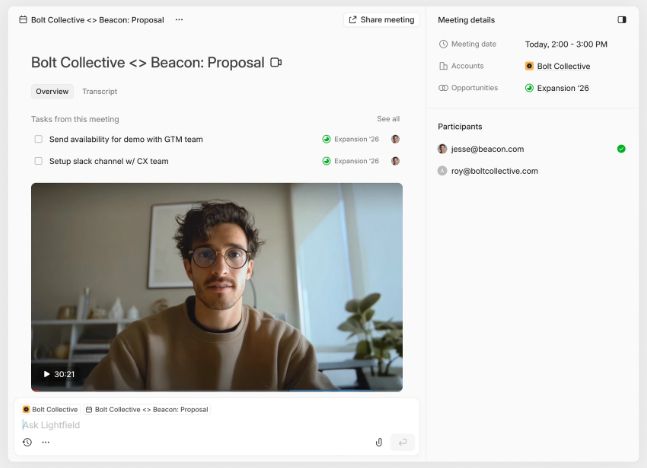
Lightfield is an AI-native CRM designed for early-stage B2B teams that want pipeline visibility without manual upkeep. Instead of relying on activity logging, Lightfield captures emails, meetings, and calls directly from existing workflows and converts them into structured CRM records automatically.
There's no Kanban board to populate before the system is useful, no automation to configure before emails start logging, and no manual stage updates to maintain between conversations. The CRM builds from what's already happening.
Key Features
- Integrated call intelligence: Record, transcribe, and analyze meetings directly inside the CRM—transcripts and action items appear on the correct deal record automatically.
- Retrospective field population: Create a field today and populate it from past email and meeting history—no re-entry, no manual backfill.
- Automatic task extraction: Action items from conversations appear in a central task panel across accounts, without anyone manually creating them.
- Agentic chat over customer data: Ask questions in natural language and receive answers grounded in conversation history, with citations to the source email or meeting.
- Schema-less setup: Start immediately and refine the data model later without losing historical context. No pipeline architecture required before the system becomes useful.
Lightfield Pricing
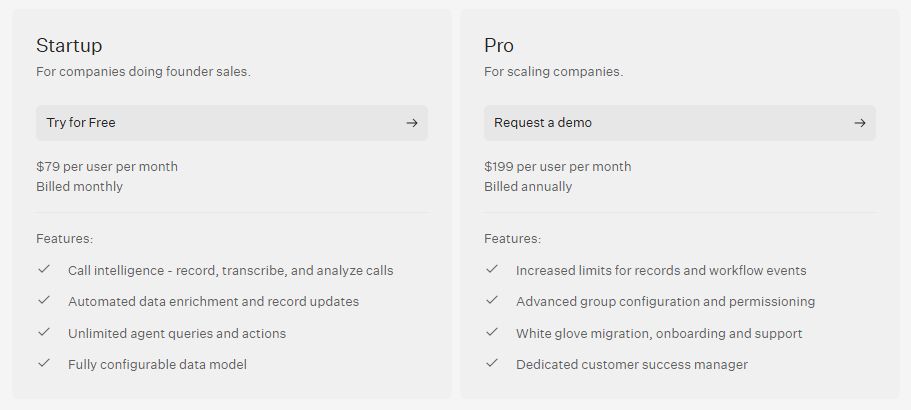
Note to editor: Verify pricing at lightfield.app/pricing before publishing.
Why People Choose Lightfield Over Pipedrive
1. CRM That Updates Itself
Pipedrive's pipeline accuracy depends on reps logging activities consistently or automations being configured to capture them. When a founder is running 20 conversations in a week across calls, emails, and threads, that logging discipline is hard to maintain. Emails and meetings automatically become structured CRM records in Lightfield, keeping pipeline data aligned with real conversations instead of relying on manual activity updates—so the system reflects reality even when no one has time to update it.
2. AI-Native Foundation
Pipedrive's AI features—deal summaries, email suggestions, Pulse lead scoring—are layered onto a traditional activity-based CRM architecture. They help organize what's already been manually logged, but they don't change how data enters the system. Lightfield is built with AI at the core: new fields can be created anytime and automatically populated from historical conversations, and the system learns from interactions as they happen rather than waiting for structured input.
3. Full Conversation Visibility
Pipedrive shows activity logs—calls made, emails sent, meetings scheduled. It doesn't surface what was said on those calls, what objections were raised, or what was promised in a specific email. Teams relying on Pipedrive for context often end up re-reading inboxes before a follow-up. Lightfield allows teams to query their complete customer history—every email, transcript, and meeting note—and receive cited answers grounded in real conversations rather than activity metadata.
FAQs about Pipedrive
1. Can Pipedrive Automatically Log my Meetings?
Partially. With email and calendar sync enabled (available from the Growth plan), Pipedrive can log emails and import calendar events as activities, and automatically link messages to the relevant contacts and deals. However, it does not record or transcribe what was discussed in those meetings. Content from calls and conversations requires manual note-taking or a third-party call recorder connected via integration.
2. Does Pipedrive Offer a Free Plan?
No. Pipedrive offers a 14-day free trial with no credit card required and full feature access during the trial period. After the trial ends, a paid plan is required to continue. The entry-level Lite plan starts at $14/user/month on annual billing or $24/user/month on monthly billing.
3. Is Pipedrive Easy to Set Up?
Yes. Its drag-and-drop pipeline and data import tools make initial setup simple—most teams can have a working pipeline in under an hour. However, getting the system to reflect your actual sales process requires configuring stages, custom fields, and automations deliberately. The out-of-box experience is good; the ongoing accuracy depends on whether that configuration is maintained as the process evolves.
4. Can Pipedrive's AI Provide Cited Answers From Meetings?
No. Pipedrive's AI assistant surfaces suggestions based on deal history and activity data—next actions, deal risk flags, and email drafts. It cannot answer open-ended questions with citations from meeting transcripts, because Pipedrive doesn't capture or store meeting content natively. For transcript-grounded answers, teams need a separate call recorder and a way to surface that content in context.
5. Can Pipedrive Backfill New Custom Fields Automatically?
No. When a new custom field is created in Pipedrive, it is empty for all existing records. Populating it across historical deals requires manual updates, a bulk import, or a third-party integration. There is no native feature that reads past activities or conversations and retroactively populates new fields based on what happened.