Monday CRM review 2026: Built-in efficiency or workflow overload?
Lightfield
Quick Summary
monday CRM is a flexible sales platform built around visual boards, automations, and customizable workflows. Lightfield is a CRM that updates itself by capturing emails and meetings automatically. Both promise better pipeline visibility. The difference is whether accuracy depends on maintaining workflows or whether it happens automatically.
Automation Depends on Workspace Design
monday CRM organizes sales activity through boards, pipelines, and automation rules that teams customize to match their process. Visual workflows and code-free automations make it possible to manage outreach, deal stages, and reporting from a single workspace.
However, automation only works reliably when those structures are designed carefully. Pipelines, fields, and handoffs must be configured deliberately to keep reporting and workflows aligned. As sales activity increases, maintaining consistency across boards and automation rules requires ongoing operational attention—and on lower-tier plans, monthly automation action limits can cap how much of that work the system handles on its own.
This review explores where monday CRM's visual workflow model improves execution and where it can introduce administrative overhead as teams scale.
Why Listen to Us?

Lightfield is an AI-native CRM built for founder-led sales teams. We operate in the same category as monday CRM, HubSpot, and other workflow-driven platforms. This perspective gives us a practical view of where flexible CRM systems create leverage and where ongoing structure and upkeep become the hidden cost that nobody mentions in the demo.
What is monday CRM?
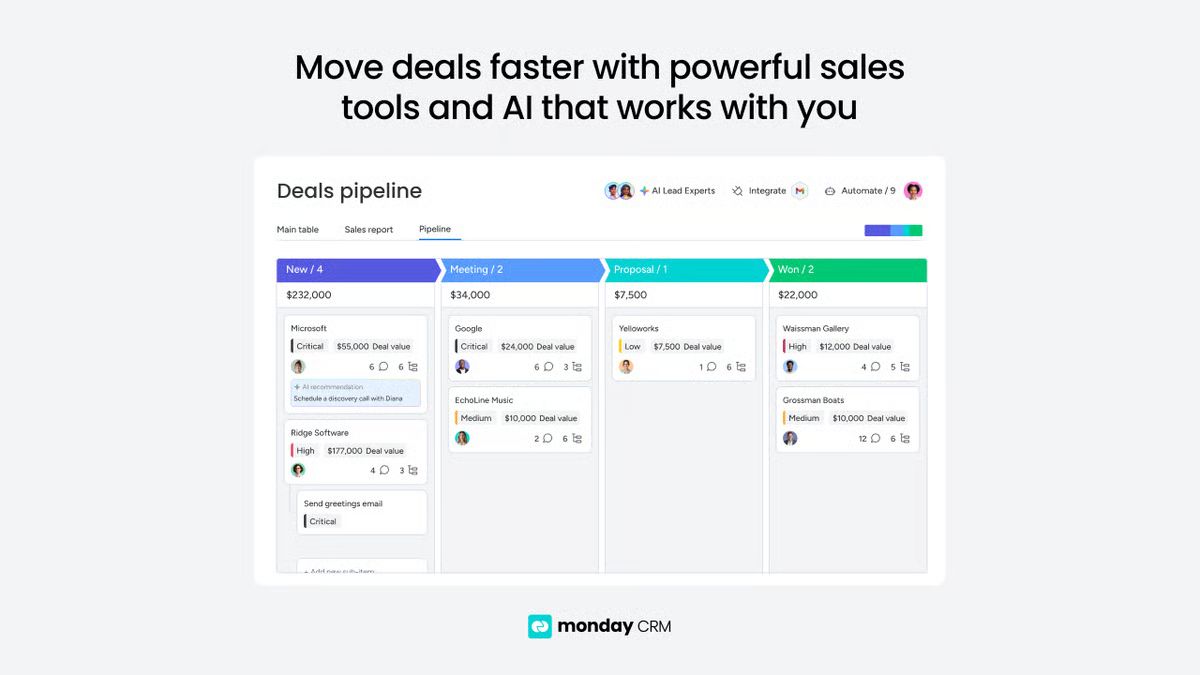
monday CRM is a sales-focused CRM built inside the monday.com Work OS platform. It combines visual deal boards, customizable pipelines, no-code automations, and outreach tools in a single workspace. Designed for teams that want to manage pipeline activity, reporting, and cross-functional collaboration without switching between apps.
Unlike purpose-built sales CRMs, monday CRM inherits the flexibility of a project management platform. That means the system can adapt to almost any sales process—but it also means teams need to actively design and maintain that structure. Out of the box, the platform provides core boards for leads, contacts, deals, and accounts. What you do with them depends heavily on how the workspace is configured.
monday CRM works well for SMBs, cross-functional teams, and companies already using monday.com for operations or project management. The shared platform means sales and delivery can live in one tool—a genuine advantage for teams where handoffs between sales and ops are a recurring friction point.
Key Features
- Visual deal boards: Customizable Kanban pipelines with drag-and-drop stages, color-coded statuses, and probability tracking across multiple deal views.
- Code-free automations: Rule-based workflows to assign leads, trigger notifications, update statuses, and move deals between stages—no developer required.
- Sequences and mass emails: Structured outreach with automated email steps, follow-up reminders, and engagement tracking. Email sequences are available on the Pro plan as of 2026.
- Dashboards and reporting: Real-time dashboards for pipeline health, rep performance, and revenue visibility. Advanced reporting and forecasting require Pro or higher.
Integrations and app ecosystem: 200+ native integrations plus marketplace apps covering Gmail, Outlook, Slack, Zoom, QuickBooks, and more.
monday CRM Pricing
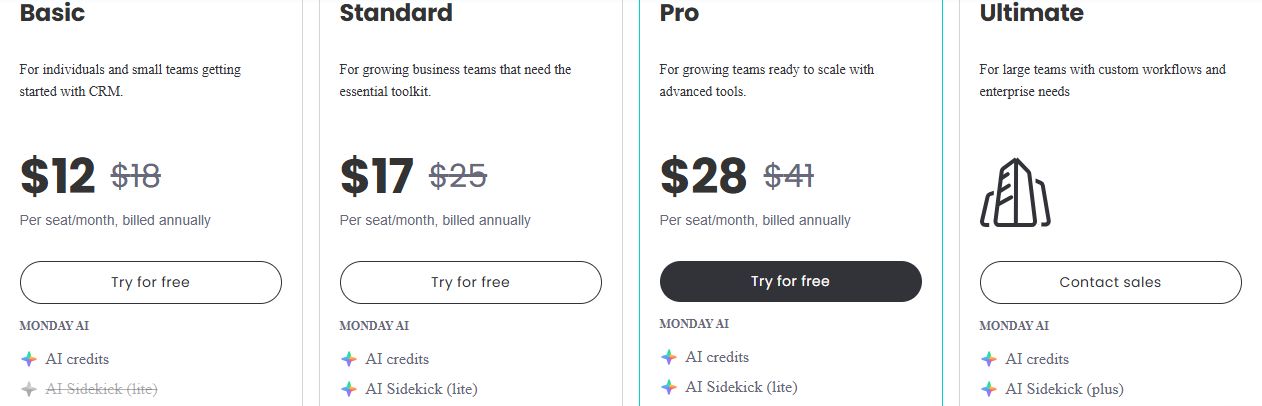
monday CRM uses per-seat pricing with a minimum of three seats on all paid plans. Annual billing offers approximately 18% savings over monthly rates. Prices below reflect annual billing.
| Plan | Annual price | What's included |
|---|---|---|
Basic | $12/user/month | Unlimited contacts and deals, core CRM boards, basic dashboards, 5GB file storage — no automations or integrations |
Standard | $17/user/month | Two-way email sync, quotes and invoices, guest access, 250 automation and integration actions per month |
Pro | $28/user/month | Email sequences, sales forecasting, private boards, chart views, formula columns, up to 25,000 automation and integration actions per month |
Enterprise (Ultimate) | Custom pricing | Advanced reporting, multi-level permissions, enterprise security controls, AI Sidekick Plus, dedicated onboarding |
A few pricing realities worth knowing. The Basic plan includes zero automation or integration actions—any workflow automation requires Standard or above. The jump from Standard (250 actions/month) to Pro (25,000 actions/month) is significant, and teams with active pipelines often hit the Standard cap faster than expected. The 3-seat minimum means the true entry cost for a small team is $51/month on Basic or $51–$84/month on Standard before any add-ons.
monday.com renamed its Enterprise tier to "Ultimate" in 2026. The features are unchanged—same governance controls, same security, new label.
Note to editor: Verify pricing at monday.com/pricing/crm before publishing.
What We Like About monday CRM
monday CRM is genuinely well-designed for teams that want visual clarity and flexibility once the workspace is set up. These are the strengths that hold up in real-world use:
- Visual pipeline clarity: Drag-and-drop deal boards make it easy to see stage movement and identify bottlenecks at a glance—particularly useful for sales managers reviewing team performance.
- Flexible customization: Fields, stages, automations, and dashboards can be tailored to almost any sales process without writing code. Teams aren't forced into a rigid schema.
- Strong automation capacity on higher tiers: The jump from 250 to 25,000 monthly automation actions on Pro gives scaling teams meaningful room to run without hitting limits.
Broad integration ecosystem: Native integrations and marketplace apps connect the GTM tools most sales teams already use, reducing the need for Zapier to bridge gaps.
What We Don't Like About monday CRM
These are the limitations that surface most consistently once teams move beyond the initial setup and start running real pipeline volume:
- Automation limits on lower tiers: The 250-action cap on Standard is low for active sales teams. A single workflow triggered across a modest pipeline can exhaust the monthly budget quickly, forcing an upgrade before teams are ready to commit to Pro pricing.
- Minimum seat requirement: Paid plans require at least three seats, increasing entry cost for small or early-stage teams who may only need one or two users in the CRM.
- Workspace dependency: Pipeline accuracy depends on maintaining boards, stages, and automation logic consistently. Core CRM boards have structural constraints—they can't be duplicated or moved between workspaces reliably—which limits how teams can scale or reorganize their setup without rebuilding from scratch.
Feature concentration in higher tiers: Email sequences, advanced forecasting, and private board access all require the Pro plan at $28/user/month. Teams evaluating monday CRM at the Standard tier are often missing the features that would make it competitive with purpose-built sales CRMs.
Lightfield: A monday CRM Alternative That Updates Itself
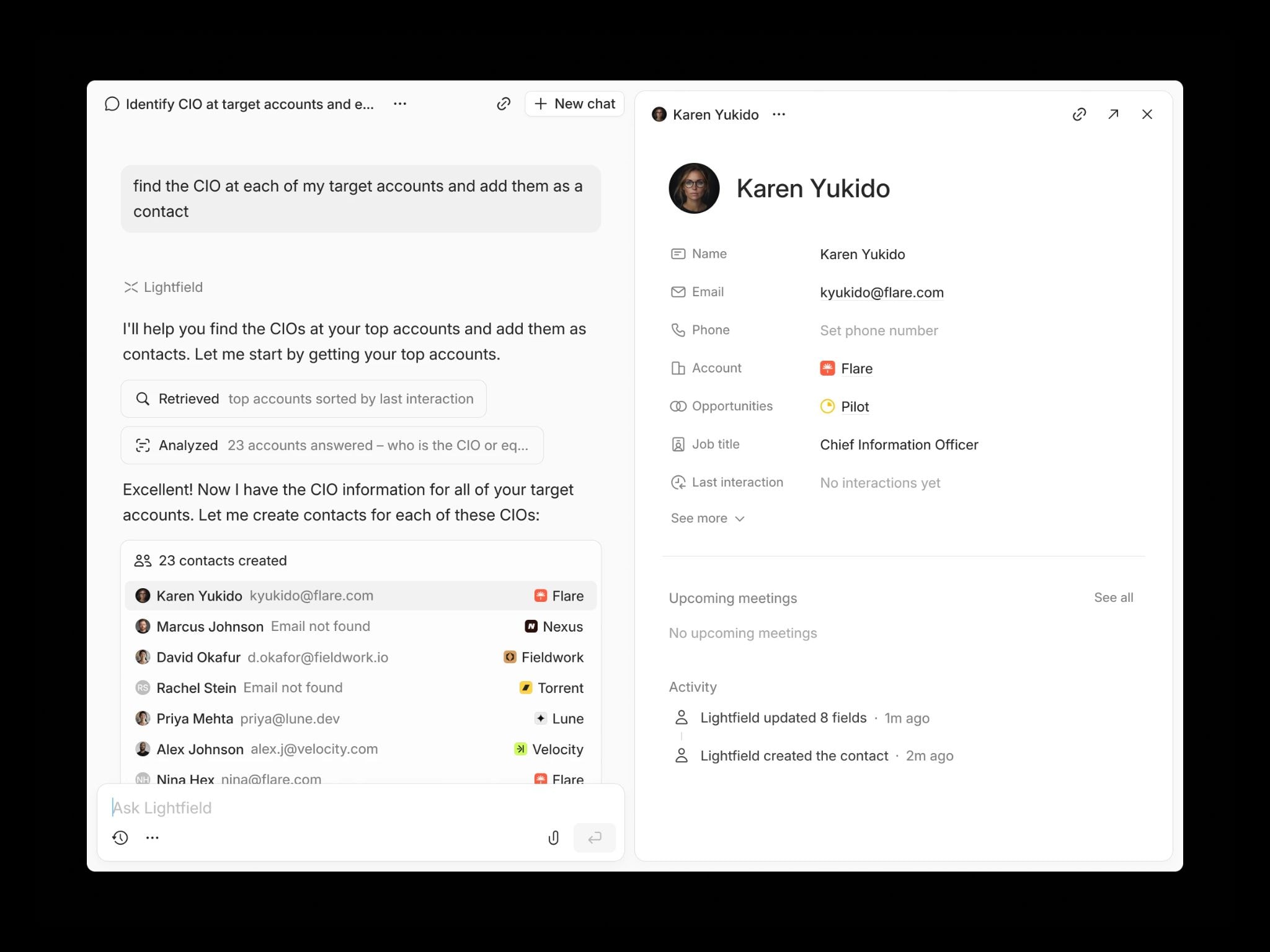
Lightfield is an AI-native CRM built for founder-led sales teams that want pipeline visibility without maintaining boards, stages, or automation rules. Instead of relying on workspace design to keep records accurate, Lightfield captures emails, meetings, and follow-ups directly from daily workflows and converts them into structured CRM records automatically.
The core difference: monday CRM gives you the tools to build a system that reflects your pipeline. Lightfield builds the system for you, from your actual conversations.
Key Features
- Auto-capture CRM: Emails and calendar meetings automatically create and update contacts, accounts, and opportunities—no configuration required to get started.
- Integrated call intelligence: Meetings are recorded, transcribed, and analyzed, with searchable transcripts and AI-generated summaries living directly inside the CRM record.
- Agentic chat with citations: Ask natural-language questions about deal status, customer history, or pipeline health and receive answers linked back to source emails and meetings.
- Retroactive field population: Create a new custom field and Lightfield automatically populates it using past conversations—including historical data captured before the field existed.
Schema-less memory architecture: Start immediately and refine your CRM structure later without losing any historical context. No workspace design required before the system becomes useful.
Lightfield Pricing
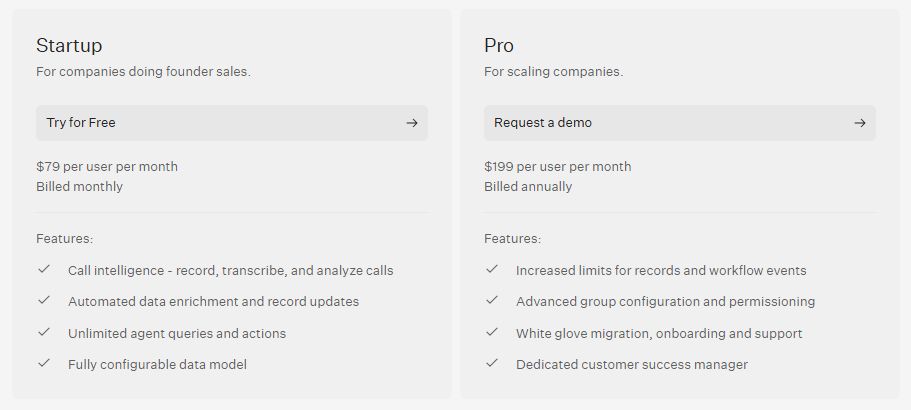
| Plan | Price | What's included |
|---|---|---|
Startup | $79/user/month (billed monthly) | Call intelligence, automated record updates, unlimited AI agent queries, configurable data model, defined record and workflow limits |
Pro | $199/user/month (billed annually) | Higher record and workflow limits, advanced permissions, white-glove migration support, dedicated onboarding assistance, dedicated customer success manager |
Note to editor: Verify pricing at lightfield.app/pricing before publishing.
Why Teams Choose Lightfield Over monday CRM
1. Pipeline Accuracy
monday CRM can sync emails and meetings once configured, but deal stages and reporting still depend on how consistently boards and automation rules are maintained. If a rep forgets to drag a deal to the next stage, the pipeline report doesn't reflect reality. Lightfield structures CRM records directly from conversations—so pipeline data reflects what's actually happening, not what someone remembered to update.
2. No Automation Caps
monday CRM limits automation and integration actions based on plan tier—250 per month on Standard, 25,000 on Pro. Teams on Standard can hit the cap mid-month with moderate pipeline activity. Lightfield includes core automation and AI agent queries on every plan without action-based limits. The system runs continuously without teams needing to budget their workflow capacity.
3. Conversation Context
monday CRM can log and display activity once integrations are connected, but structured deal data still depends on how well the workspace was designed to capture it. Lightfield converts full conversations—emails, meeting transcripts, call recordings—into structured, searchable CRM records automatically. There is no board to configure before context starts accumulating.
FAQs About monday CRM
1. Does monday CRM Automatically Log Emails?
Yes, when Gmail or Outlook is connected through two-way sync, emails are automatically logged to the relevant contact or deal record. Email sync is available on the Standard plan and above. Basic plan users do not have access to email integration, which means email logging requires a manual workaround or plan upgrade at that tier.
2. Is There a Forever-Free Plan?
monday.com has historically offered a free plan for up to two seats with basic boards, templates, and mobile app access. However, the free tier is designed primarily for individual work tracking—not CRM usage. It lacks email sync, automations, and the CRM-specific boards that make the platform useful for sales teams. Most sales teams will need Standard or above to get functional CRM value. Confirm current free plan availability at monday.com before planning around it.
3. Does monday CRM Eliminate Manual Data Entry Entirely?
No. While many activities can be automated or synced once the workspace is configured, deal stage updates, notes, and certain workflow adjustments still require manual input. The platform reduces repetitive data entry for teams that invest in proper automation setup, but it doesn't remove the human requirement for pipeline hygiene. Accuracy depends on rep discipline and workspace maintenance.
4. Can I Invite External Contractors or Clients to View my CRM?
Yes. Viewer access is free and unlimited on all paid plans—external stakeholders can see boards without consuming a paid seat. Guest access, which allows commenting or limited editing, requires the Standard plan or higher. This makes monday CRM workable for agencies or client-facing teams that need controlled external visibility into project or deal status.
5. Can monday CRM Support Outbound Sales Teams?
Yes. monday CRM supports outbound sales through email sequences, automation rules, engagement tracking, and integrations with calling tools. Email sequences were added to the Pro plan in 2026. Higher plans increase automation limits and activity capacity, which matters for teams running structured outbound cadences. Teams with heavy calling volume will still need to connect a third-party dialer, as monday CRM does not include native calling.