HubSpot CRM review 2026: Features, pricing and a smarter alternative
Lightfield
Quick Summary
HubSpot is a full-platform CRM combining marketing, sales, service, and automation tools. Lightfield is a CRM that updates itself by capturing emails and meetings automatically. Both promise better pipeline visibility. The difference is how much configuration is required to make that automation reliable.
Automation Still Requires Architecture
HubSpot positions itself as an all-in-one platform designed to reduce manual work across marketing, sales, and customer management.
But meaningful automation depends on how the system is structured. Lifecycle stages, pipelines, and workflow logic must reflect how the team actually sells. If that architecture is misaligned—wrong stages, stale properties, conflicting enrollment triggers—automation can produce inconsistent data, fragmented reporting, and additional administrative overhead. HubSpot partners and consultants often cite this as the most common implementation failure: the technology works, but the configuration doesn't match the business.
This review examines where HubSpot's automation improves operational efficiency and where ongoing configuration and maintenance are still required to keep the system reliable.
Why Listen to Us?
Lightfield is an AI-native CRM built for founder-led sales teams. We work closely with early-stage companies evaluating platforms like HubSpot as they scale their sales infrastructure. That perspective gives us practical insight into where full-platform CRMs deliver value and where complex configuration can create ongoing operational overhead—often before a team has the RevOps function to manage it.
What is HubSpot CRM?
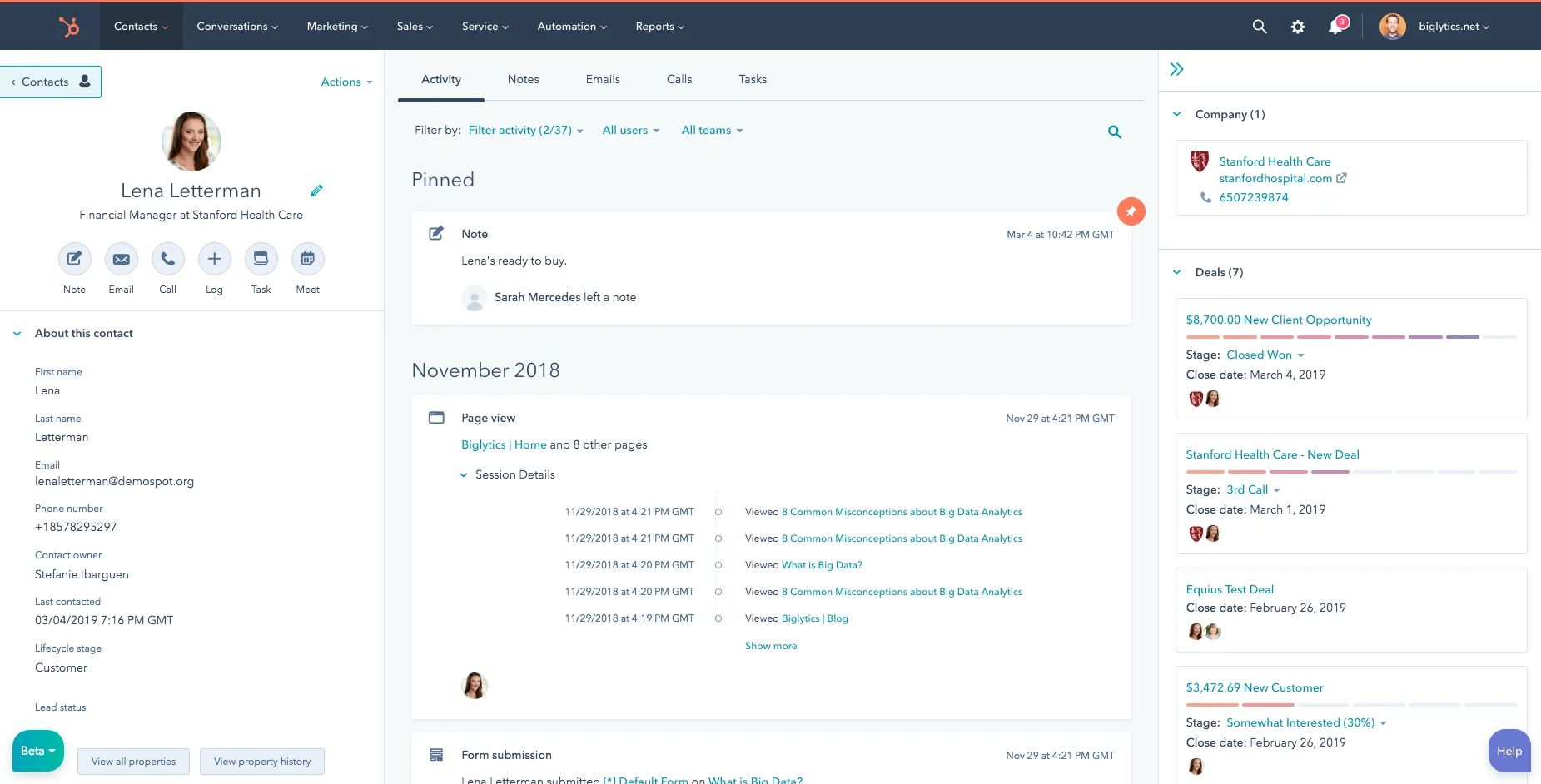
HubSpot CRM is the core database within HubSpot's broader customer platform. It unifies marketing, sales, and service data in a single system of record, storing contacts, companies, deals, and activities while supporting automation, reporting, and collaboration across connected Hubs. It's often adopted by growing teams that want marketing and sales data connected in one place without running multiple disconnected tools.
The free CRM is one of the most feature-rich free tiers in the category—contact management, basic pipelines, email tracking, and Gmail or Outlook integration are all available at no cost. That low barrier makes HubSpot easy to start with. The complexity shows up later, as teams layer in automation, reporting, and cross-hub functionality and begin to understand how pricing actually scales.
HubSpot operates across six product Hubs: Marketing, Sales, Service, Content, Operations, and Commerce. Each Hub has its own pricing tiers. You can buy individual Hubs or bundle them—but pricing adds up quickly once teams move beyond Starter, and the onboarding fees at Professional and Enterprise can represent a meaningful additional line item.
Key Features
- Unified contact timeline: Emails, calls, meetings, website activity, and support tickets in a single chronological record per contact.
- Visual deal pipelines: Drag-and-drop boards with customizable deal stages, probability weighting, and task automation tied to stage movement.
- Email and activity tracking: Automatic logging from connected Gmail or Outlook accounts, with open and click tracking on sent emails.
- Workflow automation: Rule-based triggers for tasks, internal notifications, email sequences, and property updates across the CRM.
Breeze AI suite: HubSpot's AI layer covering record enrichment, contact and company summaries, predictive lead scoring, and AI-assisted content generation across Hubs.
HubSpot CRM Pricing
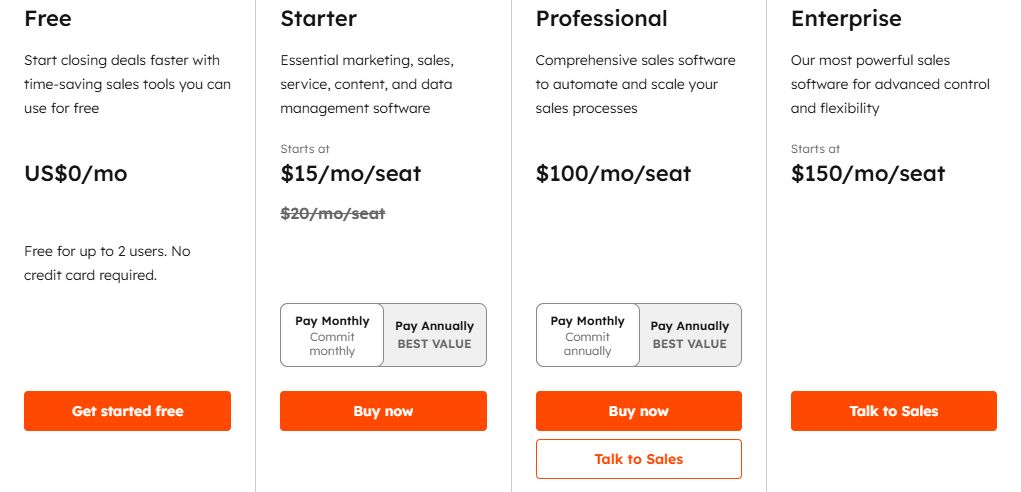
HubSpot moved to a seat-based pricing model in 2024. The structure is more flexible than the old bundle tiers, but also more complex to evaluate. The numbers below are annual billing rates; monthly billing is available for Starter only.
| Plan | Annual price | Monthly price | What's included |
|---|---|---|---|
Free CRM | $0 forever | $0 forever | Unlimited users, basic contact management, one deal pipeline, 2,000 email sends per month with HubSpot branding, Gmail and Outlook integration, and simple deal tracking. No workflow automation, no custom reports, no AI features |
Starter | $15/seat/month | $20/seat/month | Removes HubSpot branding, adds basic automation across all Hubs, and opens up more email sends and marketing contacts |
Professional | $90/seat/month | $100/seat/month | Advanced automation, custom reporting, sequences, and AI features unlock |
Enterprise | $150/seat/month | $150/seat/month | Adds advanced governance, multi-team permissions, custom objects, and deeper predictive AI |
A practical note: most growing B2B sales teams land on Sales Hub Professional ($90/seat/month, billed annually) alongside Marketing Hub Professional, and the combined subscription cost climbs quickly before onboarding, add-ons, or contact-volume overages. HubSpot's pricing is transparent on a per-feature basis but requires careful modeling to understand total cost.
What We Like About HubSpot CRM
HubSpot is well-built for teams that need marketing and sales data in one system, and that have the operational capacity to configure it properly. These strengths hold up:
- Robust ecosystem: Marketing, sales, service, and content tools operate within the same database. A deal won in Sales Hub can trigger onboarding in Service Hub without any manual handoff—when configured correctly.
- Extensive integrations: HubSpot's App Marketplace connects with most GTM and revenue tools. Over 1,500 native integrations cover everything from Salesforce to Slack to most major ad platforms.
- Structured interface: Pipelines, dashboards, and contact timelines provide organized visibility once the system is set up. The UI is broadly considered one of the more intuitive in the enterprise CRM category.
High-tier automation: At Professional and Enterprise, workflows, predictive lead scoring, AI enrichment, and Breeze AI tools meaningfully reduce repetitive work for teams with the RevOps capacity to configure and maintain them.
What We Don't Like About HubSpot CRM
These are the limitations that show up in real-world deployments, particularly for leaner teams without dedicated operations support:
- Setup tax: Automation depends on correctly defining lifecycle stages, pipelines, and workflow logic upfront. Teams that skip or rush this work end up with inconsistent data, unreliable forecasting, and reports that raise more questions than they answer. HubSpot's own implementation partners describe this as the most common failure mode.
- Activity-driven model: Pipelines become inaccurate when activities or stage updates are missed. If a rep doesn't log a call or move a deal, the CRM doesn't reflect the real state of the pipeline. Automation can partially compensate, but it requires deliberate configuration and ongoing maintenance to work reliably.
- Feature gating: Advanced automation, custom reporting, predictive scoring, and AI features all require Professional or Enterprise tiers. Teams drawn in by the free CRM often discover that the features they actually need sit two pricing tiers above where they started.
Context fragmentation: Key deal insights from emails and meeting transcripts don't automatically become structured CRM data. Notes, summaries, and outcomes need to be manually logged or require workflow configuration to surface. Raw conversation context doesn't flow through the system without deliberate setup.
Lightfield: A HubSpot CRM Alternative That Updates Itself
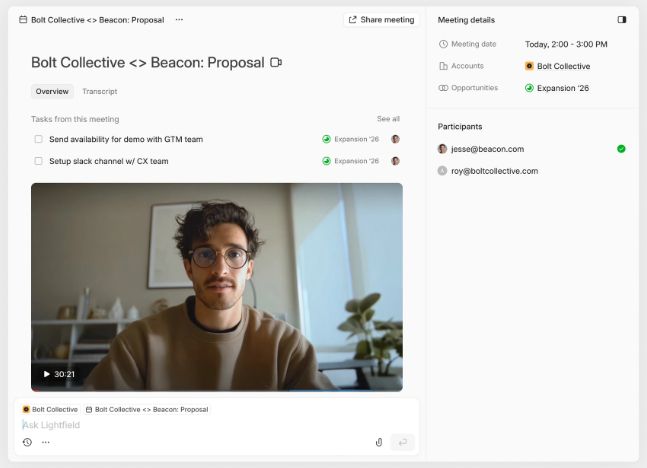
Lightfield is an AI-native CRM built for founder-led sales teams that want pipeline visibility without ongoing configuration. Instead of relying on lifecycle stages and workflow setup first, Lightfield captures emails, meetings, and follow-ups directly from daily workflows and converts them into structured CRM records automatically.
There's no lifecycle architecture to design before the CRM becomes useful, no workflow setup before emails start logging, and no Breeze AI to train on clean data before it produces reliable output. Lightfield builds the system from the conversations your team is already having.
Key Features
- Auto-capture CRM: Emails and meetings automatically create and update accounts, contacts, and opportunities—no pipeline architecture required before value accumulates.
- Integrated call recorder: Record, transcribe, and analyze meetings directly inside the CRM, with transcripts and summaries linked to the correct records automatically.
- Schema-less data model: Start immediately and refine the data structure later without losing historical context. No lifecycle stage mapping required before the system is useful.
- Retrospective field population: Create a new field and Lightfield automatically backfills it from past conversations captured in the system—including emails and meeting transcripts from before the field existed.
Agentic chat with citations: Ask questions about customers, deals, or pipeline status and receive answers linked to the exact emails or meetings they came from.
Lightfield Pricing
Starter
$89/user/month, up to 3 users. 14-day free trial.
Larger teams doing more complex agentic work can move to a team plan with unlimited viewer seats.
Pro
Visit lightfield.app/pricing for details.
Growth
Visit lightfield.app/pricing for details.
Why People Choose Lightfield Over HubSpot CRM
1. No Ongoing Workflow Maintenance
HubSpot automation depends on correctly configured lifecycle stages, pipelines, and workflow logic—and that configuration needs to be maintained as the sales process evolves. A workflow with a stale enrollment trigger or a broken branch can silently misroute leads or produce inaccurate pipeline data for weeks before anyone notices. Lightfield captures emails and meetings directly from daily workflows and converts them into structured CRM records automatically, so the system reflects reality without anyone managing configuration in the background.
2. Lower Complexity and Cost Layers
HubSpot's deeper automation, AI features, and cross-hub reporting often sit behind Professional or Enterprise tiers—or require separate Hubs with their own per-seat or platform-level pricing. By the time a team has Sales Hub Professional plus Marketing Hub Professional plus onboarding, they're looking at $15,000–$25,000+ per year before their pipeline is actually running. Lightfield combines CRM and meeting intelligence in one system at a predictable per-seat price, reducing both tool stacking and subscription overhead.
3. Full Conversation Context
HubSpot logs activities, but deeper insight from emails and meetings depends on properties and workflow setup to surface that information in a structured form. A rep's call with a key prospect becomes a logged activity with a duration and outcome—not a searchable, structured record of what was discussed, what objections were raised, or what was promised. Lightfield turns conversations into searchable, structured data with citations, so context is preserved automatically and available to anyone on the team who needs it.
FAQs about HubSpot CRM
1. Is the HubSpot Onboarding Fee Mandatory?
For Professional and Enterprise tiers, yes—HubSpot requires onboarding for most new customers at these levels. The fee is one-time and varies by Hub: Sales Hub Professional onboarding runs approximately $750, while Marketing Hub Professional is $3,000. The requirement can sometimes be waived when purchasing through a certified HubSpot Solutions Partner, who may include implementation services as part of their engagement. Starter plans do not require onboarding fees.
2. Does HubSpot Have a Mobile App?
Yes. HubSpot's mobile app is available on iOS and Android and lets sales reps view deals, log calls, and manage contacts remotely. Core CRM functions work well on mobile. However, complex workflow configuration, custom reporting, and dashboard building are desktop-only—the mobile app is designed for access and activity logging, not system administration.
3. Is HubSpot Suitable for Non-Sales Use Cases?
Yes. HubSpot is built around a shared contact database that connects Marketing, Sales, Service, Content, and Operations Hubs. Marketing teams use it for campaigns and attribution; service teams use it for ticketing and customer support; operations teams use it for data sync and workflow management. The shared database is the core value proposition—different teams working from the same customer record without duplicate data or manual syncing.
4. Does HubSpot Offer Phone Support for Free Users?
No. Free users rely on HubSpot's community forums, knowledge base, and self-serve documentation. Phone support and direct access to a support representative require a paid subscription. Professional and Enterprise customers get priority support access, and Enterprise accounts typically receive a dedicated customer success manager.
5. Does the HubSpot CRM Have Limits on Marketing Emails?
Yes. The free plan caps monthly sends at 2,000 emails (with HubSpot branding on all sends). Starter plans scale based on your active marketing contact count—starting at 1,000 contacts—and Professional and Enterprise tiers include larger contact allotments that can be expanded for additional cost. Exceeding your plan's contact or send limits triggers overage charges, which can add meaningfully to monthly costs for teams with large or fast-growing contact databases.