Close CRM review 2026: Does speed solve manual CRM work?
Lightfield
Quick Summary
Close CRM is an outbound-focused sales CRM with built-in calling, SMS, and email designed for high-velocity outreach. Lightfield is a CRM that updates itself by capturing emails and meetings automatically. Both aim to reduce manual sales admin. The difference is how much pipeline accuracy still depends on rep activity and system upkeep.
When Speed Replaces Tools but not Maintenance
Close CRM keeps communication inside one system. Native calling, SMS, and email reduce reliance on external dialers, and most interactions are logged automatically. This simplifies outreach and supports high outbound velocity for teams focused on pipeline generation.
However, activity capture does not automatically translate into structured pipeline accuracy. Deal stages, forecasting fields, and follow-up structure still depend on how consistently reps manage pipeline updates. Close handles the communication layer well—but the CRM layer still requires rep discipline to reflect reality.
This review evaluates where Close's communication-heavy model improves execution and where manual CRM upkeep still plays a role as teams scale.
Why Listen to Us?
Lightfield is an AI-native CRM for founder-led sales. We specialize in helping early-stage teams transition from established platforms like HubSpot and Close as their needs change. This perspective shows us exactly where advanced GTM tools provide value versus where structured setup and ongoing maintenance persist—and where the gap between the two starts to cost teams real selling time.
What is Close CRM?
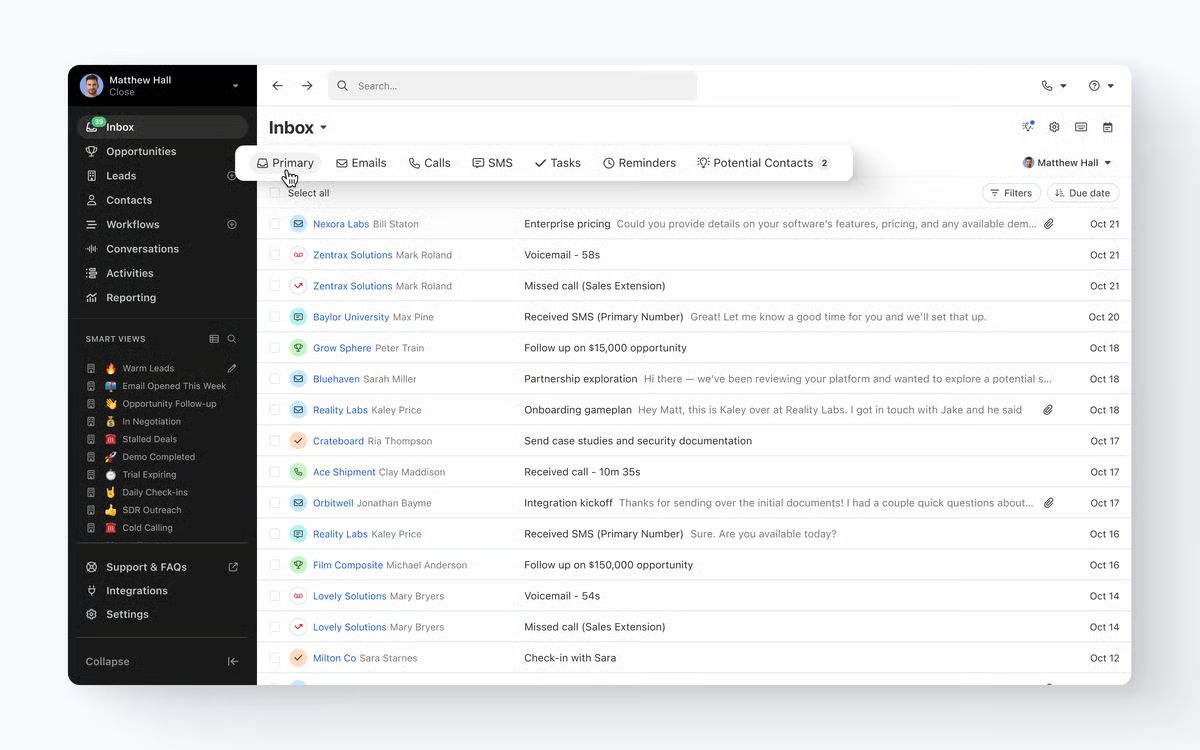
Close positions itself as an all-in-one sales workspace where conversations, calls, emails, SMS, tasks, and reporting live in one platform. Built primarily for outbound teams that prioritize high-velocity communication and centralized activity tracking, it was originally developed as an internal tool at a Y Combinator-backed company and has since grown into one of the more recognized names in inside sales CRM.
Close is particularly well-suited for SMBs and SDR/BDR teams that run phone-heavy pipelines. Its core design decision—putting communication at the center of the CRM rather than treating it as an integration—shapes both its strengths and its limitations.
Key Features
- Built-in calling and SMS: Make phone calls and send text messages directly from lead records, with automatic logging of duration, outcomes, and recordings.
- Email sequences and tracking: Two-way email sync with sequence automation, open tracking, and reply monitoring across multiple connected accounts.
- AI-assisted activity capture: Call summaries and transcriptions generated automatically after conversations via the Call Assistant add-on.
- Smart Views: Dynamic lead lists that update in real time based on engagement signals and recent activity.
Workflow automation: Rule-based automations to update lead status, assign tasks, and trigger follow-ups—available on Growth and Scale plans.
Close CRM Pricing
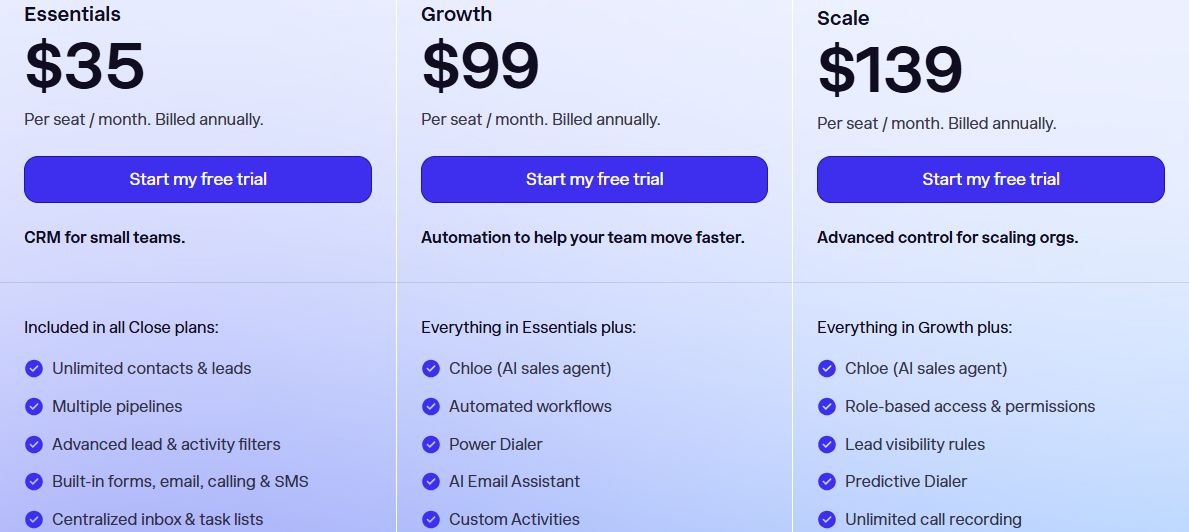
Close offers four subscription tiers designed for different team sizes and outbound sales needs. All plans include a 14-day free trial. Prices below reflect annual billing; monthly billing adds approximately 10–25% to each tier.
| # | Plan | Annual price | What's included |
|---|---|---|---|
1 | Solo | $9/user/month | Single-user lead and pipeline management, up to 10K leads, built-in calling and SMS, basic email sync |
2 | Essentials | $35/user/month | Unlimited leads and contacts, multiple pipelines, Smart Views, centralized inbox, follow-up reminders |
3 | Growth | $99/user/month | Everything in Essentials plus workflow automation, Power Dialer, AI Email Assistant, bulk email, custom activities |
4 | Scale | $139/user/month | Everything in Growth plus Predictive Dialer, unlimited call recording, role-based permissions, lead visibility rules |
A few notes on the real cost of Close. The features that make Close distinctively useful—the Power Dialer, automated workflows, and AI email tools—are locked behind the Growth tier at $99/user/month. Call transcription and summaries are available as a separate add-on (Call Assistant) at $50/month plus usage on top of any plan. Teams making heavy use of outbound calling should budget for additional phone number and calling credit costs beyond the plan price.
What we Like About Close CRM
Close is genuinely well-built for what it's designed to do. Teams running structured outbound programs will find real value in these capabilities once the system is configured:
- Built-in calling and SMS: eliminate the need for third-party dialers like Aircall or Dialpad, reducing both tool costs and context switching.
- Automatic logging: captures calls, emails, and texts without manual entry, so activity history stays current as long as reps are working inside Close.
- Power and Predictive Dialers: support structured, high-volume outbound workflows—particularly useful for SDR teams running call blocks.
Smart Views: dynamically prioritize leads based on engagement and recent activity, making it easier to surface warm prospects without manual list-building.
What we Don't Like About Close CRM
These are the limitations that come up most consistently in real-world use, particularly for teams that move beyond pure outbound execution:
- Pricing structure: The features that justify Close's price—automation, Power Dialer, AI tools—require the Growth plan at $99/user/month. Call transcription costs extra on top of that. Smaller teams can hit meaningful costs before accessing what makes Close competitive.
- Limited marketing capabilities: Close is a sales tool. Top-of-funnel activities—ads, landing pages, nurture sequences tied to marketing data—require external tools, adding integration overhead that somewhat undermines the "all-in-one" positioning.
- Restricted data modeling: Custom objects are available on Growth and above and must be attached to lead records. They are not fully independent entities, which limits how teams can model complex account structures or non-standard sales processes.
Reporting scope: Close's reporting is strong for sales activity metrics—calls made, emails sent, deal velocity. It's less useful for cross-team operational analysis, pipeline health over time, or custom business metrics that don't map cleanly to activity data.
Lightfield: A Close CRM Alternative Built for Structured Context
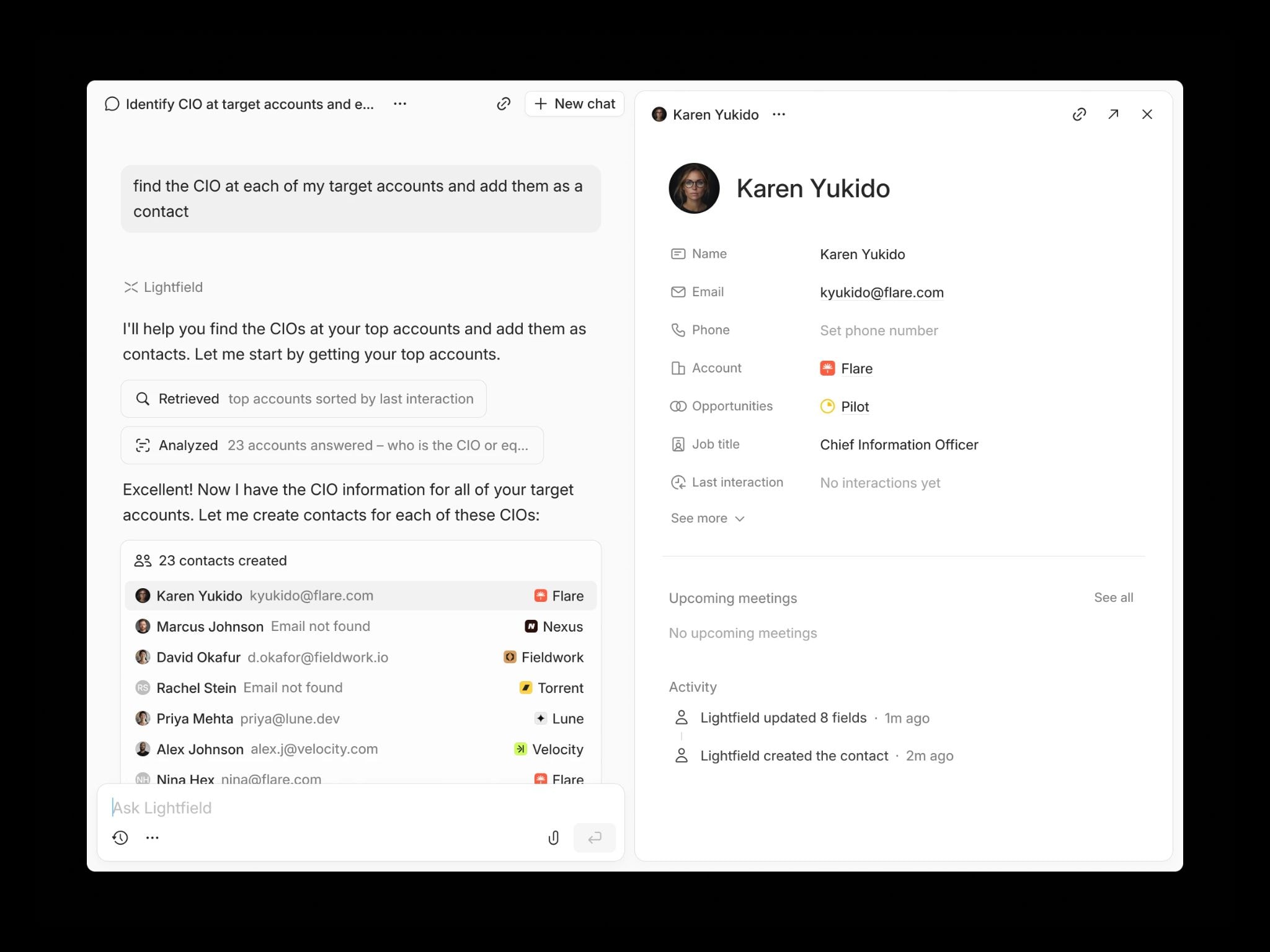
Lightfield is an AI-native CRM built for founder-led sales teams that want pipeline accuracy without managing activity logs or manually advancing deal stages. Instead of leaving conversations as timeline entries, Lightfield converts emails, meetings, and calls into structured CRM records automatically—updating accounts, contacts, opportunities, and custom fields in real time.
The core difference in design: Close captures activity. Lightfield structures it.
Key Features
- Auto-capture from conversations: Emails and calendar meetings automatically create and update contacts, accounts, and opportunities—no manual entry required.
- CRM and call recorder in one: Recordings, transcripts, summaries, and action items live directly inside the CRM record, not as a separate add-on.
- Schema-less architecture: Start immediately and reshape your data model later without losing historical context. No setup required before the CRM becomes useful.
- AI field population: Create a custom field and Lightfield automatically populates it using past conversations—retroactively.
Agentic customer querying: Ask natural-language questions about pipeline, objections, or deal status with answers linked back to the source conversations.
Lightfield Pricing
Starter
$89/user/month, up to 3 users. 14-day free trial.
Larger teams doing more complex agentic work can move to a team plan with unlimited viewer seats.
Pro
Visit lightfield.app/pricing for details
Growth
Visit lightfield.app/pricing for details
Why People Choose Lightfield Over Close
1. Context Beyond Activity Logs
Close records calls, SMS, and emails automatically, but most interactions remain as timeline activity—a chronological feed of what happened rather than structured data your CRM can act on. Deal stages still require manual updates. Forecasting still depends on rep discipline. Lightfield converts conversations into structured CRM data that directly updates pipeline records, so the system reflects reality without anyone having to manually maintain it.
2. Forecasting Without Stage Dependence
Close forecasting relies on deal stages and associated probability percentages that reps set and update. If stages are stale—which they often are in high-volume environments—forecast accuracy degrades quickly. Lightfield extracts tasks, field updates, and opportunity signals directly from meetings and emails, so pipeline data stays current even when no one explicitly touched the CRM.
3. Reduced Coordination Overhead
Close centralizes dialing and outreach effectively, but call recording, transcription, and summary generation sit behind a separate paid add-on. Follow-up generation isn't built in. Lightfield combines CRM records, call recording, transcripts, and follow-up draft generation in one system—reducing the number of moving parts a lean team needs to manage.
FAQs About Close CRM
1. Does Close CRM Eliminate All Manual Data Entry?
Not entirely. Close automatically logs calls, SMS messages, and emails, which removes a meaningful portion of rep data entry. However, deal stage progression, forecasting accuracy, and certain custom fields still require user updates to ensure pipeline reports remain accurate. Activity logging and pipeline management are different problems—Close solves the first more completely than the second.
2. Does Close Include a Built-In Dialer?
Yes. Close includes a native Power Dialer on the Growth plan ($99/user/month) and a Predictive Dialer on the Scale plan ($139/user/month). Calls are recorded and logged directly to the lead record. Call transcription and AI-generated summaries are available through the Call Assistant add-on, which is priced separately at $50/month plus per-minute usage fees.
3. Can Close Replace my Marketing Automation Tools?
No. Close is designed primarily for sales teams and sales execution. It does not include advanced marketing automation, ad management, landing page builders, or behavioral nurture flows. Most teams using Close for outbound sales also run a separate marketing platform—HubSpot Marketing, Mailchimp, or similar—to manage top-of-funnel activity and lead generation.
4. Is There a Free Version of Close?
No. Close provides a 14-day free trial but does not offer a free-forever tier. The Solo plan at $9/user/month (billed annually) is the entry-level paid option, though it is limited to one user and 10,000 leads. Continued team use requires upgrading to the Essentials plan at a minimum.
5. Does Close Support Custom Objects?
Yes, but with constraints. Custom objects are available on the Growth plan and above, and they must be attached to a lead record rather than existing as independent entities in the data model. They support multiple fields and appear in reporting, but they are not fully flexible for teams that need to model complex account hierarchies, product lines, or non-lead-centric data structures.
Ready to make the switch?
Lightfield is free to start and takes minutes to set up. No admin required, no implementation timeline.