Attio review 2026: Flexible by design, but at what cost?
Lightfield
Quick Summary
Attio is a highly flexible CRM built around a customizable data model and AI-assisted workflows. Lightfield is a CRM that updates itself by capturing emails and meetings automatically. Both promise deeper CRM insight. The difference is how much setup and system design is required to make that flexibility useful.
Flexibility First, Simplicity Later
Attio is designed around a data-model-first approach. Teams define the objects, properties, and relationships that match how their business actually operates. Custom objects, branching automations, and relational data structures are all possible—and for teams with genuinely complex workflows, that design freedom is real.
But the tradeoff is setup complexity. Building the right schema, automation rules, and data structure requires planning before the system delivers value. Attio's flexibility doesn't self-organize around your sales process—you have to organize it. And as the team grows and the pipeline matures, those structures need active maintenance to stay accurate.
The real question isn't whether Attio can model complex sales processes. It's whether that flexibility helps teams move faster or adds operational overhead as they scale.
Why Listen to Us?

Lightfield is an AI-native CRM built for founder-led sales teams. We work with early-stage companies evaluating modern CRMs such as Attio and Pipedrive as their sales infrastructure evolves. This perspective gives us direct visibility into where customization helps teams build better systems and where configuration complexity can slow down daily sales operations—often before teams realize it's happening.
What is Attio?
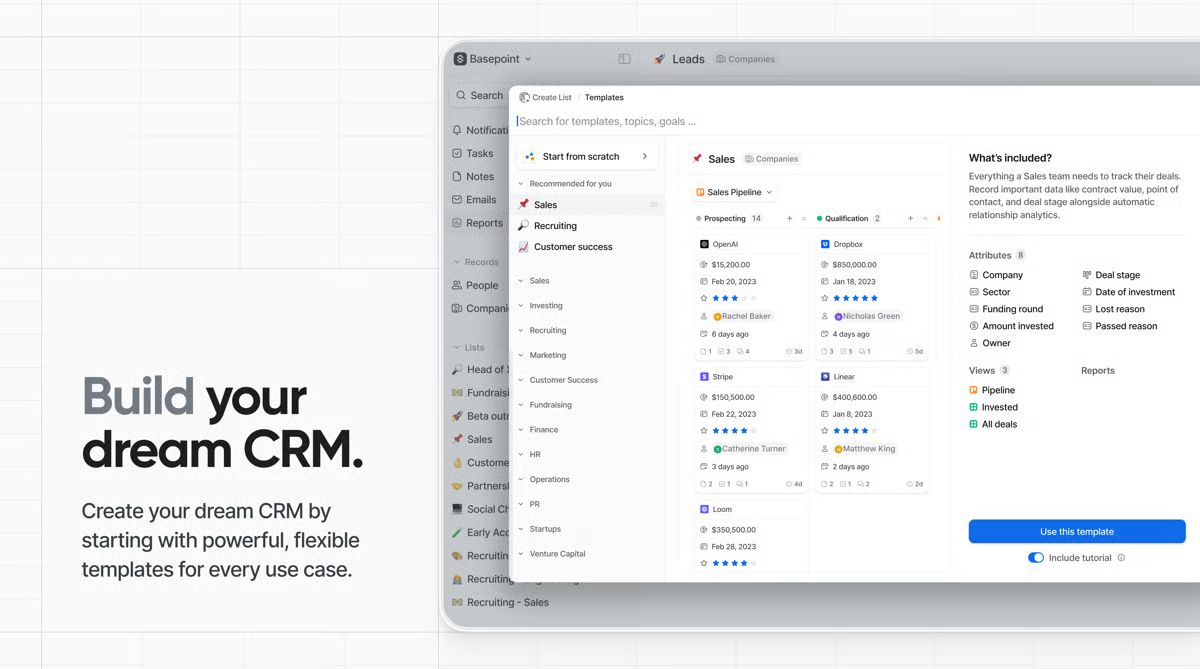
Attio is a data-model-first CRM designed to reflect how a business actually operates. Instead of relying on predefined pipelines, it allows teams to define custom objects, relationships, and workflows that mirror internal processes. Founded in 2019, Attio positions itself as a next-generation CRM combining relational database flexibility with embedded AI capabilities and a Notion-like interface that's unusually clean for the category.
The appeal is real. G2 reviewers consistently praise how quickly a working CRM can be stood up—founders describe going from signup to functional pipeline in under 30 minutes. The custom object model goes well beyond standard contact-deal-company structures, which makes Attio a genuinely compelling option for venture capital firms, agencies, and startups with non-standard relationship maps.
The platform works especially well for technical founders and RevOps-minded teams who enjoy designing systems. The API-first architecture means CRM data can flow into product analytics, billing tools, or internal dashboards with relatively low engineering overhead.
Where Attio gets more complicated is what happens after initial setup, as pipeline volume increases, automation demands grow, and the team starts running up against plan-level constraints.
Key Features
- Custom objects: Create new data types—investors, candidates, partnerships, pilot programs—and define how they relate to contacts, companies, and deals.
- Ask Attio: Natural language queries across CRM records and conversation history, with AI-generated summaries.
- AI agents and attributes: AI-powered prospecting, record classification, lead scoring, and automated field population. AI Attributes consume workspace credits.
- No-code workflow automation: Conditional workflows with branching logic and automated triggers. Workflow runs are metered by plan tier.
Automatic data enrichment and sync: Two-way email and calendar sync with public data enrichment to keep contact and company records current.
Attio Pricing
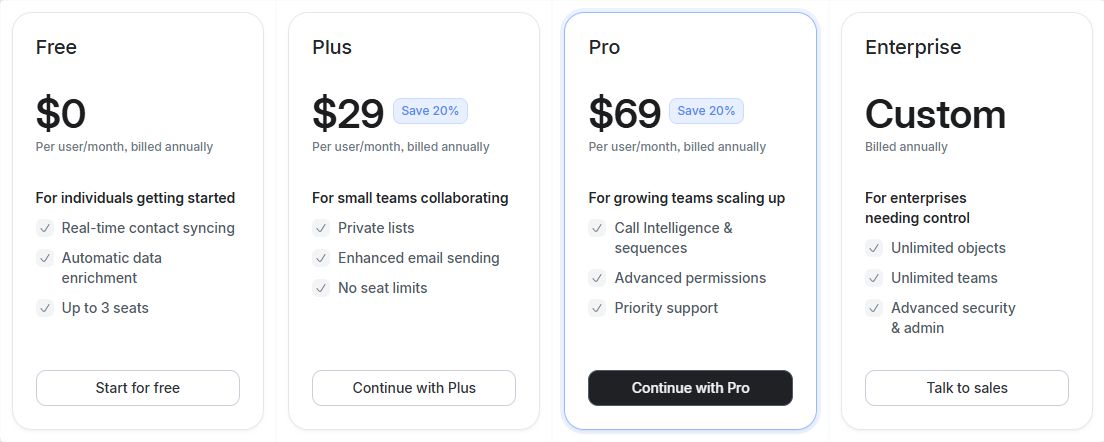
Attio uses per-seat pricing with a free tier for up to three users. A 14-day free trial is available on paid plans. Prices below reflect annual billing; monthly billing is approximately 25% higher.
| # | Plan | Annual price | What's included |
|---|---|---|---|
1 | Free | $0/user/month (up to 3 seats) | Real-time contact syncing, automatic data enrichment, email and calendar sync, basic pipelines |
2 | Plus | $29/user/month | Private lists, enhanced email sending, no seat limits, 1,500 workflow runs per month |
3 | Pro | $69/user/month | Call intelligence, sequences, custom objects, advanced permissions, priority support, higher workflow and AI credit limits |
4 | Enterprise | Custom pricing | Unlimited objects, unlimited teams, advanced security controls, SSO, dedicated support |
A few things worth understanding before signing up. The Plus plan's 1,500 monthly workflow runs sounds generous—until a growing team realizes that automated actions across an active pipeline can exhaust that budget mid-month. Scaling teams routinely hit this cap and either upgrade or discover they've been running with automations silently disabled.
AI Attributes—Attio's feature for auto-populating fields across records—consume workspace credits. Retroactively recalculating an attribute across a large contact list can drain a significant portion of the monthly credit allocation in a single run. This is worth modeling before committing to a plan based on AI usage.
Custom objects are available only on Pro and above. Teams evaluating Attio for its flexibility and then discovering this limit on Plus sometimes feel the platform's most compelling feature is behind a plan that costs more than 2x the entry price.
Note to editor: Verify pricing at attio.com/pricing before publishing.
What We Like About Attio
Attio earns its strong G2 ratings for good reasons. These strengths hold up in real-world use once the workspace is configured:
- Custom objects: The ability to define new entities and relationships beyond standard deal pipelines is genuinely differentiated at this price point. Modeling investors, portfolio companies, or partner channels as first-class CRM objects—rather than hacking contact fields—reflects how many modern sales teams actually operate.
- Relational data architecture: Attio supports complex workflows such as fundraising, multi-product sales, and partnership tracking in a way that most CRMs at this price can't match without heavy customization or an admin.
- AI features: Ask Attio and AI Attributes make natural language querying, record classification, and workflow-triggered field population accessible without writing code. The interface for configuring these is cleaner than most alternatives.
Automatic email and calendar sync: Two-way sync builds a real-time interaction history across contacts without manual logging. For teams that live in Gmail or Outlook, this is a meaningful time save.
What We Don't Like About Attio
These are the Attio limitations that come up most consistently in G2 reviews and real-world evaluations—often after teams have committed to the platform:
- Blank-slate setup: The flexible data model is only as useful as the time invested in designing it. There's no default schema that fits most B2B sales processes out of the box. New users frequently describe a period of trial and error before the CRM becomes operational: "Setting up workflows can be tricky the first time. It took me a lot of trial and error to start." For founders who need a CRM to be useful immediately, that lag is a real cost.
- Structural maintenance: Custom objects and relationships require ongoing oversight to prevent schema drift. As the team adds fields, relationships, and automation rules, keeping the data model coherent becomes its own operational task. This is the kind of hidden cost that doesn't show up during evaluation.
- Credit-based AI usage: AI Attributes and workspace automations consume credits that are metered by plan. Teams that build AI-heavy workflows or attempt retroactive enrichment across large datasets can hit credit limits faster than expected. There is no unlimited-use option on standard plans.
Workflow run caps: Plus plan users get 1,500 workflow runs per month—a limit that active sales teams can reach before the month is out. Pro removes this constraint but at more than double the Plus price.
Lightfield: An Attio Alternative That Reduces Configuration Complexity
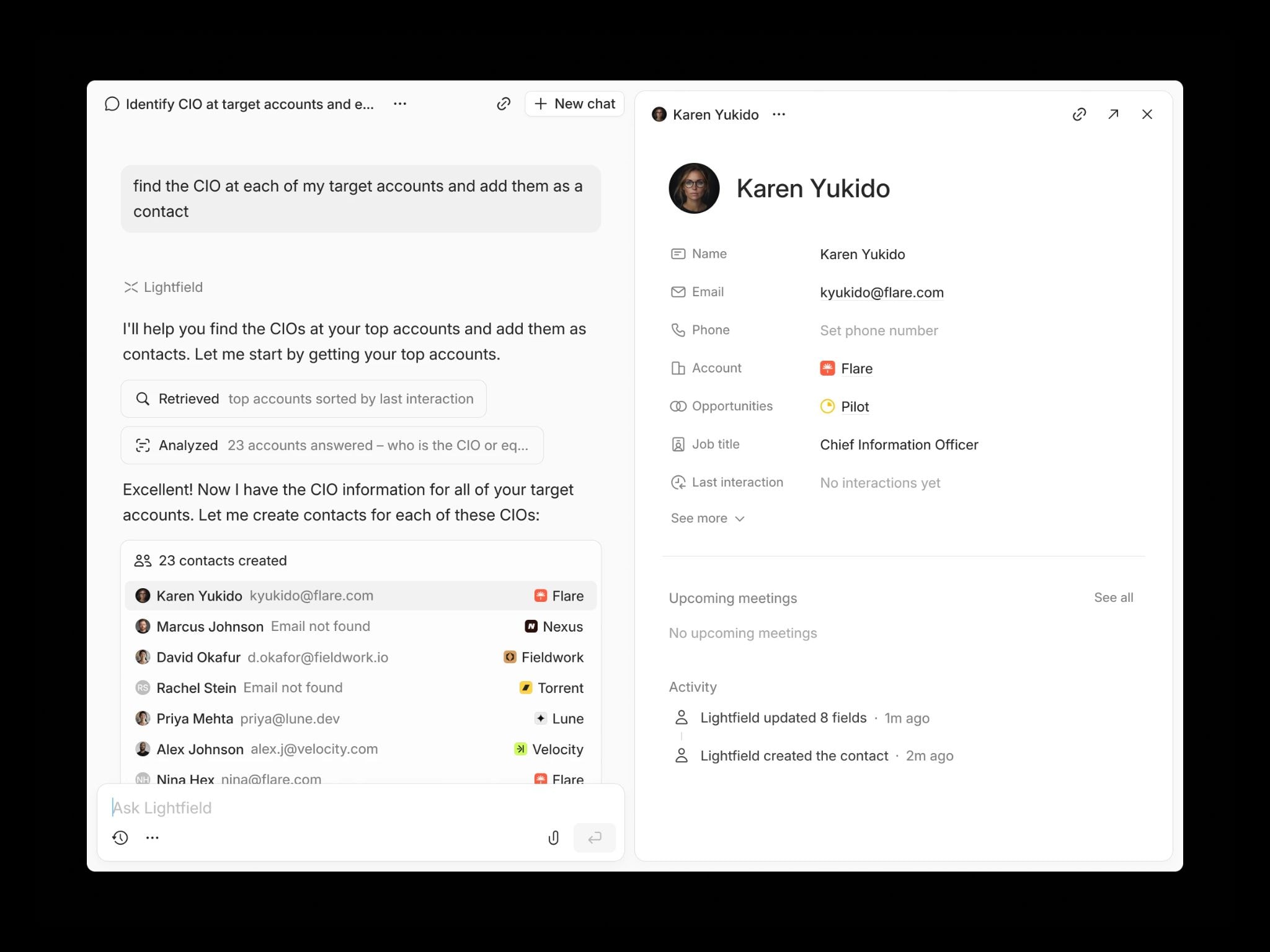
Lightfield is an AI-native CRM designed for founder-led sales teams that want pipeline visibility without complex schema design. Instead of starting with custom objects and relational modeling, Lightfield captures emails, meetings, and calls directly from daily workflows and converts them into structured CRM records automatically. The system focuses on eliminating manual CRM upkeep and configuration overhead—not on giving you more tools to build your own system.
Teams that have switched from Attio often describe the same transition: moving from a CRM that's powerful but passive to one that actively maintains itself. As one customer put it: "I go to Attio, I know next to nothing. If I go to Lightfield, I know exactly what's going on."
Key Features
- Auto-capture CRM: Emails, calendar events, and meetings automatically create and update contacts, accounts, and opportunities—no schema design required before value starts accumulating.
- Built-in call recording: Meetings are recorded, transcribed, and linked to the correct CRM records, with searchable transcripts and AI-generated summaries inside the record.
- Natural language queries: Ask questions across conversation history and receive cited answers linked to source emails and meetings—no prompt engineering or query syntax required.
- Retroactive field population: Add a new field and Lightfield automatically backfills it from past emails and meeting transcripts, including data captured before the field existed.
Multi-account email drafting: Generate personalized follow-ups using prospect language and context pulled directly from prior conversations.
Lightfield Pricing
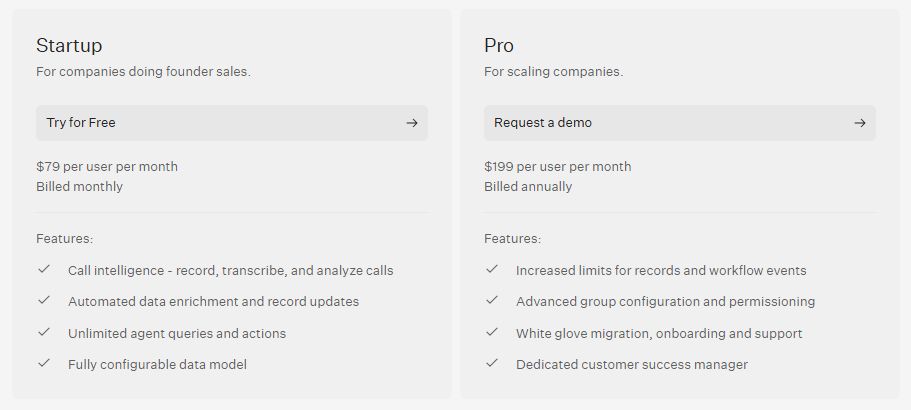
| # | Plan | Price | What's included |
|---|---|---|---|
1 | Startup | $79/user/month (billed monthly) | Call intelligence, automated record updates, unlimited AI agent queries, configurable data model, up to 10,000 records, 1,000 workflow events/month |
2 | Pro | $199/user/month (billed annually) | Higher record and workflow limits, advanced permissions, white-glove migration support, dedicated onboarding assistance, dedicated customer success manager |
Note to editor: Verify pricing at lightfield.app/pricing before publishing.
Why People Choose Lightfield Over Attio
1. Skip the Setup Phase
Attio requires deliberate schema design before the CRM becomes operational—custom objects, relationship mappings, and automation logic all need to be configured before the system reflects your sales process. For teams without a dedicated RevOps function, that design work often falls on the founder. Lightfield uses a schema-less memory architecture that starts working immediately from the first email and meeting captured, while remaining fully customizable as sales processes evolve. There's no setup tax before the CRM becomes useful.
2. Predictable Costs
Attio's credit-based system for AI Attributes and workflow automation can lead to variable usage costs as the team scales and AI usage increases. Teams building automation-heavy workflows on Plus regularly hit the 1,500 monthly workflow run cap and face either a significant price jump to Pro or degraded automation coverage. Lightfield includes unlimited AI agent queries and call intelligence on every plan with no credit meters—the cost is predictable whether you run one query or one thousand.
3. Retrospective Data Capture
Attio can recalculate AI Attributes retroactively, but doing so consumes workspace credits proportional to the number of records processed. A large retroactive calculation can meaningfully deplete a month's credit budget. Lightfield allows teams to create a new field and automatically backfill it from all past conversations already captured in the system—without additional cost or credit consumption.
FAQs About Attio
1. Does Attio Offer a Free Plan?
Yes. Attio offers a free tier for up to three users that includes real-time contact syncing, automatic data enrichment, and two-way email and calendar sync. It's a functional starting point for very small teams. The free plan does not include custom objects, sequences, call intelligence, or advanced automation—features that most sales teams will need as pipeline volume grows. A 14-day free trial with full feature access is available on paid plans.
2. How Does the Attio Credit System Work?
Attio uses two types of credits. Seat credits cover personal AI usage such as drafting and record summaries. Workspace credits cover team-wide automations, AI Attribute calculations, and enrichment tasks. Each plan includes a monthly credit allocation. When workspace credits run out, AI-driven automations pause until the next cycle or credits are topped up. Teams running AI Attributes across large contact lists or frequently recalculating enrichment fields should model expected credit consumption before committing to a plan.
3. Can I Create Custom Objects on All Plans?
No. Custom objects—which allow teams to model unique entities such as investors, pilot programs, or partner channels—are available only on the Pro tier ($69/user/month billed annually) and above. Teams on the Free or Plus plans are limited to standard objects: People, Companies, and Deals. This is a significant constraint for teams evaluating Attio specifically for its flexible data model, as that flexibility is gated behind the higher-cost plan.
4. Does Attio Include Native Call Recording?
Yes. Attio's Call Intelligence feature provides recording and transcription for Zoom, Google Meet, and Microsoft Teams meetings. Calls are automatically linked to the relevant CRM records and transcripts are searchable. This feature is available on the Pro and Enterprise plans only. Teams on Free or Plus who need call intelligence will need to use a third-party recorder and sync results manually or via integration.
5. How Long Does it Take to Set Up Attio?
Initial email and calendar syncing can be completed in under an hour, and a basic pipeline can be functional the same day. However, building a full CRM structure with custom objects, relationship mappings, and automated workflows typically takes longer—often several weeks for teams with complex sales processes or non-standard data models. G2 reviewers consistently note that the flexibility requires upfront planning: teams that skip the schema design phase often find themselves rebuilding the structure once they understand how their data actually needs to be organized.