Top 10 Fathom Alternatives for CRM and Sales Data Capture
Matt Serna
Quick Summary
Fathom alternatives provide different levels of meeting capture, transcription, and workflow automation. The top picks combine automation, multi-channel capture, and actionable insights for teams ranging from founder-led startups to large revenue operations.
Here are our top three picks:
| Tool | Best For | Why Teams Pick It |
|---|---|---|
Lightfield | Founder-led teams | Captures calls, meetings, and emails automatically, updates CRM records, and generates follow-ups without manual upkeep. |
Gong | Larger sales and revenue teams | Analyzes conversations for deal risk, pipeline signals, and coaching metrics, then updates CRM records automatically for complex pipelines. |
Circleback | Teams needing flexible workflow automation | Generates structured meeting notes and action items while syncing automatically to CRM and collaboration tools. |
Looking for the Best Fathom Alternative for Your Team?
Fathom captures meetings and generates summaries, but it is not always the right fit for every workflow. While some teams need deeper CRM integration, multi-channel capture, or automated follow-ups, others want actionable insights and task management without extra manual work.
This Lightfield guide breaks down the top 10 Fathom alternatives, highlighting how each tool compares on automation depth, multi-channel capture, suitability for different team sizes, and more.
Why Teams Look for Fathom Alternatives
Fathom records sales meetings and summarizes calls, but it comes with limitations such as missing CRM sync, weak automation, and incomplete insight tracking. Reviews and user feedback reveal three main reasons teams explore alternatives:
1. Limited CRM and Workflow Integration
Fathom captures transcripts and summaries, but users report integration limits. CRM and task linkage can require manual steps or higher-tier plans, which slows workflow. Teams relying on connected systems face this friction, leading to duplicated work, missed updates, and additional manual effort.
From G2 reviews:
- Integration sometimes misses impromptu meetings or needs manual setup
- Advanced features like action item exports may be gated by plan tier
For founder-led teams, fragmented workflows mean more time spent updating records manually, tracking follow-ups, and ensuring CRM data stays current instead of focusing on closing deals.
2. Recording and Transcription Gaps
While Fathom records meetings reliably for scheduled calls, users note challenges in complex, hybrid, or noisy sessions. Transcripts may mislabel speakers, skip portions of conversation, or fail to join calls automatically. Teams often spend additional time reviewing, correcting, and filling gaps to ensure notes and action items are accurate.
From G2 reviews:
- Accuracy drops in multi-speaker or noisy calls
- Meetings outside calendar invites may not capture automatically
These gaps increase administrative work for teams and create risk of missed context in customer interactions, slowing deal follow-ups and pipeline management.
3. Feature Constraints for Growing Teams
Fathom provides core meeting summaries and action items, but advanced features are limited or available only on higher-tier plans. Teams that need deeper analytics, collaborative note-taking, trend tracking, or richer insight exports often require additional tools or alternatives to fill the gaps.
From G2 reviews:
- Agenda creation, collaborative notes, and deeper insight exports are absent
- Limited analytics slows pipeline evaluation and coaching
Constrained features mean manual tracking, additional tool subscriptions, and more effort keeping the team aligned,reducing time spent on revenue-generating activity.
The Top 10 Fathom Alternatives
| Tool | Best For | CRM & Workflow Automation | Multi-Channel Meeting Capture |
|---|---|---|---|
Lightfield | Founder-led teams who want meetings captured and CRM updated automatically | Very high | Calls, meetings, emails |
Avoma | Teams needing meeting capture with integrated CRM updates and collaboration | Medium | Calls, meetings |
Fireflies.ai | Teams wanting meeting transcripts, summaries, and CRM updates with minimal manual effort | Medium | Calls, meetings |
Otter.ai | Teams that need real-time transcription and shared meeting notes | Low | Low |
Sembly.ai | Teams that want structured meeting insights and task extraction across platforms | Medium | Calls, meetings |
Bluedot | Teams that want background meeting capture with CRM connectivity | Low | Calls, meetings |
tl;dv | Teams that need fast meeting recording, clips, and sharing | Low | Video & audio calls |
Circleback | Teams that want automated meeting notes with flexible workflows and integrations | Medium | Calls, in-person meetings |
Gong | Larger revenue teams that want conversation intelligence plus deep sales insights | High | Calls, meetings, emails |
Outdoo AI | Teams wanting conversation intelligence with CRM integration and coaching support | Medium | Calls, meetings |
1. Lightfield — Best for founder-led teams that want meetings notes to automatically populate their CRM
What it is
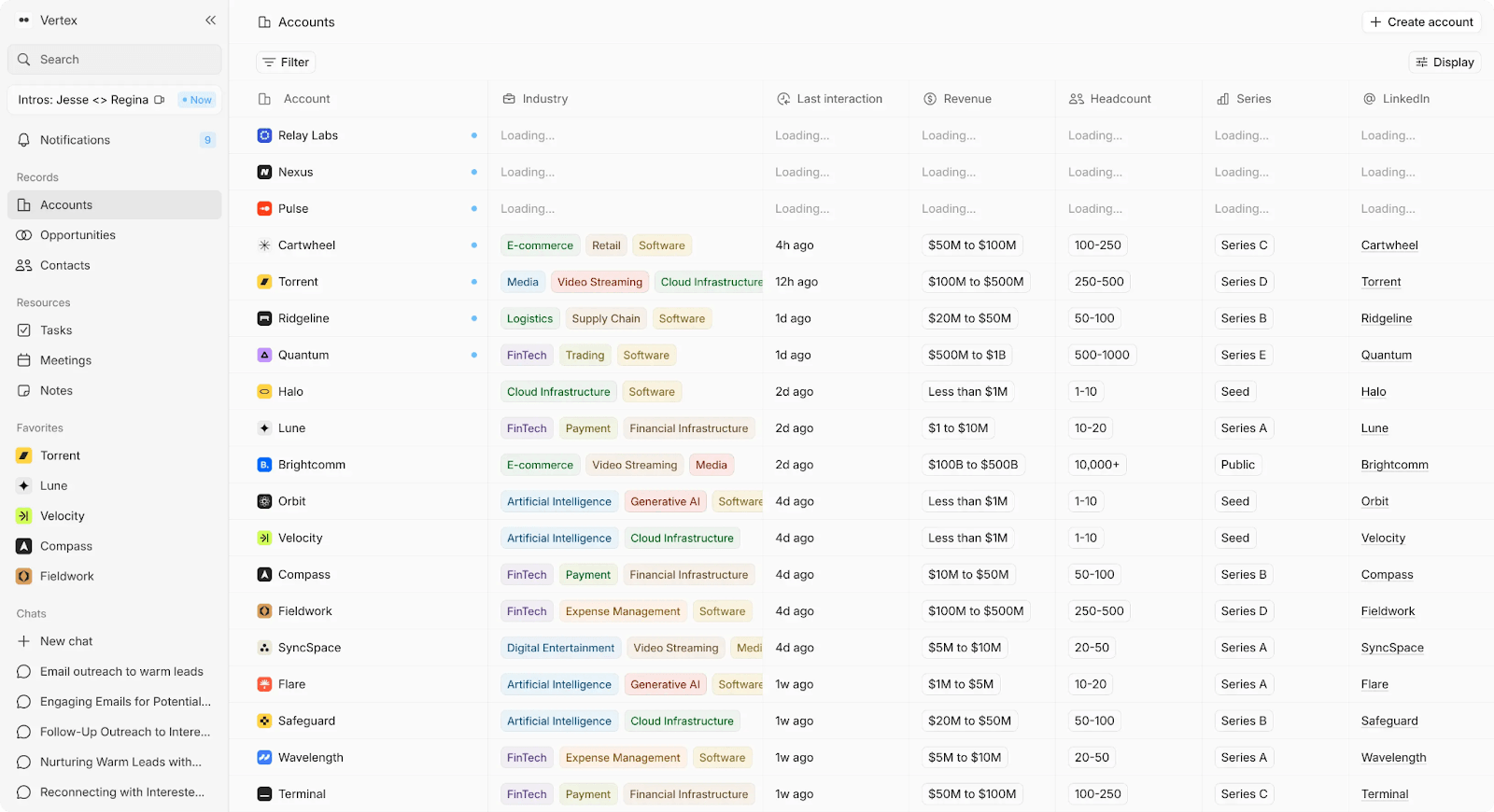
AI-native CRM that records meetings, emails, and calls, then turns them into structured CRM records with follow-ups and tasks.
Key Features
- Captures calls, meetings, and emails without setup or manual entry
- Action items and follow-ups created automatically from interactions
- Adaptive data model that evolves with your workflow
- AI summaries and searchable insights across all customer touchpoints
- Activity integrated directly into your CRM, keeping pipelines current
- Next-step recommendations for each contact based on past interactions and pipeline data
Tradeoffs
- Not ideal for teams that want full manual control over every workflow
- Newer platform with fewer public reviews
Pricing
14-day free trial, then $89/user/month. Up to 3 users.
Larger teams doing more complex agentic work can move to a team plan with unlimited viewer seats.
Best for
Founder-led teams who want a tool that does more than summarize calls—keeping CRM records updated automatically so they can focus on deals instead of logging meetings.
Bottom line
Lightfield captures all interactions and updates CRM records automatically, offering meeting intelligence plus workflow automation.
2. Avoma — Best for teams that need meeting capture and collaboration features
What it is
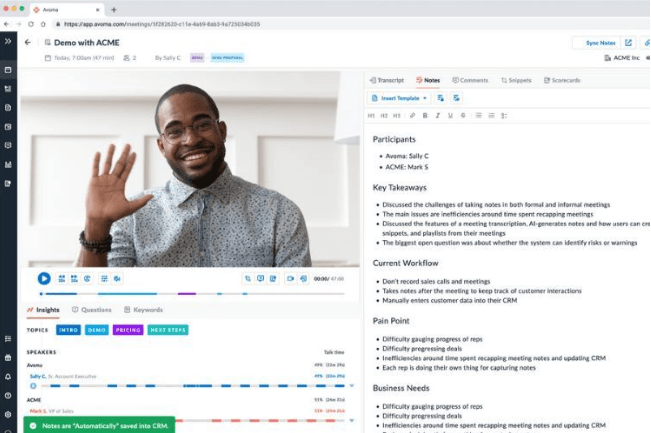
AI meeting assistant that records calls, generates summaries, and syncs insights into CRM and collaboration tools.
Key Features
- Meeting recordings and transcripts with speaker separation
- Action items and follow-ups extracted automatically
- Agenda templates and collaborative notes for team alignment
- Insights and analytics across meetings for coaching or pipeline tracking
- CRM integration to keep contact and deal records current
Tradeoffs
- Some AI summaries can miss nuanced decisions or context
- Agenda and collaboration features may feel cluttered for small teams
- Real-time transcription occasionally lags in hybrid or noisy calls
Pricing
Free trial available; paid plans start at $19/month per seat
Best for
Teams that need automated meeting capture with CRM syncing and collaborative note-taking.
Bottom line
Avoma records and summarizes meetings while syncing insights into CRM, giving teams automated capture plus collaboration beyond Fathom.
3. Fireflies.ai — Best for teams that want meeting transcripts, summaries, and CRM updates
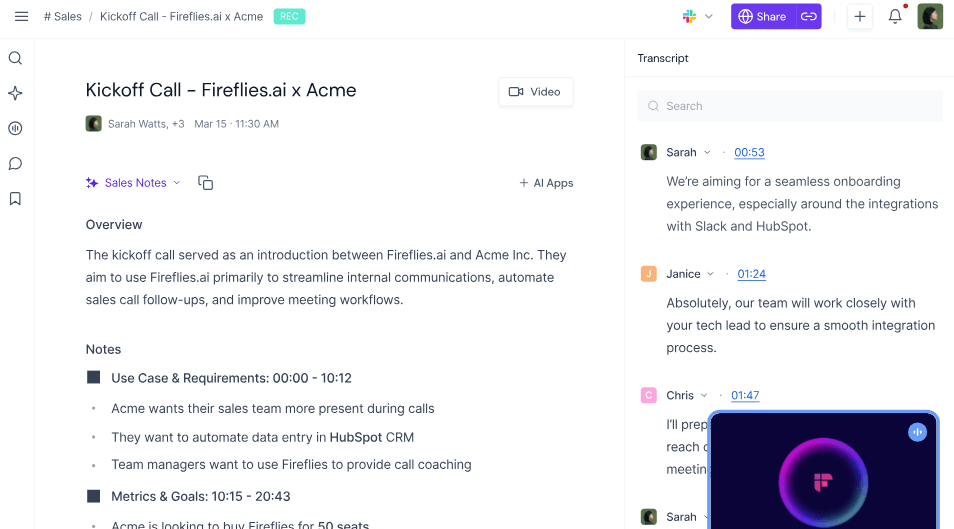
What it is
AI-powered platform that captures meetings, generates transcripts and summaries, then syncs notes and action items into CRMs and collaboration tools.
Key Features
- Records calls and creates searchable transcripts for all meeting types
- Converts conversation highlights into tasks and actionable items automatically
- CRM and productivity tool integrations to keep records updated
- Keyword tracking and conversation analytics for insights
- Shared notes and highlights to support team collaboration
Tradeoffs
- Overlapping speakers and heavy accents can reduce transcription accuracy
- Some advanced analytics and integrations require higher-tier plans
- Occasional delays syncing action items to third-party tools
Pricing
Free trial available; paid plans start at $10/month per seat
Best for
Teams that need call capture, automated summaries, and CRM sync without manual note-taking.
Bottom line
Teams that need call capture, automated summaries, and CRM sync without manual note-taking.
4. Otter.ai — Best for teams that need real-time transcription and shared meeting notes
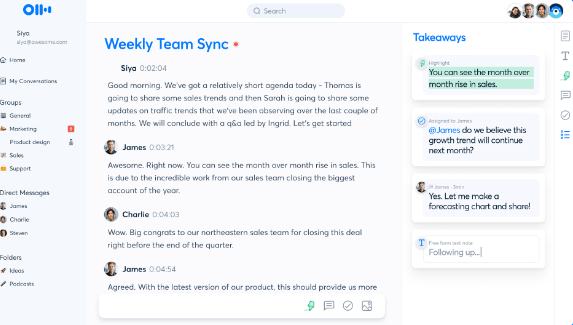
What it is
AI transcription tool that captures live meetings, generates transcripts in real time, and supports shared notes and highlights.
Key Features
- Live transcription during meetings with near real-time updates
- Searchable transcripts with highlights, comments, and playback
- Shared folders and notes for team visibility
- Basic summaries and action items generated from transcripts
- Integrations with Zoom, Google Meet, and collaboration tools
Tradeoffs
- CRM syncing is limited compared to CRM-first tools
- Summaries focus on transcription context rather than deal or workflow data
- Advanced features and higher limits require paid plans
Pricing
Free plan available; paid plans start around $8.33/month per user
Best for
Teams that prioritize live transcription and shared notes over CRM automation or workflow syncing.
Bottom line
Otter.ai excels at real-time transcription and collaboration, but offers less CRM and workflow automation than some other Fathom alternatives.
5. Sembly.ai — Best for teams that want structured meeting insights and task extraction across platforms
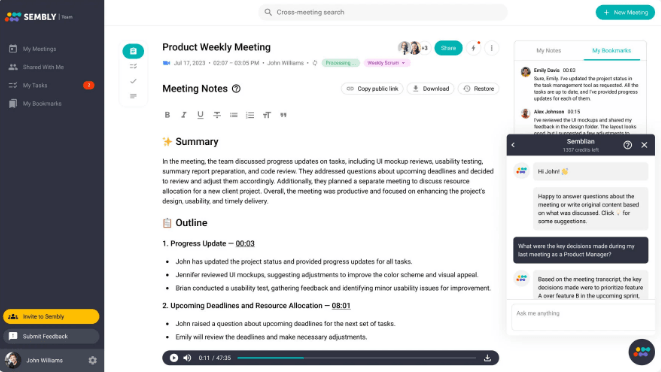
What it is
AI meeting assistant that captures, transcribes, and segments calls into actionable insights and tasks.
Key Features
- Transcriptions with topic segmentation and timestamped insights
- Tasks and decisions extracted automatically from conversations
- Shared workspaces for team context and follow-ups
- Searchable meeting history with filters for speakers and topics
- Integrations with major video conferencing and productivity tools
Tradeoffs
- Transcript accuracy can vary with overlapping speakers or background noise
- Advanced task workflows may require manual refinement
- CRM sync is less deep than dedicated CRM automation tools
Pricing
Free trial available; paid plans start around $10/month per user
Best for
Teams that need detailed structured summaries and decision tracking from meetings.
Bottom line
Sembly.ai converts meetings into searchable summaries and tasks, providing deeper context than Fathom.
6. Bluedot — Best for teams that want background meeting capture with CRM connectivity

What it is
Background AI notetaker that captures calls and meetings without visible bots, creates transcripts and highlights, and syncs outputs to connected tools.
Key Features
- Background capture of meetings without on-screen bot presence
- Searchable transcripts with highlights and key moments
- Integration with calendars and selected CRM/tool workflows
- Shared archives and notes for team reference
- Exportable insights for task tracking and reviews
Tradeoffs
- May miss context in informal or off‑calendar meetings
- CRM integrations require configuration per platform
- Advanced analytics and summaries are limited compared to full meeting tools
Pricing
Free trial available; paid plans starts at $14/month per user
Best for
Teams that want transcripts and highlight capture without intrusive bots or prompts.
Bottom line
Bluedot captures meetings and creates searchable transcripts, offering background CRM updates beyond Fathom’s core notes.
7. tl;dv — Best for teams that need fast meeting recording, clips, and sharing
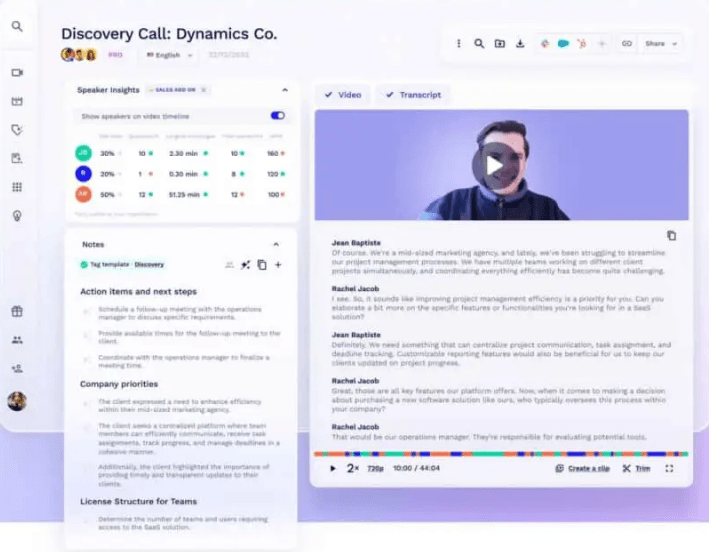
What it is
Lightweight meeting recorder that captures video calls, generates timestamps and clips, and enables sharing of highlights for team review.
Key Features
- Video and audio recording with automatic timestamps
- Clip and highlight creation for quick sharing
- Searchable meeting history with keyword filtering
- Shared libraries for team access
- Integrations with Zoom, Google Meet, and collaboration tools
Tradeoffs
- CRM and workflow automation is minimal
- Transcriptions and summaries focus on video/audio rather than structured action items
- Advanced analytics require higher-tier plans
Pricing
Free plan available; paid plans start around $18/month per user
Best for
Teams that prioritize recording, clipping, and sharing meetings over CRM updates or workflow automation.
Bottom line
tl;dv captures and shares meetings efficiently, offering fast highlight and clip capabilities but less CRM or task automation than Fathom.
8. Circleback — Best for teams that want automated meeting notes with flexible workflows and integrations
What it is
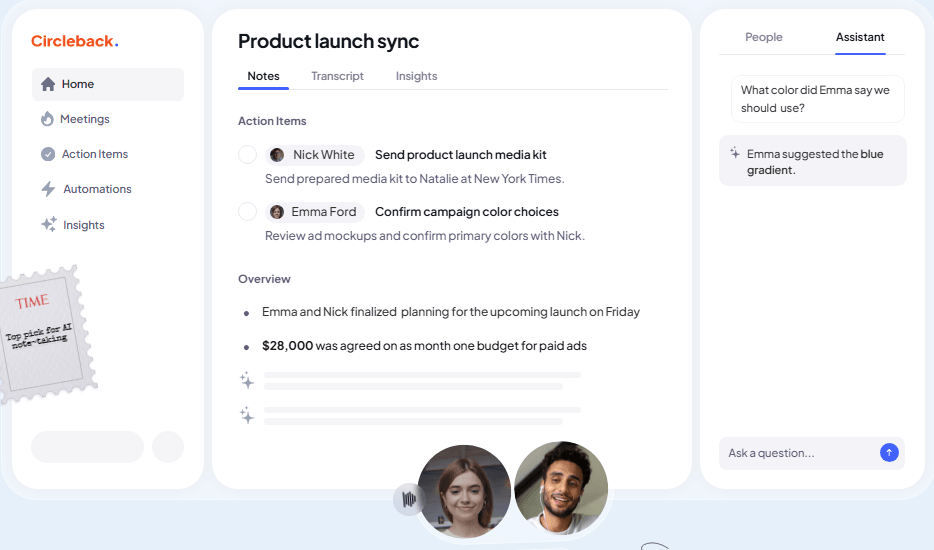
AI assistant that captures meetings, generates notes and tasks, and automates updates to CRM and collaboration tools.
Key Features
- AI‑generated notes with speaker identification and structured summaries
- Action items and tasks created and tracked automatically
- Calendar capture for online and in‑person meetings
- Automations that push meeting data to CRMs and apps like HubSpot, Salesforce, Slack, Notion, and more
- AI‑powered search across all meetings for quick answers to past discussions
Tradeoffs
- Advanced automation setup can require time
- CRM updates depend on connected tools and setup quality
- Feature depth may exceed needs for small teams focused only on simple notes
Pricing
Free plan available; paid plans typically start around $25/month per user.
Best for
Teams that need both detailed meeting summaries and automated workflows into CRM and productivity apps.
Bottom line
Circleback captures meetings, creates structured insights, and automates CRM and tool updates, offering broader workflow power than Fathom.
9. Gong — Best for larger revenue teams that want conversation intelligence plus sales insights
What it is
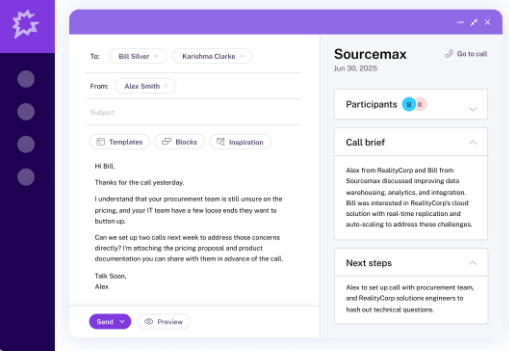
Revenue intelligence platform that captures calls, meetings, and emails, delivering AI insights, coaching signals, deal metrics, and CRM updates.
Key Features
- Automatic capture and transcription of calls, meetings, and emails
- AI analysis of deal risks, buying signals, and pipeline health
- CRM integration with automated updates and deal context syncing
- Sales coaching and analytics with scorecards and talk metrics
- Forecasting and trend insights based on real conversation data
Tradeoffs
- High cost with enterprise pricing that can be prohibitive for small teams
- Feature depth and analytics can require dedicated training to use effectively
- Some teams find transcription and processing delays disrupt workflow
Pricing
Custom enterprise pricing; no public plans listed (varies by contract and team size)
Best for
Revenue and sales operations teams that need conversation insights, deal risk detection, and forecasting.
Bottom line
Gong turns interactions into AI insights and pipeline signals, offering deeper analytics and coaching than Fathom for larger sales teams.
10. Outdoo AI — Best for teams that want conversation intelligence with CRM integration and coaching support in one tool
What it is
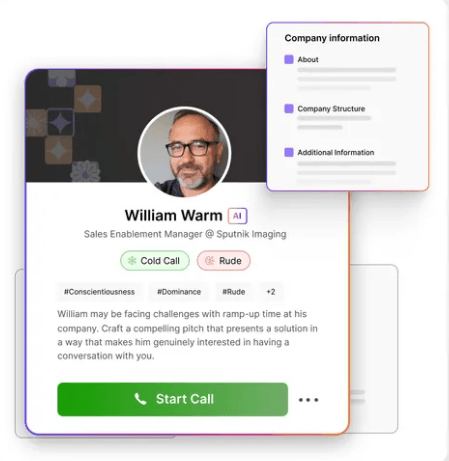
Sales intelligence platform that captures, transcribes, and analyzes calls, delivering insights, tasks, and CRM updates automatically.
Key Features
- Meeting recordings and transcripts with topic highlights
- Deal and conversation insights such as objections, timelines, and buyer behavior
- CRM sync with next‑step follow‑up updates and contextual summaries
- AI‑driven coaching, call scoring, and performance dashboards
- Mobile access with review and share options for recordings on the go
Tradeoffs
- Search and navigation for past calls can be inconsistent
- Transcription accuracy can drop with accents or overlapping speakers
- Interface and discovery features may have a learning curve for new users
Pricing
Free trial available; paid plans vary by team size and feature needs.
Best for
Sales teams and RevOps groups that want automated meeting capture, CRM sync, and coaching insights in one tool.
Bottom line
Outdoo AI captures and analyzes meetings, syncing insights and tasks to CRM, offering deeper conversation intelligence and coaching than Fathom.
Why a Call Recorder Isn't Enough — And What to Use Instead of Fathom
Fathom does one thing well: it captures meetings. But capturing a call and actually doing something with it are two different problems. After the transcript is generated, someone still has to update the CRM, write the follow-up, and make sure nothing slips. Most "Fathom alternatives" have the same gap — they stop at the recording.
Where standalone recorders fall short:
- Otter.ai and Fireflies.ai transcribe and summarize, but the output lives in a silo. You're still copy-pasting into your CRM and writing follow-ups yourself.
- Gong adds conversation analytics and deal intelligence, but it's built for large sales orgs with dedicated ops teams — overkill and overpriced for early-stage companies.
- Circleback offers flexible workflows and action items, but it's still a layer on top of your existing stack, not a replacement for the manual work underneath.
The pattern is the same: record the call, then go do all the work that actually moves the deal forward.
The real question isn't "which recorder?" — it's "why am I updating my CRM by hand at all?"
If your team is spending time logging notes, updating deal stages, and drafting follow-ups after every call, the problem isn't your meeting tool. It's that your CRM doesn't learn from your conversations automatically.
Lightfield takes a different approach. Instead of recording calls and handing you a transcript, it captures every interaction — calls, emails, meetings — and turns them directly into structured CRM data. Records update themselves. Follow-ups get drafted. Pipeline stays accurate without anyone touching it.
For founder-led teams running fast, that's the difference between a transcript you might read later and a system that's already acted on it.